本指南提供在 AIGNE 框架內設定和使用 xAI 語言模型(特別是 Grok)的說明。內容涵蓋了必要套件的安裝、API 金鑰的設定、模型的實例化,以及標準和串流調用的範例。
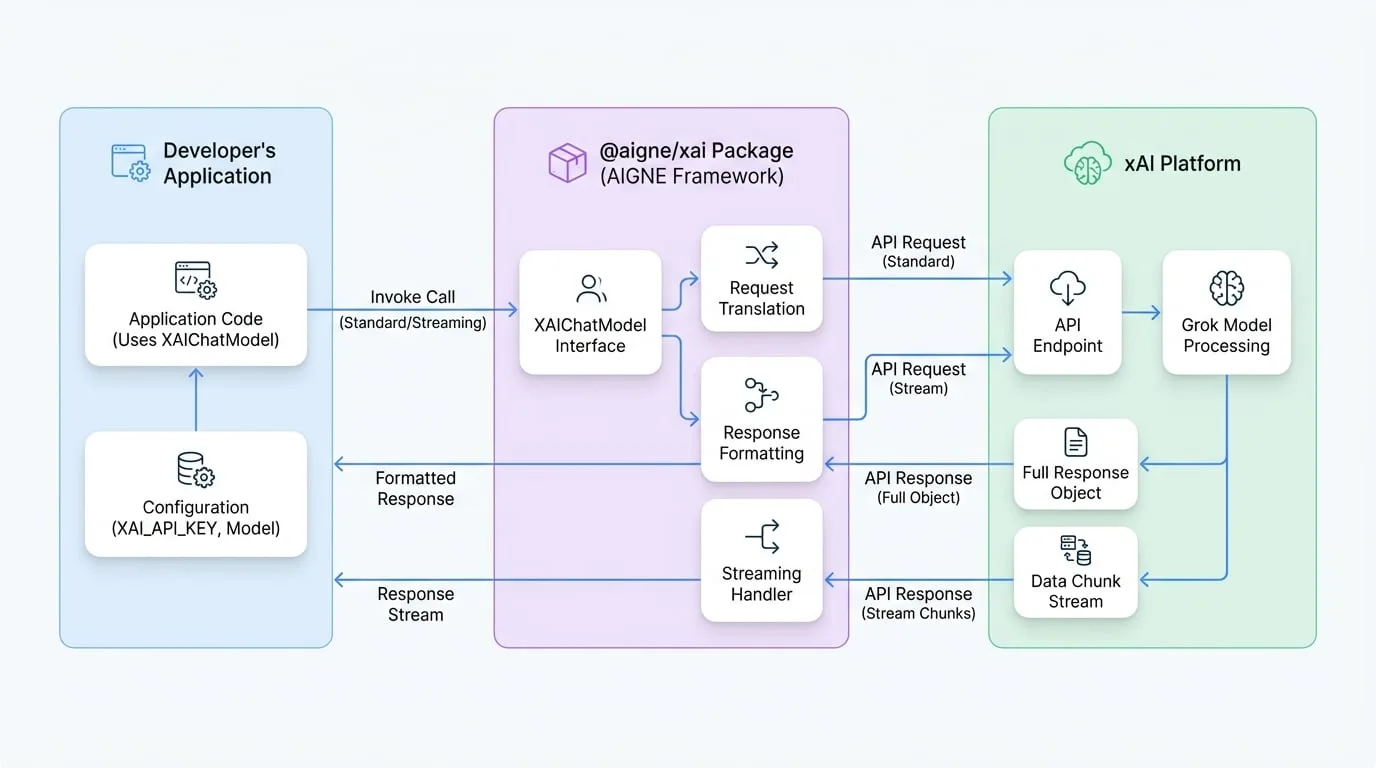
@aigne/xai 套件作為 xAI API 的直接介面,讓開發者可以透過 AIGNE 框架提供的標準化 ChatModel 介面,將 Grok 的功能整合到他們的應用程式中。
安裝
首先,請使用您偏好的套件管理器安裝 @aigne/xai 套件以及 AIGNE 核心函式庫。
npm
```bash npm install @aigne/xai @aigne/core ```
yarn
```bash yarn add @aigne/xai @aigne/core ```
pnpm
```bash pnpm add @aigne/xai @aigne/core ```
設定
XAIChatModel 類別是與 xAI API 互動的主要介面。若要使用它,您必須使用您的 xAI API 金鑰進行設定。
您有兩種方式可以提供 API 金鑰:
直接在建構函式中提供
透過
apiKey屬性傳入金鑰。環境變數
設定
XAI_API_KEY環境變數。模型將會自動偵測並使用它。
建構函式選項
在建立 XAIChatModel 的實例時,您可以提供以下選項:
- apiKey
string— 您的 xAI API 金鑰。若未提供,系統將會改用 XAI_API_KEY 環境變數。 - model
string(default:grok-2-latest) — 用於聊天補完的特定 xAI 模型。預設為 grok-2-latest。 - baseURL
string(default:https://api.x.ai/v1) — xAI API 的基礎 URL。此為預先設定,通常不需要變更。 - modelOptions
object— 傳遞給 xAI API 的額外選項,例如 temperature、topP 等。
基本用法
以下範例示範如何實例化 XAIChatModel 並調用它以取得回應。
基本調用
import { XAIChatModel } from "@aigne/xai";

const model = new XAIChatModel({
  // 直接提供 API 金鑰或使用環境變數 XAI_API_KEY
  apiKey: "your-api-key", // 如果已在環境變數中設定,則為選用
  // 指定模型(預設為 'grok-2-latest')
  model: "grok-2-latest",
  modelOptions: {
    temperature: 0.8,
  },
});

const result = await model.invoke({
  messages: [{ role: "user", content: "Tell me about yourself" }],
});

console.log(result);
範例回應
invoke 方法會回傳一個物件,其中包含模型的回應和使用情況元數據。
回應物件
{
  "text": "I'm Grok, an AI assistant from X.AI. I'm here to assist with a touch of humor and wit!",
  "model": "grok-2-latest",
  "usage": {
    "inputTokens": 6,
    "outputTokens": 17
  }
}
串流回應
對於即時應用程式,您可以從模型串流回應。在 invoke 方法中設定 streaming: true 選項,即可在資料可用時以區塊方式接收。
串流範例
import { isAgentResponseDelta } from "@aigne/core";
import { XAIChatModel } from "@aigne/xai";

const model = new XAIChatModel({
  apiKey: "your-api-key",
  model: "grok-2-latest",
});

const stream = await model.invoke(
  {
    messages: [{ role: "user", content: "Tell me about yourself" }],
  },
  { streaming: true },
);

let fullText = "";
const json = {};

for await (const chunk of stream) {
  if (isAgentResponseDelta(chunk)) {
    const text = chunk.delta.text?.text;
    if (text) fullText += text;
    if (chunk.delta.json) Object.assign(json, chunk.delta.json);
  }
}

console.log(fullText);
console.log(json);
串流輸出
在迭代串流時,您可以累積文字 delta 以形成完整的訊息,並合併 JSON 部分以取得最終的元數據。
文字輸出
I'm Grok, an AI assistant from X.AI. I'm here to assist with a touch of humor and wit!JSON 輸出
{
  "model": "grok-2-latest",
  "usage": {
    "inputTokens": 6,
    "outputTokens": 17
  }
}
以上是關於使用 @aigne/xai 套件的指南。有關其他可用模型的更多資訊,請參閱模型總覽。