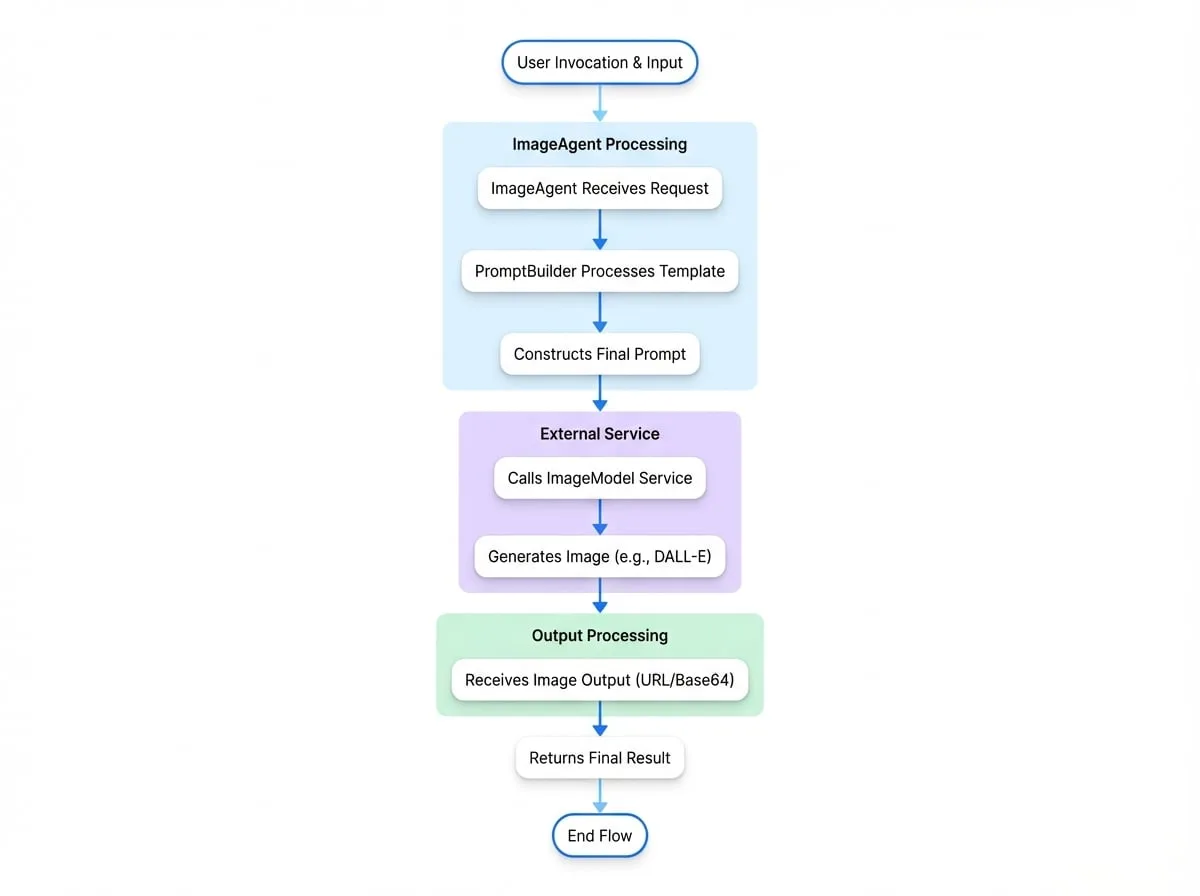
ImageAgent 是一個專門負責生成圖片的 Agent。它作為 ImageModel 的介面,處理輸入資料以形成提示,然後請求圖片生成服務來創建圖片。
這個 Agent 對於任何需要根據文字描述動態創建視覺內容的工作流程至關重要。它利用 PromptBuilder 來建構其提示,從而能夠使用範本從可變輸入中生成圖片。
設定
ImageAgent 可以使用 TypeScript 以程式化方式設定,或使用 YAML 以宣告方式設定。兩種方法都需要定義圖片生成的指令,並可選擇性地指定模型特定的參數。
TypeScript 設定
要在 TypeScript 中建立一個 ImageAgent,請使用靜態的 ImageAgent.from() 方法並為其提供 ImageAgentOptions。
"ImageAgent 設定"
import { AIGNE, ImageAgent } from "@aigne/core";
import { OpenAI } from "@aigne/openai";

// 設定圖片模型提供者
const openai = new OpenAI({
  apiKey: process.env.OPENAI_API_KEY,
});

// 建立 ImageAgent 的實例
const architectAgent = ImageAgent.from({
  name: "architect",
  description: "An agent that draws architectural diagrams.",
  instructions: "Create an architectural diagram of a {{subject}}.",
  modelOptions: {
    quality: "hd",
    style: "vivid",
  },
});

// AIGNE 實例必須設定 imageModel
const aigne = new AIGNE({
  imageModel: openai.image("dall-e-3"),
});

async function run() {
  const result = await aigne.invoke(architectAgent, {
    input: {
      subject: "microservices application",
    },
  });

  console.log(result);
}

run();
上述程式碼定義了一個名為「architect」的 ImageAgent。它使用一個帶有範本的 instructions 字串來生成提示。modelOptions 物件將特定參數傳遞給底層的 DALL-E 3 模型,以請求一張高畫質、生動的圖片。
YAML 設定
或者,您可以在一個 .yaml 檔案中定義 ImageAgent。這種方法對於將 Agent 定義與應用程式邏輯分開很有用。
"image-agent.yaml"
type: image
name: style-artist
description: 以特定風格繪製物件的圖片。
instructions: |
  以 {{style}} 風格繪製一個 {{object}} 的圖片。
input_schema:
  type: object
  properties:
    object:
      type: string
      description: 要繪製的物件。
    style:
      type: string
      description: 圖片的風格。
  required:
    - object
- style在這個宣告式的範例中,type: image 指定了這是一個 ImageAgent。instructions 欄位包含一個多行字串,其中的預留位置({{object}}、{{style}})將在叫用期間從輸入中填入。input_schema 則正式定義了預期的輸入結構。
參數
ImageAgent 的行為由其建構時提供的選項控制。
- instructions
string | PromptBuilder(required) — 用於圖片生成的提示範本。這可以是一個簡單的字串,也可以是一個用於更複雜邏輯的 PromptBuilder 實例。格式為 {{key}} 的預留位置將被輸入物件中的值所取代。 - modelOptions
Record<string, any>— 一個包含要傳遞給底層 ImageModel 的特定於提供者的參數的物件。這允許對生成過程進行微調控制,例如指定圖片品質、大小或風格。有關可用選項,請參閱特定模型提供者的文件。 - outputFileType
'url' | 'base64'— 指定輸出圖片的所需格式。預設行為由 ImageModel 決定,但您可以明確要求公開 URL (url) 或 Base64 編碼的字串 (base64)。
叫用與輸出
當 ImageAgent 被叫用時,它會將輸入傳遞給其 PromptBuilder 以生成最終的提示。然後,它會使用此提示和任何指定的 modelOptions 呼叫已設定的 ImageModel。
Agent 的輸出是一個符合 ImageModelOutput 結構的物件,其中包含所請求格式的生成圖片。
叫用範例
"叫用 Agent"
const result = await aigne.invoke(styleArtistAgent, { // 假設 styleArtistAgent 是從 YAML 載入的
  input: {
    object: "futuristic city",
    style: "cyberpunk",
  },
});
回應範例
"ImageAgent 輸出"
{
  "url": "https://oaidalleapiprodscus.blob.core.windows.net/private/...",
  "base64": null
}
回應中包含一個指向生成圖片的 url。如果 outputFileType 設定為 'base64',則 base64 欄位將會被填入。
總結
ImageAgent 提供了一種結構化且可重複使用的方式,將圖片生成功能整合到您的 AI 工作流程中。透過將提示邏輯與模型互動分開,它使得 Agent 設計清晰且易於維護。
有關其他 Agent 類型的更多資訊,請參閱以下文件:
- AI Agent:用於與語言模型互動。
- Team Agent:用於協調多個 Agent。
- Function Agent:用於將自訂程式碼包裝為 Agent。