MCPAgent 是一個專門設計用於與遵循模型情境協定 (Model Context Protocol, MCP) 的外部系統互動的 Agent。它扮演著橋樑的角色,讓您的 AIGNE 應用程式能夠連接到遠端的 MCP 伺服器,並利用其功能——例如工具、提示和資源——就像它們是框架的原生元件一樣。
這使得與各種外部服務的無縫整合成為可能,從資料庫連接器、網頁自動化工具到專有企業系統,只要它們提供符合 MCP 規範的介面即可。
主要功能包括:
- 多種傳輸協定:透過標準 I/O (
stdio)、伺服器發送事件 (sse) 或streamableHttp連接到 MCP 伺服器。 - 自動探索:自動探索並註冊所連接的 MCP 伺服器上可用的工具、提示和資源。
- 穩健的連線管理:具備針對網路傳輸的自動重新連線功能,以處理暫時性的連線問題。
MCPAgent 的運作方式
MCPAgent 封裝了連接到 MCP 伺服器並將其提供的功能轉換為 AIGNE 建構元素的邏輯。當一個 MCPAgent 被初始化時,它會連接到指定的伺服器並查詢其可用的工具、提示和資源。這些接著會分別動態地附加到 Agent 實例上,成為 skills、prompts 和 resources,使其可以在您的 AIGNE 工作流程中直接存取。
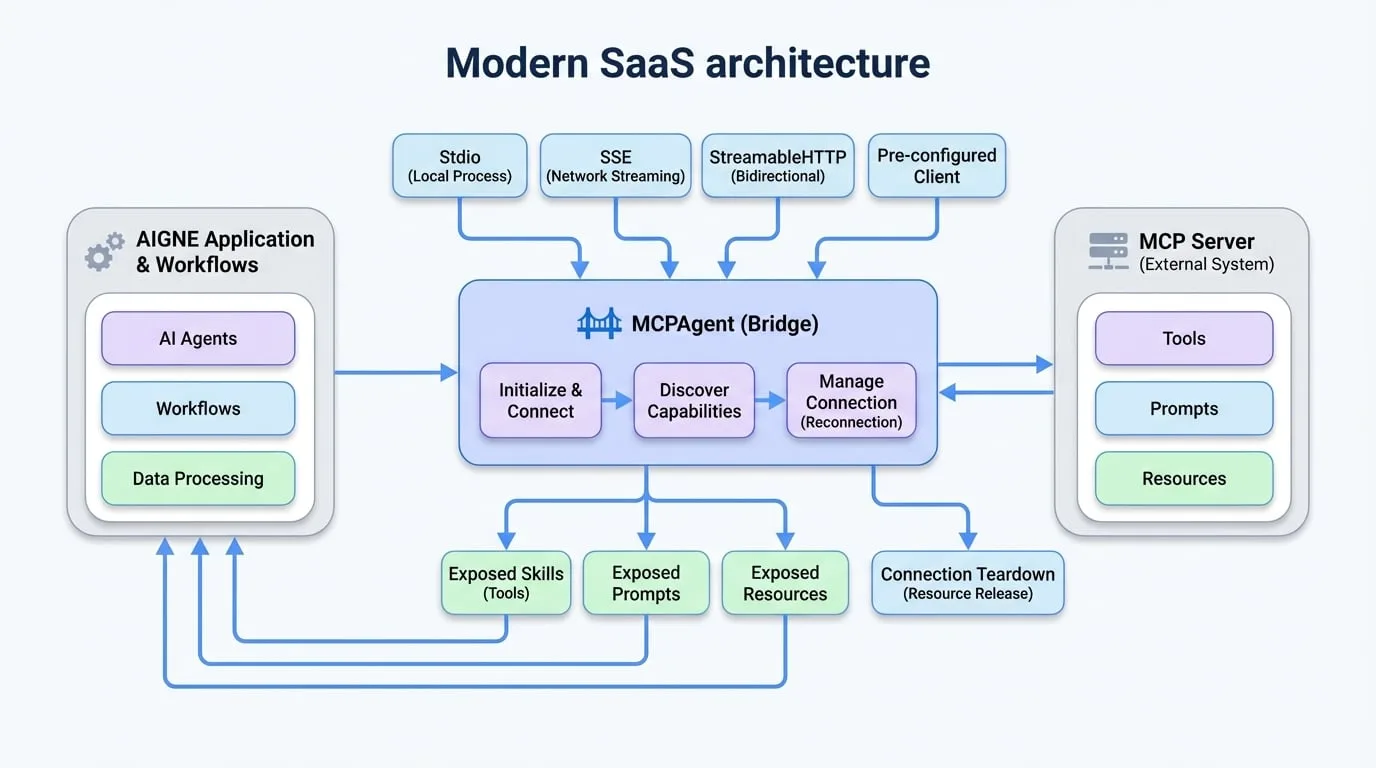
建立 MCPAgent
您可以使用靜態的 MCPAgent.from() 方法來建立一個 MCPAgent 實例。這個工廠方法支援多種設定模式,取決於您需要如何連接到 MCP 伺服器。
1. 透過標準 I/O (Stdio) 連接
此方法非常適合將 MCP 伺服器作為本機子程序執行。MCPAgent 透過其標準輸入和輸出串流與伺服器通訊。
- command
string(required) — 要執行以啟動 MCP 伺服器程序的指令。 - args
string[]— 要傳遞給指令的字串參數陣列。 - env
Record<string, string>— 為子程序設定的環境變數。
連接至本機檔案系統伺服器
import { MCPAgent } from "@aigne/core";

// 透過執行命令列伺服器來建立 MCPAgent
await using mcpAgent = await MCPAgent.from({
  command: "npx",
  args: ["-y", "@modelcontextprotocol/server-filesystem", "."],
});

console.log('Connected to:', mcpAgent.name);

// 存取檔案系統伺服器提供的技能
const fileReader = mcpAgent.skills.read_file;
if (fileReader) {
  const result = await fileReader.invoke({ path: "./package.json" });
  console.log(result);
}
2. 透過網路 (SSE 或 StreamableHTTP) 連接
這是透過網路連接到遠端 MCP 伺服器的標準方法。您可以選擇兩種傳輸協定:
sse:伺服器發送事件,一種簡單且廣泛支援的串流協定。streamableHttp:一種更進階的雙向串流協定。- url
string(required) — 遠端 MCP 伺服器端點的 URL。 - transport
'sse' | 'streamableHttp'(default:sse) — 要使用的傳輸協定。預設為 sse。 - opts
object— 要傳遞給底層傳輸客戶端的額外選項 (例如,用於標頭和身份驗證)。 - timeout
number(default:60000) — 請求逾時時間,單位為毫秒。 - maxReconnects
number(default:10) — 若連線中斷,嘗試重新連線的最大次數。設定為 0 可停用。 - shouldReconnect
(error: Error) => boolean— 一個函式,根據收到的錯誤回傳 true 表示應嘗試重新連線。
透過 StreamableHTTP 連接
import { MCPAgent } from "@aigne/core";

// 使用 StreamableHTTP 伺服器連線建立一個 MCPAgent
await using mcpAgent = await MCPAgent.from({
  url: `http://localhost:3000/mcp`,
  transport: "streamableHttp",
});

console.log('Connected to:', mcpAgent.name);

const echoSkill = mcpAgent.skills.echo;
if (echoSkill) {
  const result = await echoSkill.invoke({ message: "Hello, World!" });
  console.log(result);
}
3. 使用預先設定的 Client
如果您已經實例化並設定了一個 MCP Client 物件,您可以直接將其傳遞以建立一個 MCPAgent。這對於需要對客戶端設定進行精細控制的進階情境非常有用。
- client
Client(required) — 一個預先設定好的 MCP Client 實例。 - prompts
MCPPrompt[]— 一個可選的預先定義 MCP 提示陣列。 - resources
MCPResource[]— 一個可選的預先定義 MCP 資源陣列。
從 Client 實例建立
import { MCPAgent } from "@aigne/core";
import { Client } from "@modelcontextprotocol/sdk/client/index.js";
import { StdioClientTransport } from "@modelcontextprotocol/sdk/client/stdio.js";

// 手動建立並設定客戶端
const client = new Client({ name: "test-client", version: "1.0.0" });
const transport = new StdioClientTransport({
  command: "bun",
  args: ["./mock-mcp-server.ts"],
});
await client.connect(transport);

// 從現有的客戶端實例建立一個 MCPAgent
await using mcpAgent = MCPAgent.from({
  name: client.getServerVersion()?.name,
  client,
});

console.log('Connected to:', mcpAgent.name);
存取伺服器功能
一旦 MCPAgent 連接成功,它會透過其屬性來公開伺服器的工具、提示和資源。
存取技能
伺服器端的工具會以 skills 的形式在 MCPAgent 實例上公開。您可以透過名稱存取它們並使用其 invoke 方法。這些技能接著可以傳遞給其他 Agent,例如 AIAgent,以賦予它們新的能力。
使用 MCPAgent 的技能
// 假設 `mcpAgent` 是一個已初始化的 MCPAgent
const echoSkill = mcpAgent.skills.echo;

if (echoSkill) {
  const result = await echoSkill.invoke({ message: "Hello from AIGNE!" });
  console.log(result);
  // 預期輸出:
  // {
  //   "content": [
  //     { "text": "Tool echo: Hello from AIGNE!", "type": "text" }
  //   ]
  // }
}
存取提示
伺服器定義的提示可在 prompts 屬性下找到。這對於從伺服器擷取預先定義的複雜提示結構很有用。
存取伺服器端提示
// 假設 `mcpAgent` 是一個已初始化的 MCPAgent
const echoPrompt = mcpAgent.prompts.echo;

if (echoPrompt) {
  const result = await echoPrompt.invoke({ message: "Hello!" });
  console.log(result);
  // 預期輸出:
  // {
  //   "messages": [
  //     {
  //       "content": { "text": "Please process this message: Hello!", "type": "text" },
  //       "role": "user"
  //     },
  //     ...
  //   ]
  // }
}
存取資源
伺服器託管的資源或資源範本可透過 resources 屬性存取。這讓您可以透過擴展 URI 範本來從伺服器讀取資料。
讀取伺服器端資源
// 假設 `mcpAgent` 是一個已初始化的 MCPAgent
const echoResource = mcpAgent.resources.echo;

if (echoResource) {
  const result = await echoResource.invoke({ message: "Hello!" });
  console.log(result);
  // 預期輸出:
  // {
  //   "contents": [
  //     { "text": "Resource echo: Hello!", "uri": "echo://Hello!" }
  //   ]
  // }
}
連線拆卸
妥善關閉與 MCP 伺服器的連線以釋放資源非常重要。
手動關閉
您可以明確地呼叫 shutdown() 方法。
手動關閉 Agent
const mcpAgent = await MCPAgent.from({
  url: `http://localhost:3000/mcp`,
});

// ... 使用 agent

await mcpAgent.shutdown();
使用 using 自動關閉
對於支援 using 宣告 (ES2023) 的環境,當 Agent 超出其作用域時,其連線將會自動關閉。這是管理 Agent 生命週期的建議方法。
使用 'using' 自動關閉
async function connectAndUseAgent() {
  await using mcpAgent = await MCPAgent.from({
    url: `http://localhost:3000/mcp`,
  });

  // 在這裡使用 agent...
  const echo = mcpAgent.skills.echo;
  if (echo) await echo.invoke({ message: "Test" });
} // <-- mcpAgent.shutdown() 會在這裡自動被呼叫。
總結
MCPAgent 是透過與外部系統整合來擴展 AIGNE 框架功能的關鍵元件。藉由抽象化連線和通訊邏輯,它讓您可以將外部工具和資料來源視為您代理工作流程中的一等公民。
有關如何使用 MCPAgent 提供的技能的更多資訊,請參閱 AI Agent 文件。