AIGNE 類別是框架的核心執行引擎。它協調多個 Agent 來建構複雜的 AI 應用程式,作為 Agent 互動、訊息傳遞和整體執行流程的主要協調點。
本指南涵蓋如何實例化和組態 AIGNE、使用 invoke 方法執行 Agent,以及管理應用程式生命週期。
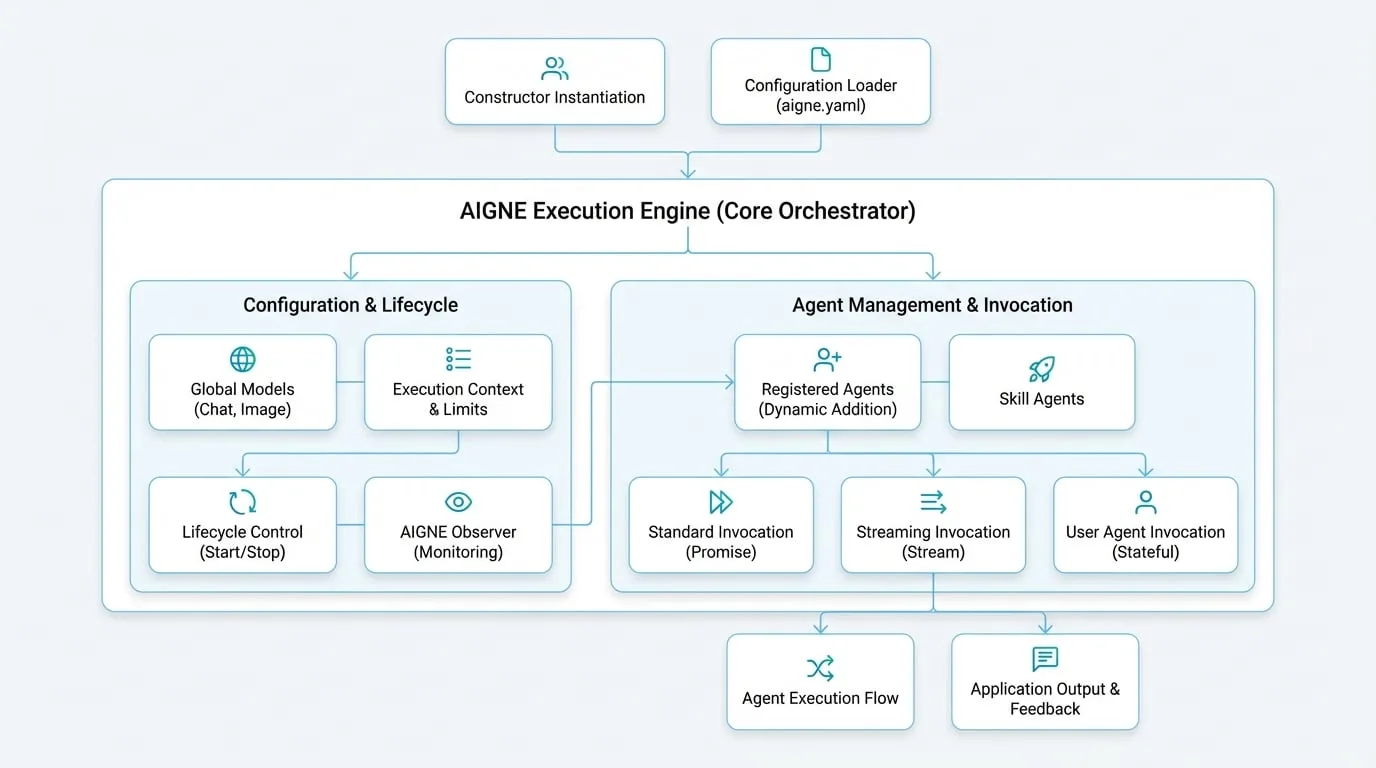
總覽
AIGNE 作為您整個 Agent 應用程式的容器。其主要職責包括:
- Agent 管理:管理所有已註冊 Agent 和技能的生命週期。
- 模型組態:為聊天和圖像模型提供全域預設組態,可由個別 Agent 繼承或覆寫。
- 執行上下文:為每次呼叫建立和管理隔離的上下文,確保並行操作互不干擾。
- 生命週期控制:提供優雅地啟動和停止應用程式的方法,確保所有資源都得到妥善處理。
實例化
建立 AIGNE 實例主要有兩種方式:使用建構函式以程式化的方式建立,或從目錄載入組態。
使用建構函式
最直接的方法是使用 AIGNE 建構函式,傳入一個選項物件。這種方法非常適合在程式碼中動態管理組態的應用程式。
實例化 AIGNE
import { AIGNE } from "@aigne/core";
import { OpenAIChatModel } from "@aigne/openai";

const aigne = new AIGNE({
  name: "MyFirstAIGNEApp",
  model: new OpenAIChatModel({
    apiKey: process.env.OPENAI_API_KEY,
    model: "gpt-4o-mini",
  }),
});
從組態載入
對於更複雜的專案,最佳實踐是在一個包含 aigne.yaml 檔案和其他 Agent 定義的目錄中定義您的應用程式結構。靜態的 AIGNE.load() 方法會讀取此目錄並建構一個完整組態的實例。這有助於將組態與邏輯分離。
從目錄載入 AIGNE
import { AIGNE } from "@aigne/core";
import { join } from "node:path";

const configPath = join(process.cwd(), "my-aigne-project");
const aigne = await AIGNE.load(configPath);
組態選項
AIGNE 建構函式接受一個 AIGNEOptions 物件來控制其行為。
- name
string— AIGNE 實例的唯一名稱。 - description
string— 實例用途的簡要描述。 - rootDir
string— 用於解析 Agent 和技能相對路徑的根目錄。 - model
ChatModel— 一個全域預設的聊天模型,適用於所有未指定自有模型的 Agent。更多詳情請參閱 模型。 - imageModel
ImageModel— 用於圖像生成任務的全域預設圖像模型。 - agents
Agent[]— 一個 Agent 實例陣列,用於在初始化時向 AIGNE 註冊。 - skills
Agent[]— 一個技能 Agent 陣列,供其他 Agent 使用。 - limits
ContextLimits— 執行限制,例如逾時或最大 token 數,適用於所有呼叫。 - observer
AIGNEObserver— 一個觀察者實例,用於監控和記錄執行追蹤。
Agent 與生命週期管理
實例建立後,您可以管理 Agent 並控制應用程式的生命週期。
新增 Agent
雖然可以在建構函式中提供 Agent,但您也可以使用 addAgent 方法動態新增它們。每個 Agent 都會附加到 AIGNE 實例上,使其能夠存取如全域模型之類的共享資源。
動態新增 Agent
import { AIAgent } from "@aigne/core";
import { AIGNE } from "@aigne/core";

// 假設 'aigne' 是一個現有的 AIGNE 實例
const aigne = new AIGNE();

const myAgent = new AIAgent({
  instructions: "You are a helpful assistant.",
});

aigne.addAgent(myAgent);
關閉
為確保乾淨地退出並妥善清理資源,請呼叫 shutdown 方法。這對於長時間運行的應用程式至關重要,以防止資源洩漏。AIGNE 也會自動處理如 SIGINT 的處理程序退出訊號。
優雅關閉
// 假設 'aigne' 是一個現有的 AIGNE 實例
await aigne.shutdown();
呼叫 Agent
invoke 方法是執行 Agent 的主要入口點。它是一個支援多種模式的重載方法,從請求-回應到即時串流。
標準呼叫
最常見的用例是提供一個 Agent 和一則輸入訊息。這會回傳一個 promise,其解析值為 Agent 的最終輸出。
標準 Agent 呼叫
// 假設 'aigne' 和 'myAgent' 已組態
const result = await aigne.invoke(myAgent, {
  message: "What is the AIGNE Framework?",
});

console.log(result.message);
// 預期輸出:關於該框架的描述性回答。
串流回應
對於像聊天機器人這樣的互動式應用程式,您可以啟用串流以逐步接收回應。在選項中設定 streaming: true 會回傳一個 AgentResponseStream。接著,您可以迭代該串流以處理陸續到達的資料區塊。
串流 Agent 回應
import { isAgentResponseDelta } from "@aigne/core";

// 假設 'aigne' 和 'myAgent' 已組態
const stream = await aigne.invoke(
  myAgent,
  { message: "Tell me a short story." },
  { streaming: true }
);

let fullResponse = "";
for await (const chunk of stream) {
  if (isAgentResponseDelta(chunk)) {
    const textDelta = chunk.delta.text?.message ?? "";
    fullResponse += textDelta;
    process.stdout.write(textDelta);
  }
}

console.log("\n--- End of Story ---");
建立 User Agent
在沒有訊息的情況下呼叫 Agent 會建立一個 UserAgent。這是一個有狀態的包裝器,可在多次呼叫之間保留對話上下文,非常適合建立對話式體驗。
建立有狀態的 UserAgent
// 假設 'aigne' 和 'myAgent' 已組態

// 建立一個 UserAgent 來維持上下文
const userAgent = aigne.invoke(myAgent);

// 第一次互動
const response1 = await userAgent.invoke({ message: "My name is Bob." });
console.log(response1.message); // 例如:「很高興認識你,Bob!」

// 第二次互動保留了上下文
const response2 = await userAgent.invoke({ message: "What is my name?" });
console.log(response2.message); // 例如:「你的名字是 Bob。」
invoke 方法為進階情境提供了額外的重載,例如在多 Agent 團隊中回傳最終活躍的 Agent。請參閱 API 參考文件以取得完整的簽名列表。
清楚了解 AIGNE 後,您現在已準備好探索構成您應用程式建構區塊的不同類型 Agents。