AIAgent 是與大型語言模型 (LLM) 互動的主要元件。它作為 ChatModel 的直接介面,可實現複雜的對話式 AI、函數呼叫 (工具使用) 和結構化資料提取。此 Agent 負責處理提示建構、模型叫用、回應解析和工具執行迴圈的複雜性。
本指南全面概述了 AIAgent、其設定及其核心功能。若要更廣泛地了解 Agent 如何融入 AIGNE 框架,請參閱 Agent 核心概念指南。
運作方式
AIAgent 遵循一個系統化的流程來處理使用者輸入並產生回應。這個過程通常涉及與 LLM 的多次互動,尤其是在使用工具時。
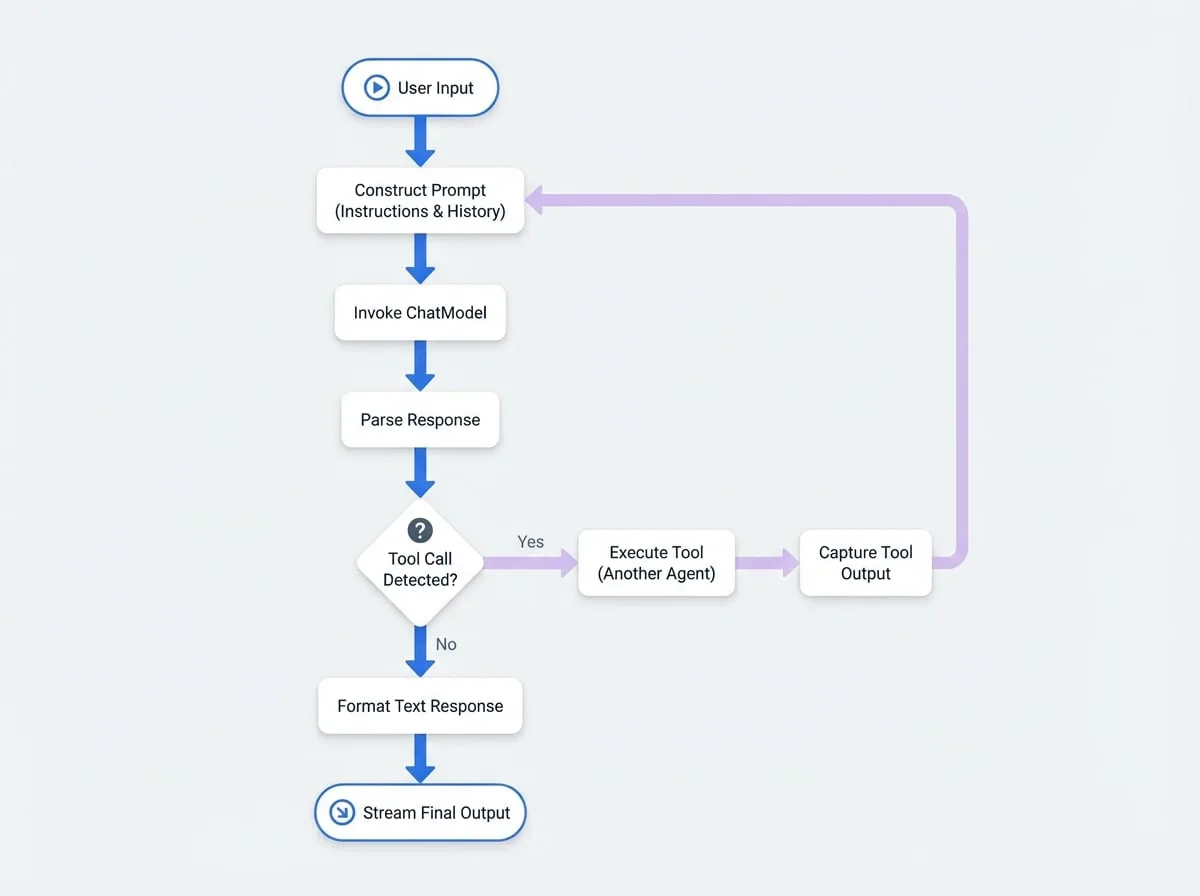
上圖說明了一個請求的典型生命週期:
- 提示建構:
AIAgent使用PromptBuilder從其instructions、使用者輸入以及任何先前工具呼叫的歷史記錄中組合出最終的提示。 - 模型叫用:將完全成形的提示傳送至設定好的
ChatModel。 - 回應解析:Agent 接收模型的原始輸出。
- 工具呼叫偵測:檢查回應是否包含呼叫工具的請求。
- 如果否,Agent 會格式化文字回應並將其傳回。
- 如果是,則進入工具執行迴圈。
- 工具執行:Agent 識別並叫用請求的工具 (這是另一個 Agent),擷取其輸出,並將其格式化為一則訊息傳給模型。然後,此過程會回到步驟 1,將工具的結果傳回給模型以進行下一步的生成。
- 最終輸出:一旦模型產生了不含任何工具呼叫的最終文字回應,Agent 就會將其格式化並以串流方式傳回給使用者。
設定
AIAgent 透過其建構函式選項進行設定。以下是可用參數的詳細說明。
- instructions
string | PromptBuilder— 指導 AI 模型行為的核心指令。這可以是一個簡單的字串,也可以是一個用於建立複雜、動態提示的 PromptBuilder 實例。更多詳細資訊,請參閱 提示 指南。 - inputKey
string— 指定應將輸入訊息物件中的哪個鍵視為主要使用者查詢。如果未設定,則必須提供 instructions。 - outputKey
string(default:message) — 定義 Agent 的最終文字回應將放置在輸出物件中的鍵。預設為 message。 - inputFileKey
string— 指定輸入訊息中包含要傳送至模型的檔案資料的鍵。 - outputFileKey
string(default:files) — 定義模型產生的任何檔案將放置在輸出物件中的鍵。預設為 files。 - toolChoice
AIAgentToolChoice | Agent(default:auto) — 控制 Agent 如何使用其可用的工具 (技能)。詳細資訊請參閱下方的「工具使用」部分。 - toolCallsConcurrency
number(default:1) — 在單一輪次中可同時執行的最大工具呼叫數量。 - catchToolsError
boolean(default:true) — 若為 true,Agent 將捕獲工具執行時的錯誤,並將錯誤訊息回饋給模型。若為 false,錯誤將中止整個過程。 - structuredStreamMode
boolean(default:false) — 啟用一種模式,用於從模型的串流回應中提取結構化的 JSON 資料。更多資訊請參閱「結構化輸出」部分。 - memoryAgentsAsTools
boolean(default:false) — 當為 true 時,附加的 MemoryAgent 實例會作為可呼叫的工具暴露給模型,允許 Agent 明確地從其記憶體中讀取或寫入。
基本範例
這是一個簡單 AIAgent 的範例,設定其作為一個樂於助人的助理。
Basic Chat Agent
import { AIAgent } from "@aigne/core";
import { OpenAI } from "@aigne/openai";

// 設定要使用的模型
const model = new OpenAI({
  apiKey: process.env.OPENAI_API_KEY,
  model: "gpt-4o",
});

// 建立 AI Agent
const chatAgent = new AIAgent({
  instructions: "You are a helpful assistant.",
  inputKey: "question",
  outputKey: "answer",
});

// 若要執行 Agent,您需要使用 AIGNE 的 invoke 方法
// const aigne = new AIGNE({ model });
// const response = await aigne.invoke(chatAgent, { question: "What is AIGNE?" });
// console.log(response.answer);
此 Agent 接受一個帶有 question 鍵的輸入物件,並產生一個帶有 answer 鍵的輸出物件。
工具使用
AIAgent 的一個強大功能是它能夠使用其他 Agent 作為工具。透過在叫用時提供一個 skills 列表,AIAgent 可以決定呼叫這些工具來收集資訊或執行操作。toolChoice 選項決定了此行為。
toolChoice 值 | 說明 |
|---|---|
auto | (預設) 模型根據對話的上下文決定是否呼叫工具。 |
none | 完全停用工具使用。模型不會嘗試呼叫任何工具。 |
required | 強制模型呼叫一個或多個工具。 |
router | 一種特殊模式,強制模型只選擇一個工具。然後,Agent 將請求直接路由到該工具,並將其回應作為最終輸出進行串流。這對於建立分派器 Agent 非常高效。 |
工具使用範例
假設您有一個可以取得天氣資訊的 FunctionAgent。您可以將此作為一項技能提供給 AIAgent。
Agent with a Tool
import { AIAgent, FunctionAgent } from "@aigne/core";
import { OpenAI } from "@aigne/openai";

// 一個取得天氣的簡單函數
function getCurrentWeather(location) {
  if (location.toLowerCase().includes("tokyo")) {
    return JSON.stringify({ location: "Tokyo", temperature: "15", unit: "celsius" });
  }
  return JSON.stringify({ location, temperature: "unknown" });
}

// 將函數包裝在 FunctionAgent 中,使其成為一個工具
const weatherTool = new FunctionAgent({
  name: "get_current_weather",
  description: "Get the current weather in a given location",
  inputSchema: {
    type: "object",
    properties: { location: { type: "string", description: "The city and state" } },
    required: ["location"],
  },
  process: ({ location }) => getCurrentWeather(location),
});

// 設定模型
const model = new OpenAI({
  apiKey: process.env.OPENAI_API_KEY,
  model: "gpt-4o",
});

// 建立一個可以使用天氣工具的 AI Agent
const weatherAssistant = new AIAgent({
  instructions: "You are a helpful assistant that can provide weather forecasts.",
  inputKey: "query",
  outputKey: "response",
});

// 叫用時,將工具作為技能提供
// const aigne = new AIGNE({ model, skills: [weatherTool] });
// const result = await aigne.invoke(weatherAssistant, { query: "What's the weather like in Tokyo?" });
// console.log(result.response); // LLM 將使用工具的輸出進行回應在這種情況下,AIAgent 會收到查詢,識別出需要天氣資訊,呼叫 weatherTool,接收其 JSON 輸出,然後使用該資料來形成自然語言回應。
結構化輸出
對於需要提取特定、結構化資訊的任務 (如情感分析、分類或實體提取),structuredStreamMode 非常有價值。啟用後,Agent 會主動解析模型的串流輸出,以尋找並提取一個 JSON 物件。
預設情況下,必須指示模型將其結構化資料以 YAML 格式放置在 <metadata>...</metadata> 標籤內。
結構化輸出範例
此範例設定一個 Agent 來分析使用者訊息的情感,並傳回一個結構化的 JSON 物件。
Structured Sentiment Analysis
import { AIAgent } from "@aigne/core";
import { OpenAI } from "@aigne/openai";

const sentimentAnalyzer = new AIAgent({
  instructions: `
    Analyze the sentiment of the user's message.
    Respond with a single word summary, followed by a structured analysis.
    Place the structured analysis in YAML format inside <metadata> tags.
    The structure should contain 'sentiment' (positive, negative, or neutral) and a 'score' from -1.0 to 1.0.
  `,
  inputKey: "message",
  outputKey: "summary",
  structuredStreamMode: true,
});

// 叫用時,輸出將同時包含文字摘要
// 和解析後的 JSON 物件。
// const aigne = new AIGNE({ model: new OpenAI(...) });
// const result = await aigne.invoke(sentimentAnalyzer, { message: "AIGNE is an amazing framework!" });
/*
  預期結果:
  {
    summary: "Positive.",
    sentiment: "positive",
    score: 0.9
  }
*/
您可以使用 customStructuredStreamInstructions 選項自訂解析邏輯,包括開始/結束標籤和解析函數 (例如,直接支援 JSON)。
總結
AIAgent 是建立進階 AI 應用程式的基礎建構模組。它為語言模型提供了一個強大而靈活的介面,並完整支援工具使用、結構化資料提取和記憶體整合。
對於更複雜的工作流程,您可能需要協調多個 Agent。若要了解如何操作,請繼續閱讀 Team Agent 文件。有關進階的提示模板技術,請參閱 提示 指南。