鉤子提供了一種強大的機制,用於觀察、攔截和注入自訂邏輯到 agent 的執行生命週期中。它們讓您可以在不更改 agent 核心實作的情況下,新增日誌記錄、監控、輸入/輸出轉換和自訂錯誤處理等功能。
本指南將詳細介紹 agent 的執行生命週期、可用的鉤子,以及如何有效地實作它們。
Agent 執行生命週期
要正確使用鉤子,了解 agent 的執行生命週期至關重要。當 agent 被調用時,它會經過一系列步驟,並在特定時間點觸發鉤子。
下圖說明了在 agent 調用期間發生的事件順序以及相應被呼叫的鉤子。
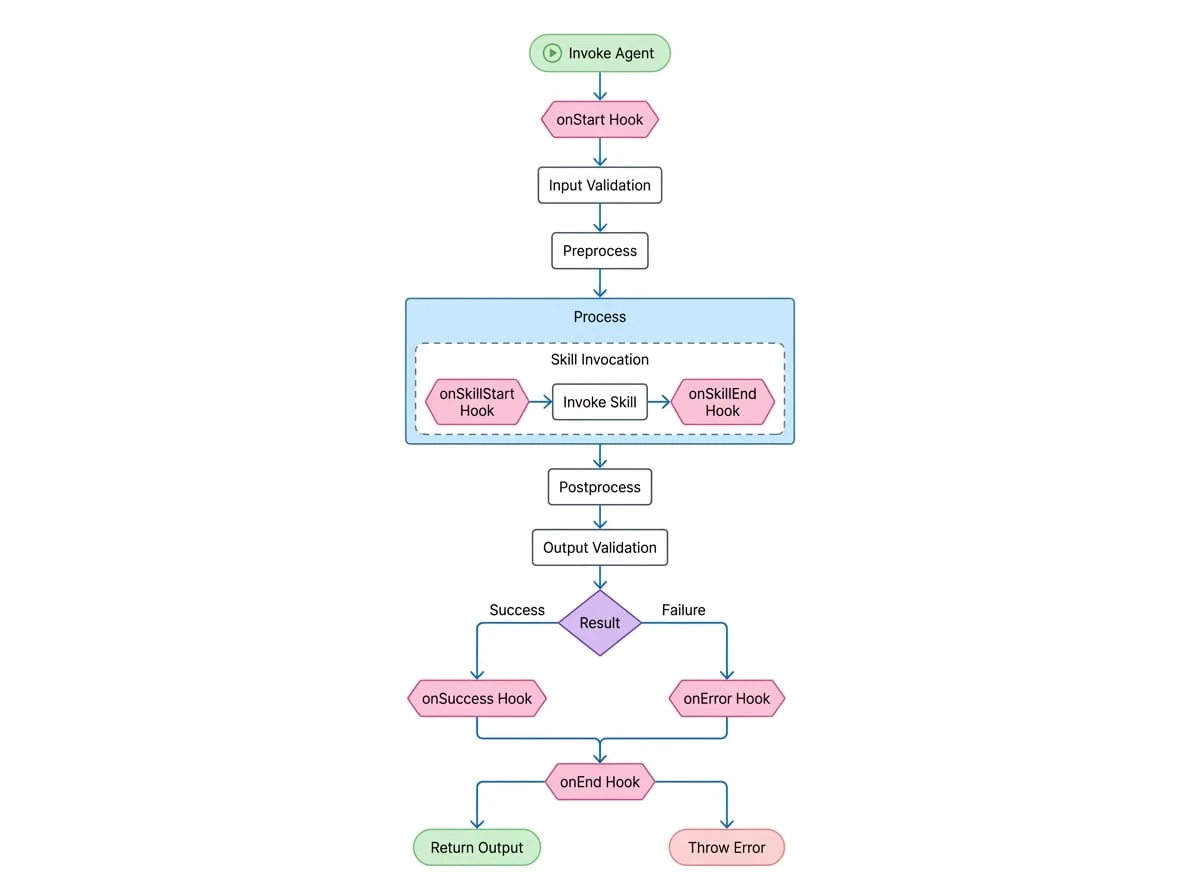
可用的鉤子
鉤子定義在一個 AgentHooks 物件中。每個鉤子可以實作為一個函式,或是一個獨立的專用 agent。
- onStart
function | Agent— 在 agent 調用的最開始,輸入驗證之前觸發。可用於修改初始的 input 或 options。 - onSuccess
function | Agent— 在 agent 的 process 方法成功完成且輸出已通過驗證後觸發。可用於轉換最終的 output。 - onError
function | Agent— 在執行的任何階段拋出錯誤時觸發。可用於實作自訂的錯誤日誌記錄,或透過回傳 { retry: true } 來實作重試機制。 - onEnd
function | Agent— 在 agent 調用的最末端觸發,無論成功或失敗。適用於清理任務、最終日誌記錄或指標收集。 - onSkillStart
function | Agent— 在 agent 調用其技能(一個子 agent)之前觸發。這對於追蹤 agent 之間的任務委派很有用。 - onSkillEnd
function | Agent— 在技能調用完成後觸發,無論成功或失敗。它會接收到技能的結果或錯誤。 - onHandoff
function | Agent— 當 agent 的 process 方法回傳另一個 agent 實例,有效地交接控制權時觸發。這允許監控 agent 之間的轉移。
實作鉤子
鉤子可以透過三種方式附加到 agent 上:
- 在 agent 實例化期間,透過
AgentOptions中的hooks屬性。 - 在調用時,透過
AgentInvokeOptions中的hooks屬性。 - 在
AIGNEContext實例上全域設定。
範例 1:基本日誌記錄
這是一個簡單的鉤子範例,用於記錄 agent 執行的開始與結束。
Agent 日誌記錄鉤子
import { Agent, AIGNE, type AgentHooks } from "@aigne/core";

// 定義日誌記錄鉤子
const loggingHook: AgentHooks = {
  onStart: ({ agent, input }) => {
    console.log(`[${agent.name}] Starting execution with input:`, input);
  },
  onEnd: ({ agent, input, output, error }) => {
    if (error) {
      console.error(`[${agent.name}] Execution failed for input:`, input, "Error:", error);
    } else {
      console.log(`[${agent.name}] Execution succeeded with output:`, output);
    }
  },
};

// 定義一個簡單的 agent
class MyAgent extends Agent {
  async process(input: { message: string }) {
    return { reply: `You said: ${input.message}` };
  }
}

// 使用鉤子將 agent 實例化
const myAgent = new MyAgent({
  name: "EchoAgent",
  hooks: [loggingHook],
});

const aigne = new AIGNE();
await aigne.invoke(myAgent, { message: "hello" });

// 主控台輸出:
// [EchoAgent] Starting execution with input: { message: 'hello' }
// [EchoAgent] Execution succeeded with output: { reply: 'You said: hello' }
範例 2:使用 onStart 修改輸入
onStart 鉤子可以回傳一個物件來修改 agent 將收到的 input。
修改 Agent 輸入
import { Agent, AIGNE, type AgentHooks } from "@aigne/core";

const inputModificationHook: AgentHooks = {
  onStart: ({ input }) => {
    // 將時間戳新增到輸入訊息中
    const newInput = {
      ...input,
      timestamp: new Date().toISOString(),
    };
    return { input: newInput };
  },
};

class GreeterAgent extends Agent {
  async process(input: { name: string; timestamp?: string }) {
    return { greeting: `Hello, ${input.name}! (processed at ${input.timestamp})` };
  }
}

const agent = new GreeterAgent({ hooks: [inputModificationHook] });

const aigne = new AIGNE();
const result = await aigne.invoke(agent, { name: "Alice" });

console.log(result);
// {
//   greeting: "Hello, Alice! (processed at 2023-10-27T10:00:00.000Z)"
// }
範例 3:使用 onError 進行自訂重試
onError 鉤子可以回傳 { retry: true } 來告知 AIGNE 應重新嘗試執行 agent 的 process 方法。這對於處理暫時性失敗很有用。
自訂重試鉤子
import { Agent, AIGNE, type AgentHooks } from "@aigne/core";

let attempt = 0;

const retryHook: AgentHooks = {
  onError: ({ agent, error }) => {
    console.log(`[${agent.name}] Attempt failed: ${error.message}. Retrying...`);
    // 回傳 true 表示重試,但僅限於前 2 次嘗試
    if (attempt < 2) {
      return { retry: true };
    }
    // 不回傳任何東西,讓錯誤繼續傳播
  },
};

class UnreliableAgent extends Agent {
  async process() {
    attempt++;
    if (attempt <= 2) {
      throw new Error("Service temporarily unavailable");
    }
    return { status: "OK" };
  }
}

const agent = new UnreliableAgent({ hooks: [retryHook] });

const aigne = new AIGNE();
const result = await aigne.invoke(agent, {});

console.log(result); // { status: 'OK' }
這個 agent 會失敗兩次,而 retryHook 會攔截錯誤並每次都觸發重試。在第三次嘗試時,agent 會成功。
鉤子優先級
鉤子可以在 agent 上、調用時以及在 context 中定義。為了管理執行順序,鉤子可以設定一個 priority 屬性,值可以是 "high"、"medium" 或 "low"(預設值)。
鉤子會按照其優先級順序執行:high > medium > low。
鉤子優先級範例
const highPriorityHook: AgentHooks = {
  priority: 'high',
  onStart: () => console.log('High priority hook executed.'),
};

const mediumPriorityHook: AgentHooks = {
  priority: 'medium',
  onStart: () => console.log('Medium priority hook executed.'),
};

const lowPriorityHook: AgentHooks = {
  // priority 預設為 'low'
  onStart: () => console.log('Low priority hook executed.'),
};

class MonitoredAgent extends Agent {
  async process(input: {}) {
    console.log('Agent processing...');
    return { success: true };
  }
}

const agent = new MonitoredAgent({
  hooks: [lowPriorityHook, highPriorityHook, mediumPriorityHook],
});

const aigne = new AIGNE();
await aigne.invoke(agent, {});

// 主控台輸出:
// High priority hook executed.
// Medium priority hook executed.
// Low priority hook executed.
// Agent processing...
當一個鉤子的邏輯依賴於另一個鉤子的結果時,這種可預測的執行順序至關重要。
總結
鉤子是建構穩健且可觀察的 agent 系統的必要工具。它們提供了一種乾淨、非侵入性的方式,為您的 agent 新增如日誌記錄、監控和彈性模式等橫切關注點。透過了解 agent 的生命週期和每個鉤子的功能,您可以建立複雜、可用於生產環境的 AI 應用程式。