Author
Assignee
Label
Relevance
Search the site
Try searching for keywords or filtering in discussions, docs, blogs, bookmarks and more...
logo
  • Products
    Applications
    • NFT Studio Mint and manage NFTs
    • Creator Studio All-in-one creator tool
    • AIGNE The Agentic Ecosystem for AI Apps
    • ArcSphere AI native browser
    Components
    • Blocklet Launcher One-click app launcher
    • Payment Kit
      Payment Kit Effortless Crypto & Card Payments
    • Blocklet Store Discover & deploy apps
    • Web3 Kit Web3 dev toolkit
    Compute/Storage
    • Blocklet Framework Build and run blocklets
    • DID Spaces Secure personal storage
    • ABT Network Fast blockchain network
    • Blocklet Server Host your apps easily
    • ОСАР Multi-chain connector
    Identity
    • DID Self-sovereign ID
    • DID Wallet Smart digital wallet
    • DID Names Web3 domain names
    • VC Verifiable Credentials
    • DID Connect Passwordless login
  • Articles
  • Docs
  • Community
  • Careers
  • About
  • Overview
  • User Guide
    • Dashboard

    • DID Connect

      • Members

      • Passports

      • Settings

      • Security

      • OAuth Apps

    • AIGNE Hub

    • Website

      • Domains

      • Branding

      • Theming

      • Navigation

    • Operations

      • Notifications

      • Analytics

      • Audit Logs

      • Advanced

    • Integrations

      • WebHooks

      • Access Keys

      • MCP Servers

    • Developers

      • Logs

      • Performance

    • DID Spaces

      • Backups

      • Storage

    • Blocklet Studio

  • Developer Guide
    • Authentication Service

    • Notification Service

    • Image Service

    • MCP Service

    • EventBus Service

    • OAuth Service

    • KYC Service

    • Discovery & SEO Services

      • Open Graph

      • OpenEmbed

  1. User Guide
  2. Integrations

Integrations


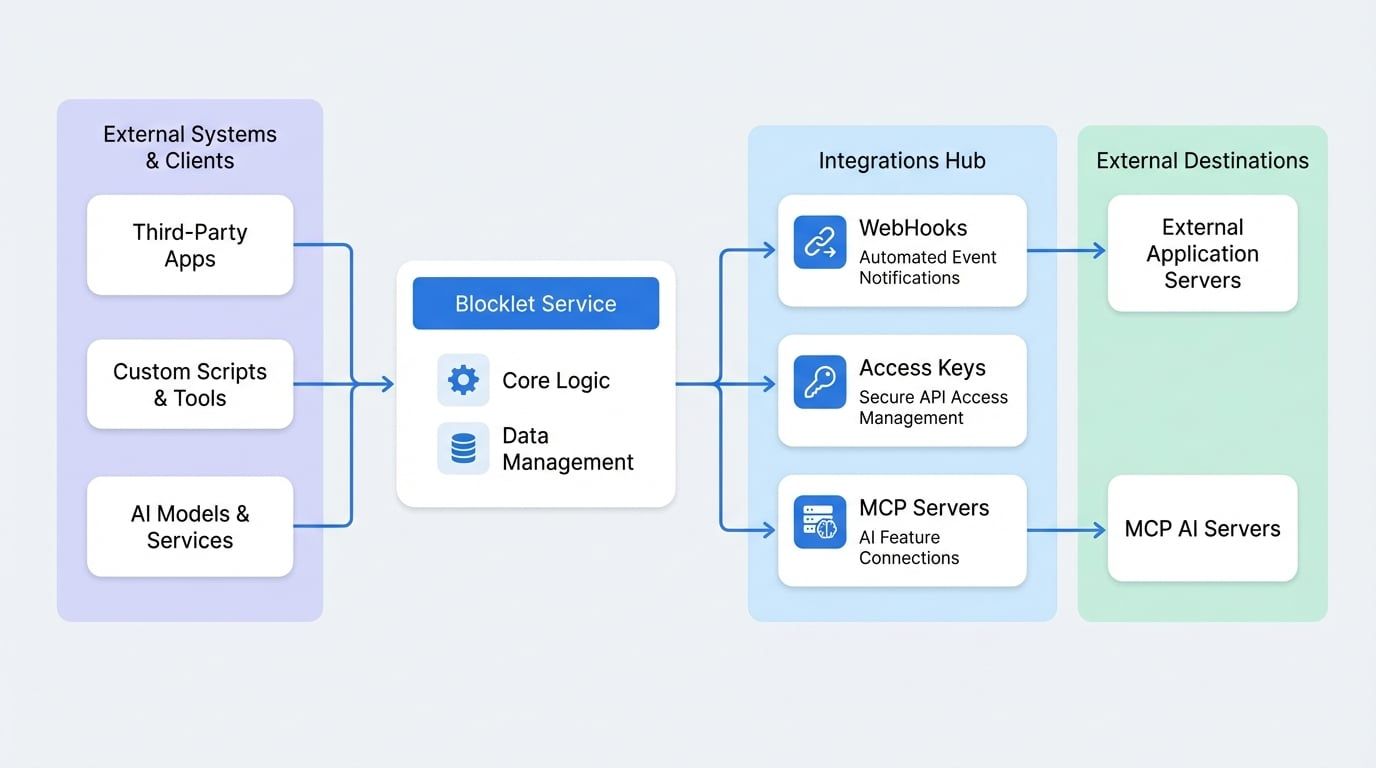
The Integrations section provides the tools necessary to connect your Blocklet Service with external systems and to manage programmatic access via the API. This is essential for automating workflows, enabling third-party services to interact with your blocklet, and building custom applications.


This section is divided into the following key areas:
WebHooks

Configure WebHooks to send automated messages from your blocklet to other applications when specific events occur, enabling real-time notifications and data synchronization.

Access Keys

Generate and manage secure API keys for applications or scripts that need to interact with your blocklet's API programmatically.

MCP Servers

Discover and manage connections to Model Context Protocol (MCP) servers, which are used for building AI-powered features within your blocklets.

For detailed instructions on how to use these features, please refer to the specific documentation for each section.


Advanced
WebHooks
Table of Contents