WebHooks
WebHooks provide a mechanism for your Blocklet Service to send real-time notifications to external services. By subscribing to specific system events, you can automate workflows and integrate your blocklet with other applications. When a subscribed event is triggered, the service sends an HTTP POST request containing event data to a URL you specify.
This guide explains how to configure and manage WebHooks within your Blocklet Service dashboard. For developer-focused information on event types and payload structures, please see the EventBus Service documentation.
How WebHooks Work#
The WebHook process is straightforward:
- Event Occurs: An action takes place within the system, such as a new user registering or content being published.
- Trigger: The system identifies that this action corresponds to a specific event (e.g.,
user.created). - Notification: The Blocklet Service checks for any active WebHook subscriptions for that event.
- HTTP POST: For each subscription, the service sends an HTTP POST request with a JSON payload to the pre-configured URL of the external service.
- External Action: The external service receives the data and can execute a corresponding action, such as updating a database, sending a notification, or starting a CI/CD pipeline.
The following diagram illustrates this workflow:flowchart TD A[Event Occurs in Blocklet Service] --> B{Check for Subscribed WebHooks}; B -- Yes --> C[Prepare JSON Payload]; C --> D[Send HTTP POST to External URL]; D --> E[External Service Receives Data]; E --> F[Action is Performed]; B -- No --> G[End Process];
Configuring WebHooks#
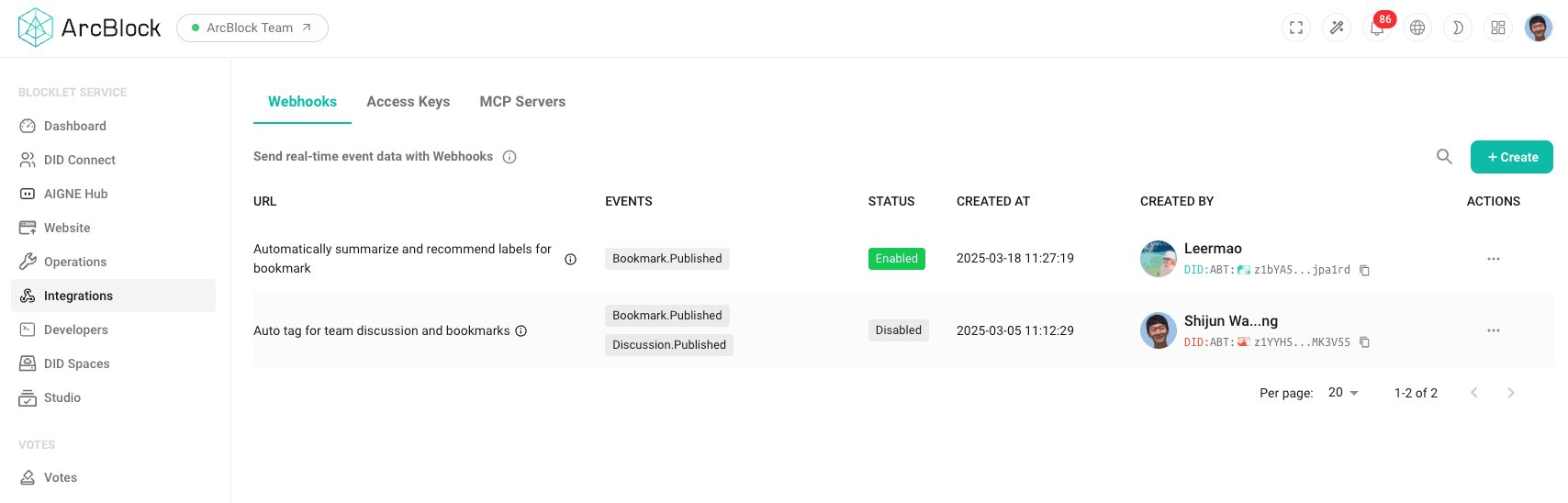
You can manage all your WebHooks from the Integrations section of the dashboard.
Creating a WebHook#
To create a new WebHook, follow these steps:
- Navigate to Integrations from the main menu.
- Select the WebHooks tab.
- Click the + Create button to open the configuration form.
- Enter the required details for your WebHook:
- Payload URL: The endpoint URL of your external service that will receive the POST requests.
- Secret (Optional): A secret token used to secure your WebHook. The service will use this secret to generate a signature for each request, allowing your endpoint to verify the sender's authenticity.
- Events: Select the specific events you want to subscribe to from the provided list. You can subscribe to one or more events.
- Ensure the Enable checkbox is checked if you want the WebHook to be active immediately.
- Click Save to create the WebHook.
Managing Existing WebHooks#
The WebHooks table provides a complete overview of all configured endpoints. From this list, you can:
- View Details: See the URL, subscribed events, and creation date for each WebHook.
- Enable/Disable: Use the toggle switch in the "Status" column to activate or deactivate a WebHook without deleting it. A disabled WebHook will not receive any event notifications.
- Edit: Click the edit action to modify the Payload URL, secret, or subscribed events.
- Delete: Permanently remove a WebHook and all its subscriptions. This action cannot be undone.
Event Types and Payloads#
The Blocklet Service emits various events related to system activities. When creating a WebHook, you can choose from a list of available events. The payload sent to your URL is a JSON object containing details about the event that occurred.
A typical payload structure includes:
event: The name of the event (e.g.,Bookmark.Published).payload: An object containing the data relevant to the event.timestamp: The time the event occurred.
Example Payload#
Here is an example of a JSON payload that might be sent for a Bookmark.Published event:
WebHook Payload Example
{
  "event": "Bookmark.Published",
  "payload": {
    "id": "1a2b3c4d-5e6f-7g8h-9i0j-1k2l3m4n5o6p",
    "url": "https://www.arcblock.io",
    "title": "ArcBlock Home",
    "author": "did:abt:z123...abc",
    "publishedAt": "2023-10-27T10:00:00Z"
  },
  "timestamp": "2023-10-27T10:00:05Z"
}Security#
To ensure that your endpoint only processes requests sent from your Blocklet Service, you can configure a secret for your WebHook. When a secret is set, the service includes an X-Hub-Signature-256 header in each POST request.
This header contains a SHA256 HMAC hex digest of the request body, generated using your secret as the key. You should validate this signature on your receiving server to confirm the request's integrity and authenticity.
Summary#
WebHooks are a powerful tool for creating automated, event-driven integrations between your Blocklet Service and other systems. By configuring WebHooks, you can extend the functionality of your blocklet and streamline your operational workflows without needing to poll for changes continuously.