Notification Service
The Blocklet Service provides a robust, multi-channel Notification Service designed to streamline communication with your users. Instead of building and maintaining separate integrations for different delivery methods, you can use a single, unified API to send notifications through various channels, including DID Wallet messages, emails, and push notifications via PushKit.
This service is built for reliability, using a queuing system to process notifications asynchronously. This ensures that delivery attempts are retried in case of transient failures and that the system remains responsive under load.
Overview#
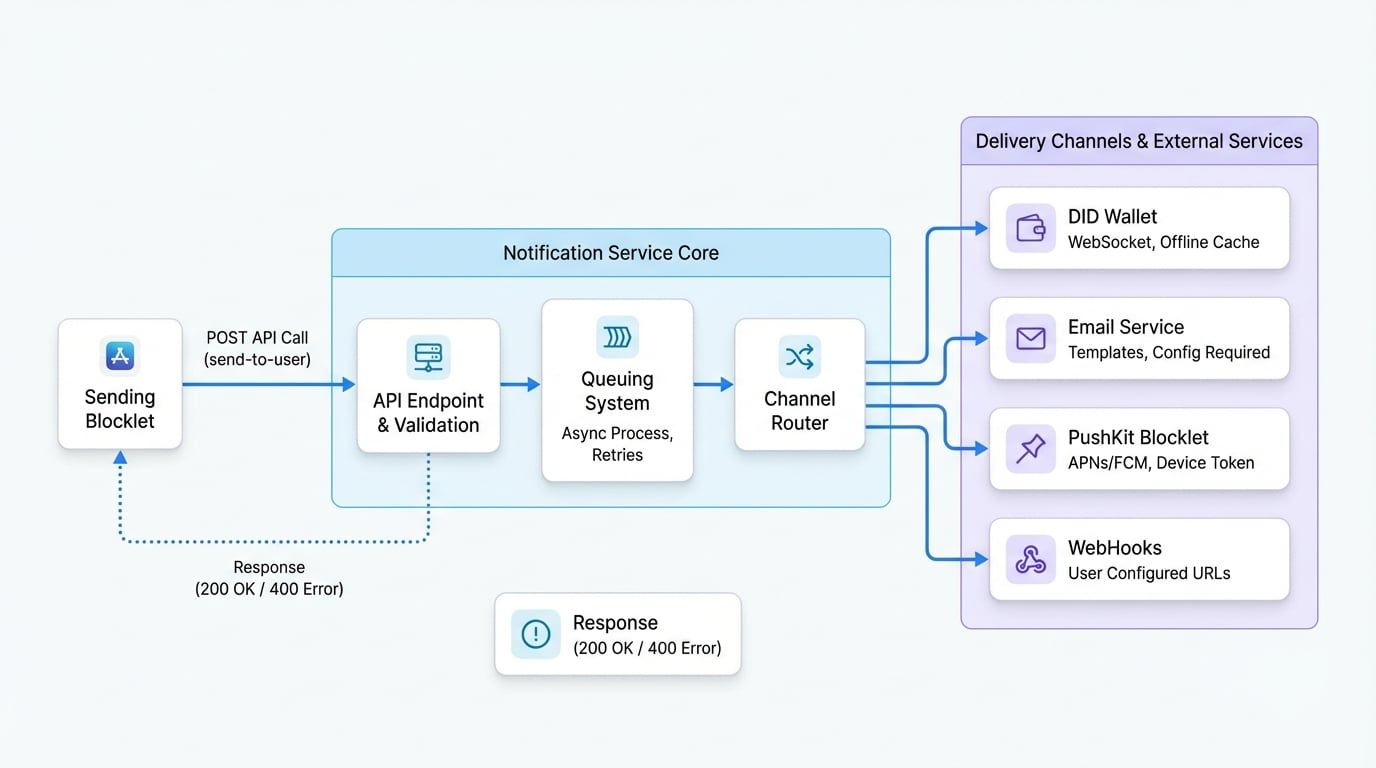
The notification process is initiated when your blocklet makes a secure API call to the Notification Service. The service then validates the request and queues a job to deliver the message to the specified users across the selected channels. The following diagram illustrates the high-level architecture:
API Usage#
Send Notification#
This is the primary endpoint for sending a notification to one or more users. It accepts a detailed payload specifying the sender, receivers, content, and desired delivery channels.
Endpoint#
POST /.well-known/service/api/send-to-user
Parameters#
The request body is a JSON object that includes sender information, a list of recipients, the notification payload, and sending options.
Information about the application sending the notification. This is typically populated automatically when using the helper function.
Additional options to control the delivery.
Code Example#
The most straightforward way to send a notification is by using the sendToUser helper function from within your blocklet's backend code. This function handles the necessary authentication and API call structure.
Send a notification to a user
const Notification = require('@blocklet/sdk/lib/util/send-notification');

async function sendWelcomeNotification(userDid) {
  const { wallet } = await req.getBlockletInfo();

  const notification = {
    title: 'Welcome!',
    body: 'Thank you for joining our application.',
    actions: [
      {
        type: 'link',
        name: 'Get Started',
        url: 'https://example.com/getting-started',
      },
    ],
  };

  try {
    const result = await Notification.sendToUser(
      userDid,
      notification,
      {
        appDid: wallet.address,
        appSk: wallet.secretKey,
      },
See all 7 lines
This example defines a simple welcome notification and sends it to a specified user DID. The getBlockletInfo method retrieves the necessary credentials to authenticate the request.
Channel-Specific Behavior#
- DID Wallet: If a user is online, the message is delivered instantly via WebSocket. If the user is offline, the message is cached and delivered the next time they connect, provided
keepForOfflineUseristrue. - Email: The system uses predefined templates to render the notification content into an HTML email. This requires the Email Service to be properly configured by the administrator in the dashboard.
- Push Notifications: The service retrieves the user's device token from their session data and forwards the notification to a configured PushKit blocklet, which then handles the platform-specific delivery to APNs (iOS) or FCM (Android).
- WebHooks: The service sends the notification payload to all webhook URLs configured by the user in their profile settings.
Responses#
- 200 OK: The notification has been successfully queued for delivery. The response body contains the created notification object(s) with their unique IDs.
- 400 Bad Request: The request is malformed. This could be due to an invalid sender token, a notification object that fails validation, or an invalid receiver DID. The response body will contain a descriptive error message.
Example Response (Success)#
Example Success Response
[
  {
    "id": "z8iZp8d7a9E5fG3bC1hJ2kL4mN6oP8qR0tV",
    "receiver": "z1...",
    "componentDid": "z2...",
    "teamDid": "z3...",
    "type": "notification",
    "status": "pending",
    "title": "Welcome!",
    "body": "Thank you for joining our application.",
    "createdAt": "2023-10-27T10:00:00.000Z",
    "updatedAt": "2023-10-27T10:00:00.000Z"
  }
]Summary#
The Notification Service provides a powerful and flexible way to engage with your users. By leveraging its multi-channel capabilities, you can ensure that your messages reach users on their preferred platform, enhancing the overall user experience of your application. For administrative tasks such as viewing notification history and configuring channels, please see the Notifications User Guide.