Open Graph
Overview#
The Open Graph service is a component of the Blocklet Service designed to dynamically generate customized images for social media sharing. When a link to your application is shared on platforms like Twitter, Facebook, or Slack, these platforms crawl the URL and look for Open Graph meta tags (og:image). This service provides a dynamic endpoint that generates an og:image on-the-fly, ensuring that shared links display rich, informative, and branded preview cards.
This functionality enhances user engagement and brand consistency by replacing generic link previews with visually appealing images that can include your application's logo, a custom title, description, and other relevant information. The service is built on Satori for SVG generation from HTML/CSS and Sharp for fast image processing, providing a robust and efficient solution for creating social sharing cards.
How It Works#
The Open Graph image generation process is straightforward and automated. Here is a step-by-step breakdown of the workflow:
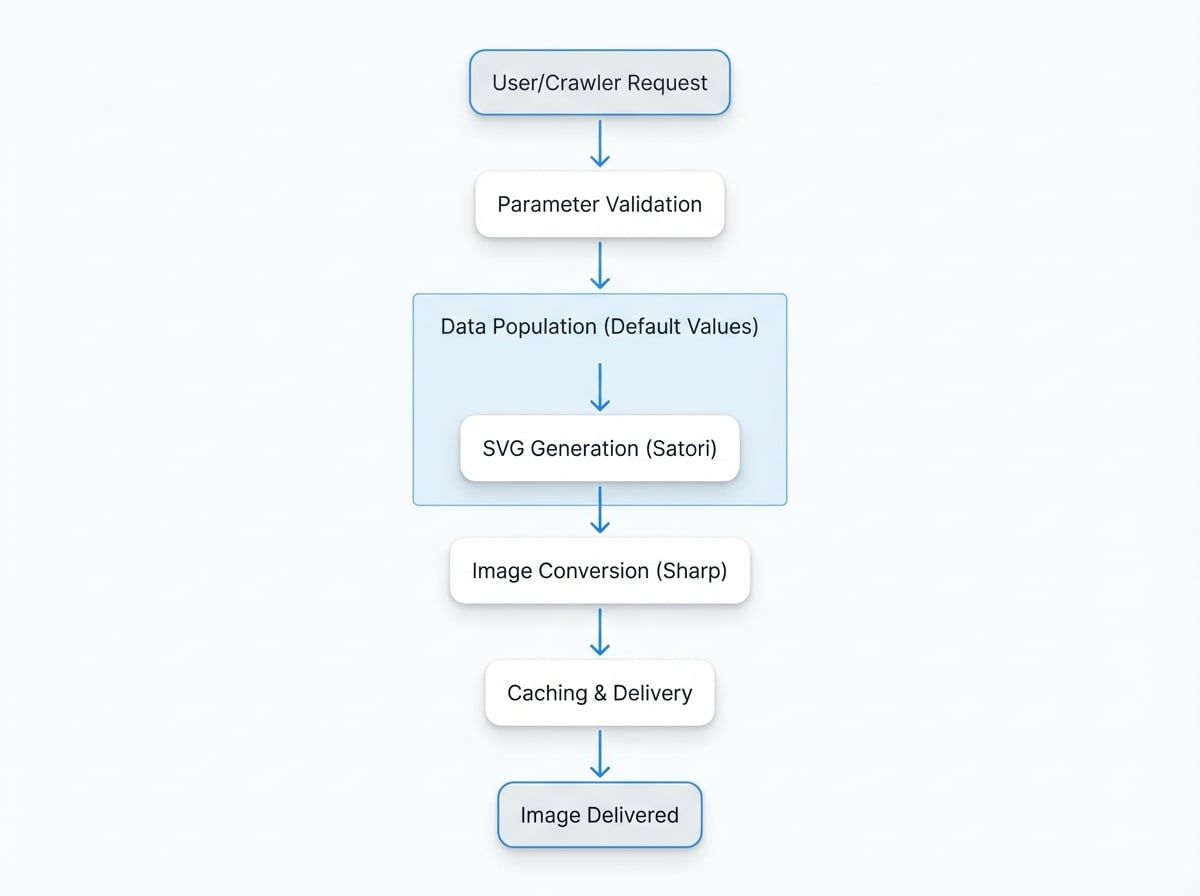
- Request: A user or a social media crawler accesses a specific URL endpoint for the Open Graph image. The URL includes query parameters that define the content and appearance of the image, such as the template, title, and description.
- Parameter Validation: The service receives the request and validates the query parameters against a predefined schema to ensure all required fields are present and correctly formatted for the chosen template.
- Data Population: The service populates an HTML template with the provided data. If certain parameters like
title,description, orlogoare omitted, the service automatically uses the default values configured for the blocklet. - SVG Generation: The populated HTML is processed by the Satori engine, which converts it into an SVG (Scalable Vector Graphic) image. This step includes rendering text, applying styles, and embedding any specified logos or cover images.
- Image Conversion: The generated SVG is then passed to the Sharp library, which converts it into a standard image format, typically PNG.
- Caching and Delivery: The final image is saved to a cache directory. On subsequent requests with the same parameters, the cached image is served directly to improve performance. The image is then delivered to the client with appropriate HTTP headers.
This entire process happens in real-time, allowing for the dynamic creation of a wide variety of social media cards tailored to different content within your application.
Usage#
To generate an Open Graph image, you need to construct a URL pointing to the service endpoint and append the desired query parameters. This URL can then be placed in the content attribute of the <meta property="og:image" content="..."> tag in your application's HTML head.
Endpoint#
The image is generated via a GET request to the following endpoint:
/.well-known/service/blocklet/og.pngFor example, if your application is running at https://example.com, the full endpoint URL would be: https://example.com/.well-known/service/blocklet/og.png
Query Parameters#
The appearance and content of the generated image are controlled by a set of URL query parameters. Below is a detailed list of the available parameters.
Specifies the layout template to use. Each template is designed for a different use case. Possible values are: default, section, cover, banner.
The main title text to be displayed on the image. Limited to 128 characters. If not provided, the blocklet's name is used. Required for section, cover, and banner templates.
The subtitle or description text. Limited to 512 characters. If not provided, the blocklet's description is used. Required for the section template.
A short text string, typically used to indicate a category or section name. Displayed above the title. Limited to 64 characters. Required for the section template.
A URL for a cover image. The image must be accessible via HTTPS. Required for the cover template.
A URL for a custom logo. The image must be accessible via HTTPS. If not provided, the blocklet's default logo is used. Required for the banner template.
Determines if the logo should be rendered with rounded corners. Set to 1 for a circular logo or 0 for a square logo.
Specifies the emoji style to use when rendering emojis in the text. Defaults to twemoji.
Set to 1 to bypass the cache and force the regeneration of the image. Useful for development and testing.
Templates#
The service provides four distinct templates, each suited for different types of content.
Default Template#
The default template is a general-purpose layout. It displays the application logo, a title, and a description against the blocklet's configured Open Graph background image.
- URL Example:
/.well-known/service/blocklet/og.png?template=default&title=Welcome%20to%20Our%20Application&description=Discover%20amazing%20features%20and%20services.
Section Template#
The section template is ideal for articles, blog posts, or documentation pages. It includes a section field to display a category or topic above the main title.
- URL Example:
/.well-known/service/blocklet/og.png?template=section§ion=Developer%20Guide&title=Getting%20Started&description=An%20introduction%20to%20our%20core%20features%20for%20developers.
Cover Template#
The cover template is designed to highlight a specific visual. It features a prominent cover image on one side with the title, description, and logo on the other.
- URL Example:
/.well-known/service/blocklet/og.png?template=cover&title=New%20Feature&description=Announcing%20Our%20Latest%20Update&cover=https://picsum.photos/id/10/660/630
Banner Template#
The banner template provides a wide-format image suitable for banners or headers. It prominently displays a large logo alongside the title.
- URL Example:
/.well-known/service/blocklet/og.png?template=banner&title=Official%20Partner%20Event&logo=https://picsum.photos/id/20/150/150&logoRounded=1
Summary#
The Open Graph service automates the creation of high-quality, branded images for social media sharing. By utilizing a simple URL-based API, developers can dynamically generate context-rich preview cards that improve visibility and user engagement. For more information on configuring your blocklet's default branding, see the Branding guide.