Audit Logs
The Audit Logs service provides administrators with a comprehensive and chronological record of all activities that occur within the system. This feature is essential for maintaining security, ensuring compliance, and troubleshooting operational issues. By tracking events such as user logins, configuration changes, and other significant actions, the audit trail offers a clear and searchable history of system usage.
Navigating to Audit Logs#
To access the audit trail, navigate to the main dashboard of your Blocklet Service and follow these steps:
- Select Operations from the primary navigation menu.
- Click on the Audit Logs sub-menu item.
This will take you to the main Audit Logs page, where all recorded system events are displayed.
Understanding the Audit Log Interface#
The Audit Logs interface is designed to provide a clear and detailed view of system activities. The main component is a table that lists all log entries in reverse chronological order, with the most recent events appearing at the top.
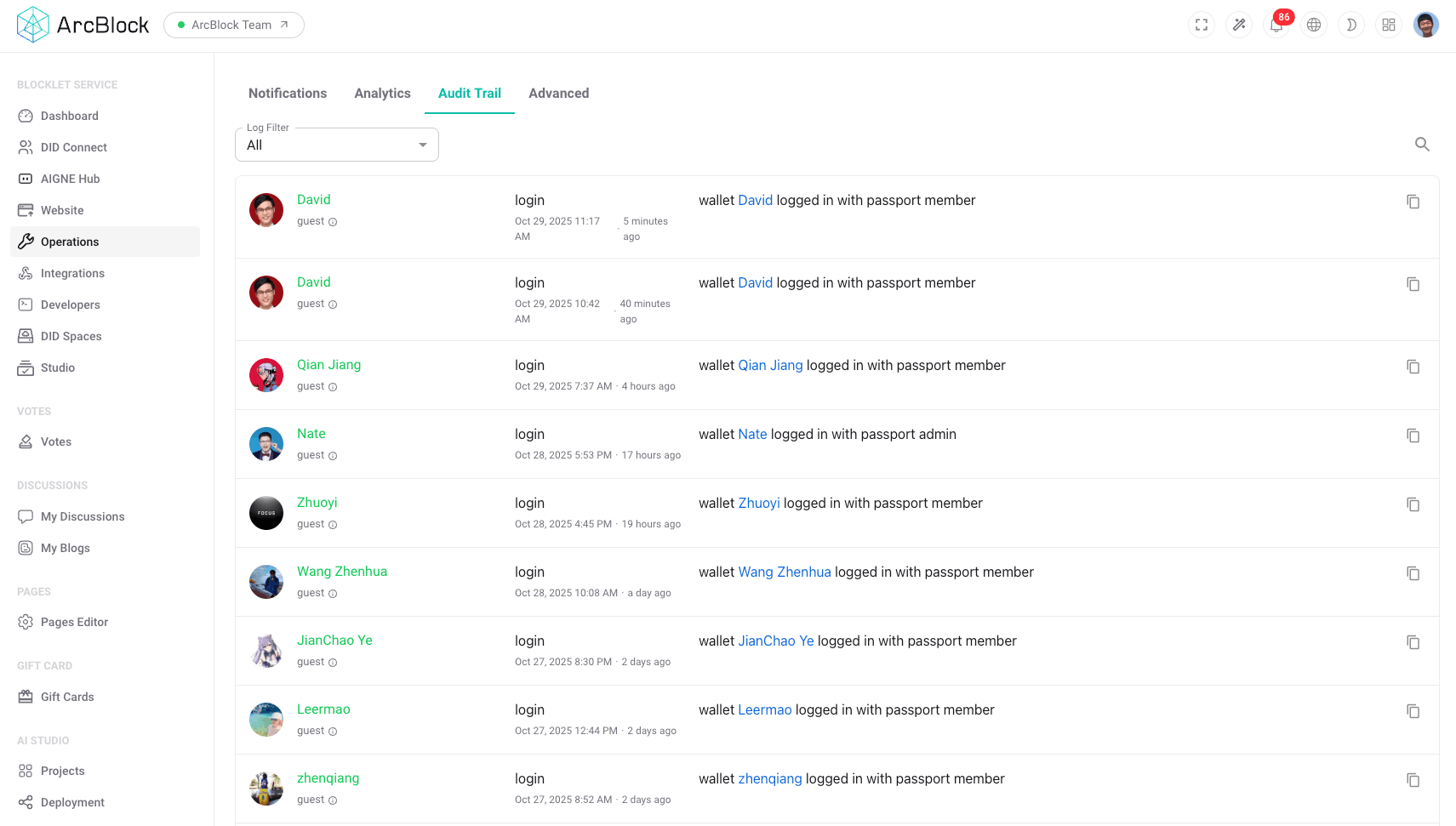
Each entry in the audit log table contains key information to help you understand the event:
- User: The user or system process that performed the action.
- Action: A description of the event that occurred (e.g., "User logged in").
- Timestamp: The exact date and time when the event was recorded.
Key Features#
The Audit Logs service includes powerful tools to help you efficiently navigate and analyze the data.
Advanced Filtering and Search#
To quickly locate specific events, you can use the filtering and search capabilities. This allows you to narrow down the log entries based on various criteria, such as:
- Date Range: Filter logs to view events that occurred within a specific period.
- User: Isolate all activities performed by a particular user.
- Action Type: Search for specific types of events, such as logins, updates, or deletions.
Detailed Log Inspection#
For a more in-depth understanding of an event, you can inspect the details of any log entry. Clicking on a specific log in the table will open a detailed view, providing additional context and data related to the event. This can include information like the user's IP address, the specific resource that was affected, and the before-and-after state of any changes.
Common Use Cases#
Administrators can leverage the Audit Logs for several critical operational tasks:
- Security Monitoring: Actively monitor for suspicious activities, such as multiple failed login attempts or unauthorized access to sensitive areas.
- Compliance and Auditing: Generate reports and provide evidence of system activity to meet internal policies or external regulatory requirements.
- Troubleshooting: Investigate issues by reconstructing the sequence of events that led to a problem, helping to identify the root cause more quickly.
- User Activity Review: Track actions performed by specific users to ensure they are complying with established protocols and permissions.
Summary#
The Audit Logs feature is an indispensable tool for administrators responsible for the security and stability of the Blocklet Service. It provides a transparent and searchable record of all system activities, enabling effective monitoring, streamlined troubleshooting, and rigorous compliance. Regularly reviewing audit logs is a best practice for maintaining a secure and well-managed operational environment.