Security
For administrators, the Security section is where you define advanced security rules, access policies, and response handling to protect your application. It provides a centralized console to manage who can access your resources and how browsers should handle your content to mitigate common web vulnerabilities.
Overview#
The Security section within DID Connect provides administrators with powerful tools to safeguard their applications. By defining a granular set of rules and policies, you can control who can access your application, what they can do, and how the application responds to requests. This ensures a secure and robust environment for your users and data.
The security model is built on three core components that work together:
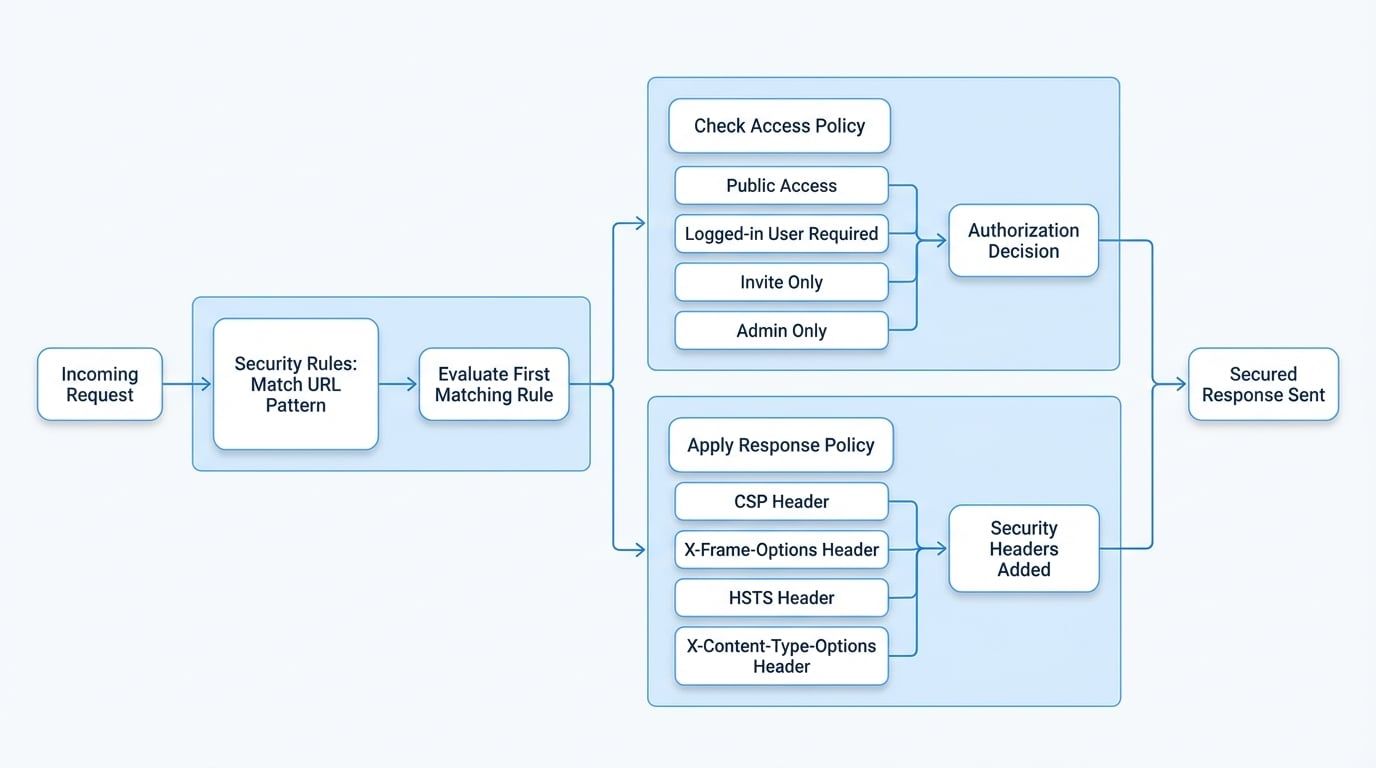
- Security Rules: The entry point for incoming requests. Each rule matches a specific URL path pattern and links it to an Access Policy and a Response Policy.
- Access Policies: These policies determine whether a user is authorized to access a resource. Examples include allowing public access, requiring a login, or restricting access to invitees only.
- Response Policies: These define the HTTP security headers sent back to the client, enhancing protection against common web vulnerabilities like cross-site scripting (XSS) and clickjacking.
The following diagram illustrates how an incoming request is processed through the security framework:
Security Rules#
Security Rules are the foundation of your application's access control. They act as a router, evaluating incoming requests against defined URL path patterns and applying the corresponding access and response policies. You can create multiple rules to handle different parts of your application with varying levels of security.
For example, you could have a rule that makes your marketing pages (/about, /features) public, another that requires users to be logged in to see their dashboard (/app/*), and a third that restricts access to an admin panel (/admin/**) to a specific user group.
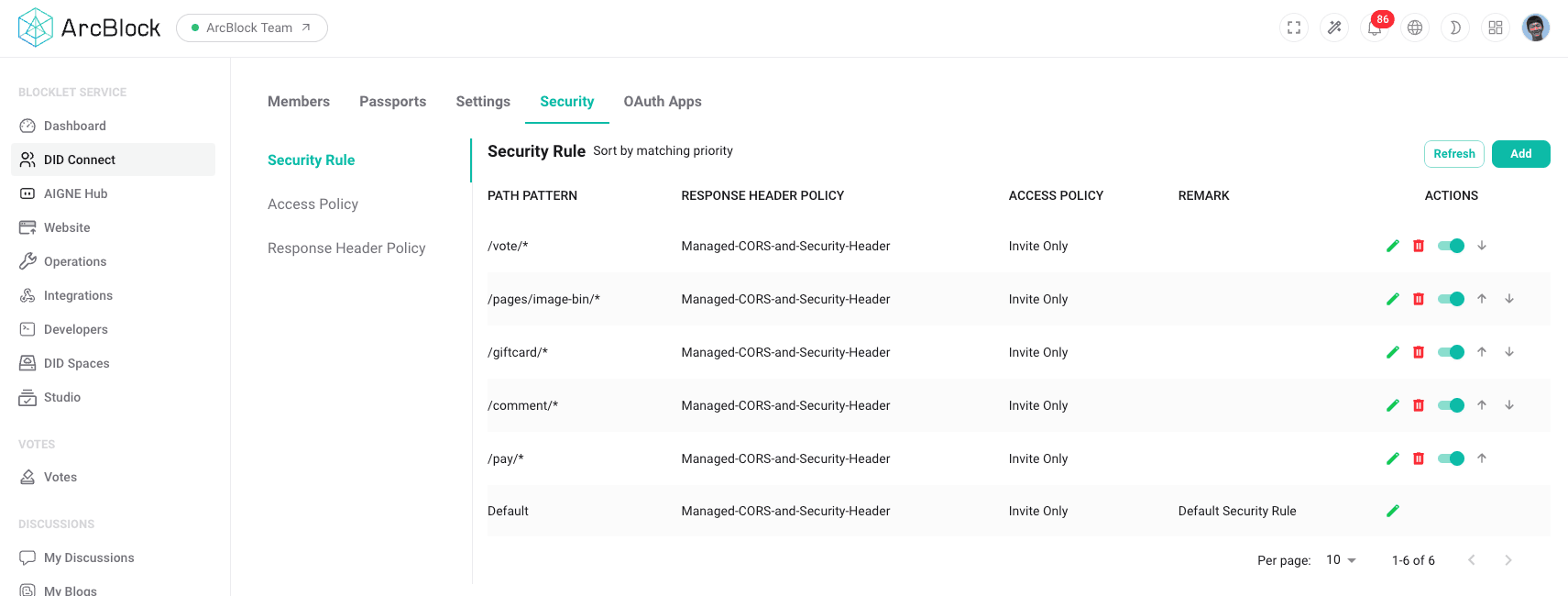
The main management interface allows you to:
- Create New Rules: Define new path patterns and link them to policies.
- Order Rules: The order is critical. Rules are evaluated from top to bottom, and the first matching rule is applied. You can drag and drop rules to set the correct priority.
- Enable/Disable Rules: Temporarily turn rules on or off without deleting them.
- Edit and Delete Rules: Modify existing rules as your application's needs change.
Configuration Fields#
When creating or editing a Security Rule, you will configure the following:
- Path Pattern: A URL pattern to match incoming requests (e.g.,
/app/*,/api/v1/**,/). Standard path-matching syntax is supported. - Access Policy: The access policy to apply if the path matches.
- Response Policy: The set of response headers to apply if the path matches.
Access Policies#
Access Policies define the authentication and authorization requirements for a request. They specify who is allowed to access a particular resource. The system includes several built-in policies that cover common use cases.
Common Access Policies#
Policy Name | Description |
|---|---|
Public | Allows access to anyone, without requiring authentication. Ideal for landing pages, blogs, or public content. |
Any Logged-in User | Requires the user to be authenticated. Any user with a valid session can access the resource. |
Invite Only | Restricts access to users who have been explicitly invited to the application. This is useful for private betas or exclusive communities. |
Admin Only | Restricts access to users with administrative privileges. |
You can assign one of these policies to each Security Rule to enforce the desired level of access control across your application.
Response Policies#
Response Policies control the HTTP security headers that your application sends back to the browser. These headers are a crucial part of a defense-in-depth security strategy, helping to mitigate client-side attacks.
By configuring these policies, you can instruct browsers on how to handle your content securely.
Common Security Headers#
- Content-Security-Policy (CSP): Helps prevent cross-site scripting (XSS) and other code injection attacks by specifying which dynamic resources are allowed to load.
- X-Frame-Options: Protects against clickjacking attacks by controlling whether your site can be embedded in an
<iframe>,<frame>,<embed>, or<object>. - Strict-Transport-Security (HSTS): Forces browsers to communicate with your server only over HTTPS, preventing downgrade attacks.
- X-Content-Type-Options: Prevents browsers from MIME-sniffing a response away from the declared content type, which can help prevent certain types of attacks.
You can create different sets of response policies (e.g., a strict policy for authenticated application areas and a more lenient one for public pages) and associate them with your Security Rules.
Summary#
The Security section provides a flexible and powerful framework for protecting your application. By combining Security Rules, Access Policies, and Response Policies, you can create a tailored security posture that meets the specific needs of your application, ensuring that your resources are only accessible to authorized users and that your application is hardened against common web threats.