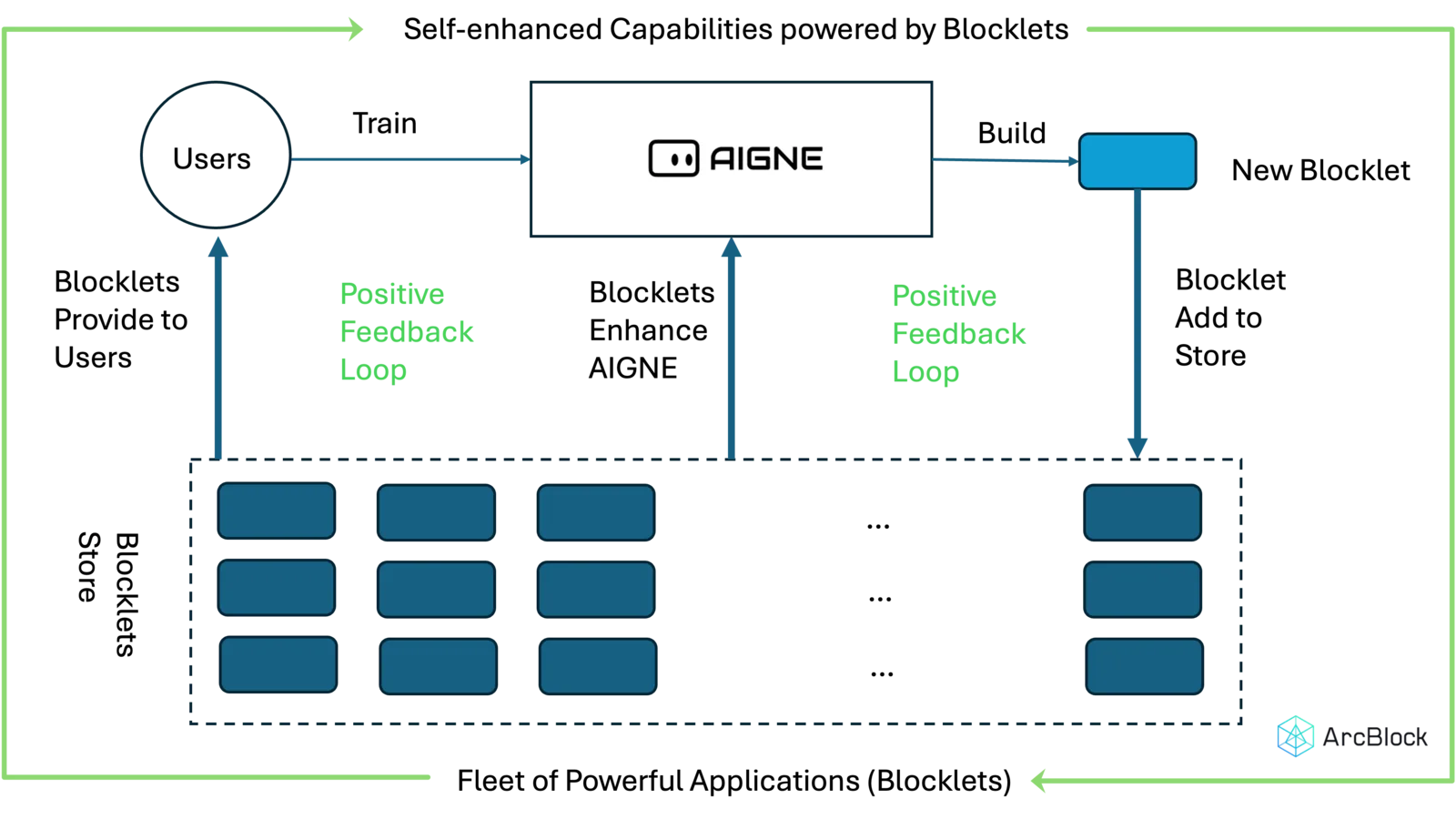
Developers of ArcBlocklet should all be familiar with this diagram, which shows how AIGNE utilizes Blocklet Studio and Blocklet Store to form a flywheel effect. AIGNE users can create many applications and publish them to the Store, thereby feeding back into AIGNE's ecosystem. In fact, any developer of a Blocklet can create their own flywheel effect by integrating Blocklet Studio and Blocklet Store.
What types of Blocklets are suitable for integration with Blocklet Studio?
Most Blocklets do not need to integrate with Blocklet Studio. All Blocklet administrators can use Blocklet Studio by default, but if you want Blocklet users to also use Blocklet Studio, you need to integrate the Blocklet with Blocklet Studio.
A typical scenario for integrating a Blocklet is when your Blocklet needs to provide users with the ability to create Blocklets and distribute them through the Blocklet Store.
Here are some examples of cases where integrating Blocklet Studio is suitable:
- AIGNE integrates with Blocklet Studio, converting each AI application created by AIGNE into a Blocklet and distributing it on Blocklet Store.
- Pages-Kit integrates with Blocklet Studio, converting created Pages components into resource-type Blocklets and distributing them on Blocklet Store.
Seamlessly Integrate Blocklet Studio in Blocklet
Integrating Blocklet Studio in Blocklet is very simple, just declare it using React components:
import { BlockletStudio } from '@blocklet/ui-react';

<BlockletStudio

mode="dialog"

tenantScope={project.id}

componentDid={MY_COMPONENT_DID}

open={open}

setOpen={() => setOpen()}

onOpened={() => onOpened?.()}
/>
Customizing Default Parameters and Optional Resources
Each project has unique requirements, so users can customize the default parameters and optional resources of the Blocklet Studio creation process. Users can set common parameters and resources in advance according to the specific situation of the project, saving publishing steps. Here is a more complete parameter example:
import { BlockletStudio } from '@blocklet/ui-react';

<BlockletStudio

...

// Information for creating the application

title={project.name || ''}

description={project.description || ''}

note=""

introduction=""

logo={logo}

componentDid={MY_COMPONENT_DID}

// Parameters to pass through to get blocklet resource

resourcesParams={{ projectId: project.id }}

// Whether the user can edit dependent components

dependentComponentsMode="readonly"

// Default selected resources

resources={{

[MY_COMPONENT_DID]: [],

}}
/>
Complete component parameters:
interface BlockletStudioProps {
  open: boolean;
  setOpen: (open: boolean) => void;
  onOpened?: () => void;
  componentDid: string;
  tenantScope?: string;
  resourcesParams?: Record<string, any>;
  mode?: string;
  title?: string;
  logo?: string;
  description?: string;
  introduction?: string;
  note?: string;
  onUploaded?: (data: unknown) => void; // Callback function after upload
  onReleased?: (data: unknown) => void; // Callback function after releasing a new release
  onConnected?: (data: unknown) => void; // Callback function after connection
  components?: Record<string, unknown>[]; // Default components list
  resources?: Record<string, unknown>; // Default resources
  componentsTitle?: string;
  resourcesTitle?: string;
  style?: React.CSSProperties;
  zIndex?: number;
  dependentComponentsMode?: 'auto' | 'readonly'; // Disable component selection
}
Integrated Effect Demonstration
By above method, the integrated Blocklet Studio effect of AIGNE internally is as follows:
Multi-tenant mode and Single-tenant mode
To meet the needs of different users, the new version distinguishes in detail between multi-tenant mode and single-tenant mode. In multi-tenant mode, each user can only manage the Blocklet they created themselves. In Dahboard, we can modify the tenant mode of Blocklet, and Blocklet Studio will follow this configuration, without the need for additional development for different tenant modes.