What is blocklet.js?
blocklet.jsis used to load blocklet info that can be used in browser environmentblocklet.jsis an endpoint served by blocklet serverblocklet.jsis available from any path, you get the same response with following requests:- https://developer.blocklet.io/blocklet.js
- https://arcblock.io/docs/blocklet-developer/blocklet.js
blocklet.jscan return info in javascript or json format- When requested as javascript, which is the default mode, you can use
window.blocklet - When requested as json, you must explicitly specify
type=jsonin the query string blocklet.jsis adaptive to any blocklet composition, both static and dynamic compositionblocklet.jscontent may change with blocklet composition updates
How is blocklet.js composed?
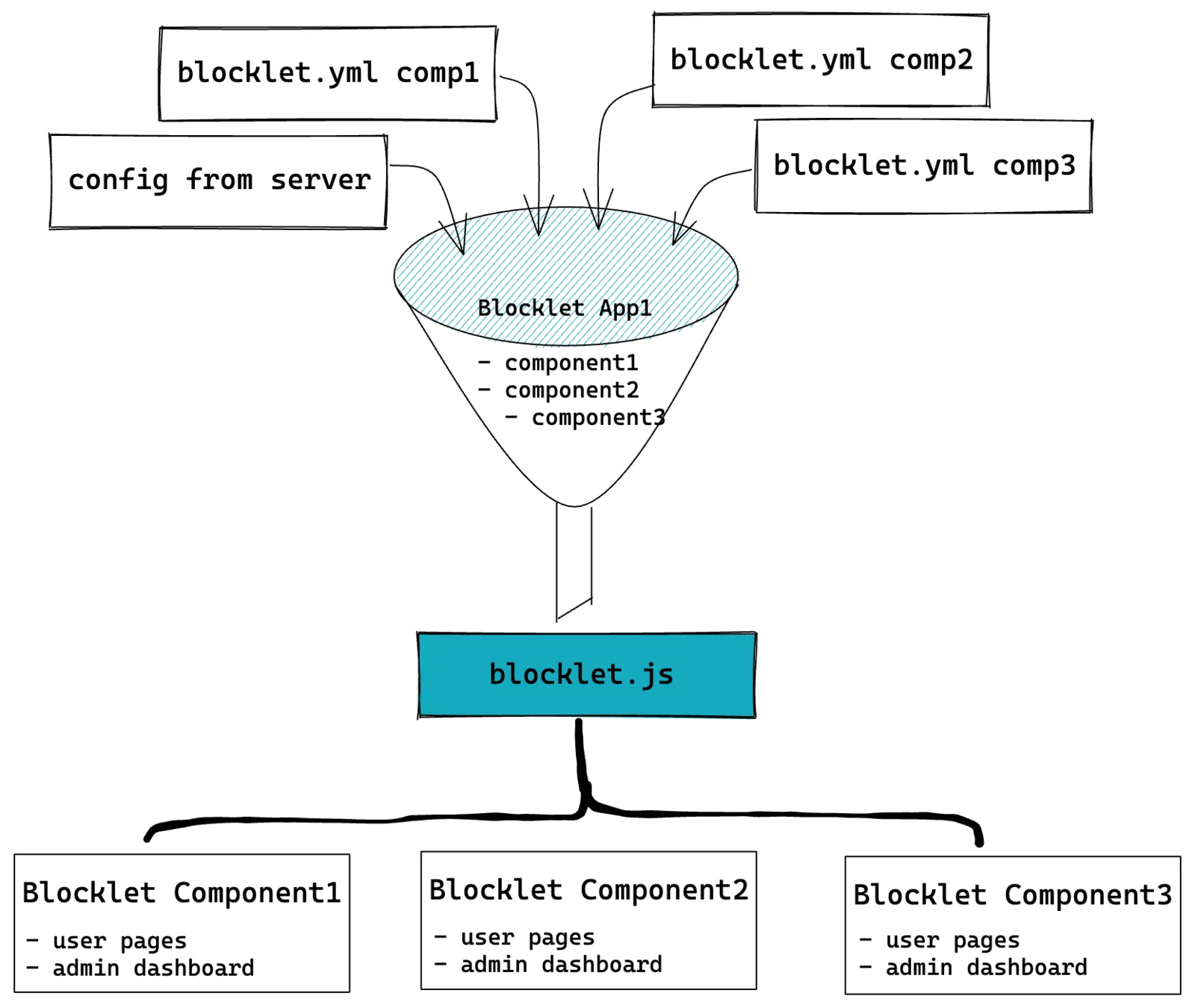
The following diagram describes how blocklet.js is created in blocklet server.
How to use blocklet.js?
To use blocklet.js, you must include the following script tag in your html file before any other script tags:
<script src="__blocklet__.js"></script>Please do not add a beginning slash to the script src attribute, since blocklet.js can be loaded form any endpoint.
Then you can access window.blocklet in your javascript code:
The response from https://developer.blocklet.io/__blocklet__.js is like following:
window.blocklet = {
  // basic app info, appName, appDescription, appUrl, appLogo can be configured in blocklet server
  appId: 'zNKh7m9JccKmZY8vCSbkdYVoXem5CceAiYD1',
  appName: 'Blocklet Developer',
  appDescription: 'Blocklet Developer portal and documentation',
  appUrl: 'https://developer.blocklet.io',
  appLogo: '/.well-known/service/blocklet/logo/',

  // whether current blocklet is a component, differs when requesting from different path
  isComponent: false,

  // the blocklet app version === the version of the root blocklet
  version: '0.1.77',
  did: 'z8iZrq2YrLLWUz6X77bfFL4wBfZuEfXuj1R2m',

  // the blocklet group mountPoint
  prefix: '/',
  groupPrefix: '/',

  webWalletUrl: 'https://web.abtwallet.io',

  // the navigation of the composed service
  // it's parsed and merged from all components
  navigation: [
    { title: { en: 'Guides', zh: '指南' }, link: { en: '/docs/en/', zh: '/docs/zh/' } },
    {
      title: { en: 'ToolKit', zh: '工具箱' },
      link: '',
      items: [
        {
          title: 'Blocklet SDK',
          link: { en: '/docs/en/reference/blocklet-sdk/', zh: '/docs/zh/reference/blocklet-sdk/' },
        },
      ],
    },
  ],

  // component blocklet mounted in this app
  componentMountPoints: [
    {
      title: 'Meilisearch',
      name: 'meilisearch',
      did: 'z8iZorY6mvb5tZrxXTqhBmwu89xjEEazrgT3t', // the component blocklet did
      mountPoint: '/meilisearch', // the component path
    },
    {
      title: 'Blocklet Developer Docs',
      name: 'blocklet-developer-docs',
      did: 'z8iZwU5C5Y5SfSqC7LqKAbY9NiqFNjUjcJfPK',
      mountPoint: 'docs',
    },
  ],

  preferences: {
    key1: 'value',
    key2: 'value2',
  },
};
Please reference Blocklet Preferences for how to change the structure and value in window.blocklet.preferences.