This guide provides instructions for configuring and using xAI's language models, specifically Grok, within the AIGNE Framework. It covers the installation of the necessary package, API key configuration, model instantiation, and examples of both standard and streaming invocations.
The @aigne/xai package serves as a direct interface to the xAI API, allowing developers to integrate Grok's capabilities into their applications through the standardized ChatModel interface provided by the AIGNE Framework.
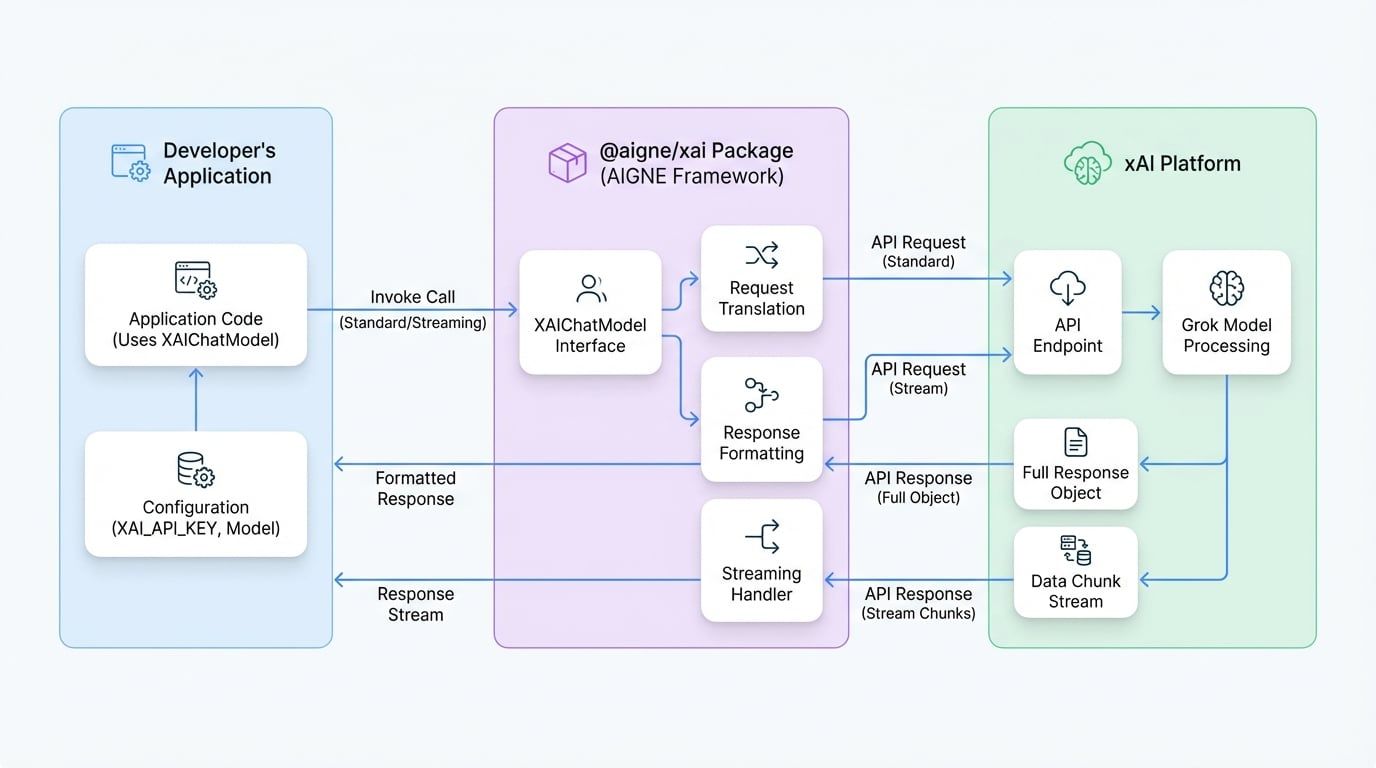
The following diagram illustrates the interaction between the developer, the @aigne/xai package, and the xAI Platform.
Installation#
To begin, install the @aigne/xai package along with the AIGNE core library using your preferred package manager.
npm
```bash
npm install @aigne/xai @aigne/core
```
yarn
```bash
yarn add @aigne/xai @aigne/core
```
pnpm
```bash
pnpm add @aigne/xai @aigne/core
```
Configuration#
The XAIChatModel class is the primary interface for interacting with the xAI API. To use it, you must configure it with your xAI API key.
You can provide the API key in two ways:
- Directly in the constructor: Pass the key via the
apiKey property. - Environment variable: Set the
XAI_API_KEY environment variable. The model will automatically detect and use it.
Constructor Options#
When creating an instance of XAIChatModel, you can provide the following options:
Your xAI API key. If not provided, the system will fall back to the XAI_API_KEY environment variable.
model
string
default:grok-2-latest
The specific xAI model to use for chat completions. Defaults to grok-2-latest.
baseURL
string
default:https://api.x.ai/v1
The base URL for the xAI API. This is pre-configured and typically does not need to be changed.
Additional options to pass to the xAI API, such as temperature, topP, etc.
Basic Usage#
The following example demonstrates how to instantiate the XAIChatModel and invoke it to get a response.
import { XAIChatModel } from "@aigne/xai";

const model = new XAIChatModel({
  // Provide API key directly or use environment variable XAI_API_KEY
  apiKey: "your-api-key", // Optional if set in env variables
  // Specify model (defaults to 'grok-2-latest')
  model: "grok-2-latest",
  modelOptions: {
    temperature: 0.8,
  },
});

const result = await model.invoke({
  messages: [{ role: "user", content: "Tell me about yourself" }],
});

console.log(result);
Example Response#
The invoke method returns an object containing the model's response and usage metadata.
{
  "text": "I'm Grok, an AI assistant from X.AI. I'm here to assist with a touch of humor and wit!",
  "model": "grok-2-latest",
  "usage": {
    "inputTokens": 6,
    "outputTokens": 17
  }
}
Streaming Responses#
For real-time applications, you can stream the response from the model. Set the streaming: true option in the invoke method to receive data in chunks as it becomes available.
import { isAgentResponseDelta } from "@aigne/core";
import { XAIChatModel } from "@aigne/xai";

const model = new XAIChatModel({
  apiKey: "your-api-key",
  model: "grok-2-latest",
});

const stream = await model.invoke(
  {
    messages: [{ role: "user", content: "Tell me about yourself" }],
  },
  { streaming: true },
);

let fullText = "";
const json = {};

for await (const chunk of stream) {
  if (isAgentResponseDelta(chunk)) {
    const text = chunk.delta.text?.text;
    if (text) fullText += text;
    if (chunk.delta.json) Object.assign(json, chunk.delta.json);
  }
}
Streaming Output#
When iterating through the stream, you can accumulate the text delta to form the complete message and merge the JSON parts to get the final metadata.
I'm Grok, an AI assistant from X.AI. I'm here to assist with a touch of humor and wit!
{
  "model": "grok-2-latest",
  "usage": {
    "inputTokens": 6,
    "outputTokens": 17
  }
}
This concludes the guide on using the @aigne/xai package. For more information on other available models, please see the Models Overview.