Orchestrator
The Orchestrator agent provides a structured, reliable solution for managing complex, multi-step AI workflows. It breaks down high-level objectives into a series of manageable tasks, executes them sequentially, and synthesizes the results into a final, coherent response, enabling autonomous task planning and execution.
This document details the architecture, configuration, and practical application of the Orchestrator agent.
Overview#
The Orchestrator agent implements a sophisticated pattern for autonomous task management using a three-phase architecture: Planner → Worker → Completer. This structure allows it to handle complex objectives that require multiple steps, tools, and iterative refinement.
The core components are:
- Planner: Analyzes the main objective and the current progress to determine the most logical next task.
- Worker: Executes the specific task assigned by the Planner, using any available tools or skills.
- Completer: Once all tasks are finished, it reviews the entire execution history and synthesizes the individual results into a final, comprehensive output.
- Execution State: A record-keeping component that tracks the history, status, and results of all tasks performed during the workflow.
This iterative process continues until the Planner determines that the overall objective has been achieved.
Architecture#
The workflow is a loop where the Planner and Worker collaborate until the objective is met, followed by a final synthesis step from the Completer. The following diagram illustrates this process:
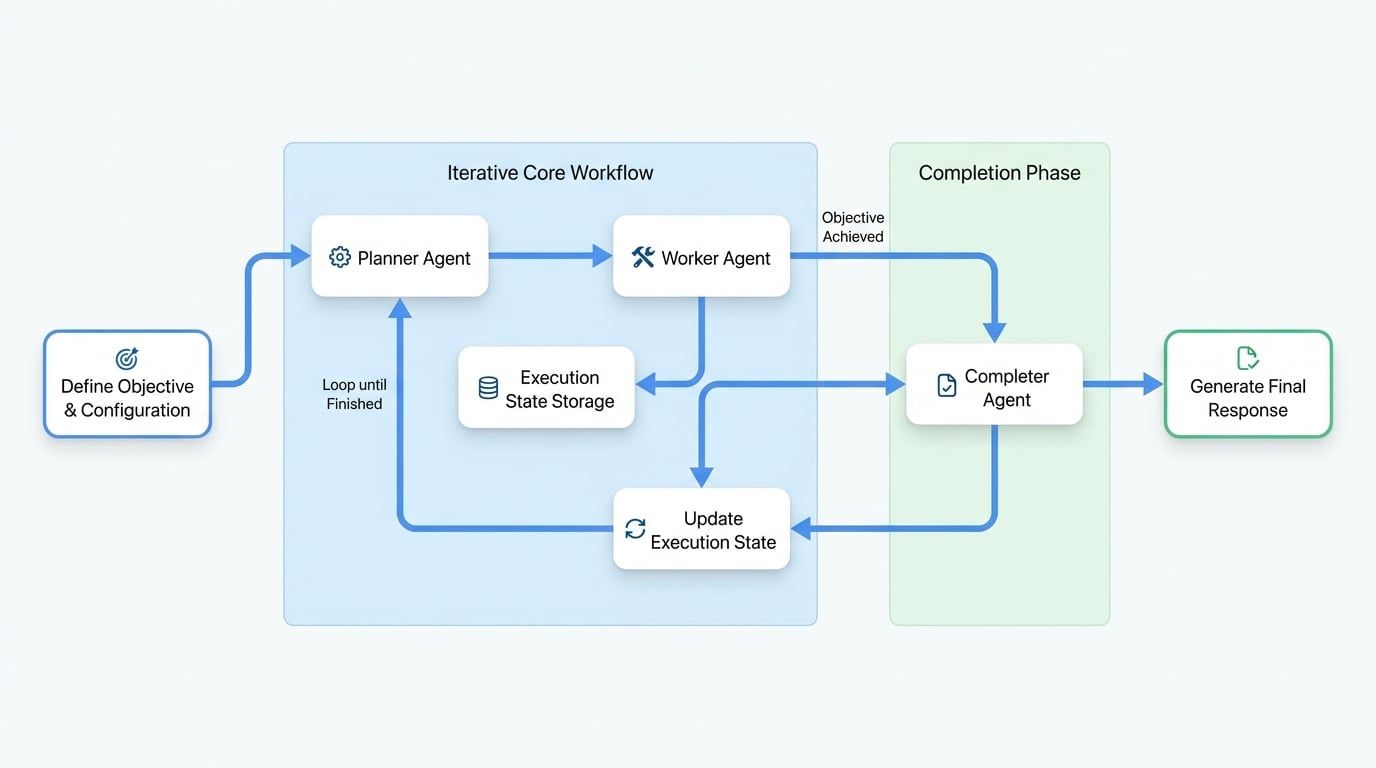
The process unfolds as follows:
- Initialization: The Orchestrator receives a high-level objective and initializes an empty execution state.
- Planning: The Planner examines the objective and the current state (initially empty) and devises the first task.
- Execution: The Worker receives the task from the Planner and executes it. The outcome (success or failure, along with results or errors) is recorded.
- State Update: The result of the task is appended to the Execution State.
- Iteration: The process repeats from Step 2. The Planner now reviews the objective and the updated history in the Execution State to determine the next task.
- Completion: When the Planner decides the objective is complete, it signals the end of the loop. The Completer then takes over, reviews the full history in the Execution State, and generates the final response.
Basic Usage#
The most direct method for configuring an Orchestrator agent is through a YAML definition file.
Example Configuration#
Here is a basic setup to create an orchestrator that analyzes a project structure.
agents/orchestrator.yaml
type: "@aigne/agent-library/orchestrator"
name: orchestrator

# Define the overall objective for the agent.
# External files can be used for cleaner separation.
objective:
  url: objective.md

# Configure state management to control the workflow's execution.
state_management:
  max_iterations: 20      # Set a limit on planning-execution cycles.
  max_tokens: 100000      # Set a token limit for the execution state context.
  keep_recent: 20         # Keep the 20 most recent tasks when compressing state.

# Configure the Agent File System (AFS) to provide a workspace.
afs:
  modules:
    - module: local-fs
      options:
        name: workspace
        localPath: .
        description: Workspace directory for the orchestrator agent.
The objective.md file contains the primary goal for the agent.
agents/objective.md
Analyze the project structure and generate a comprehensive report.

- Ignore node_modules, .git, dist, build directories.
- Provide accurate information based on actual file contents.
- Include key findings and recommendations.

{% if message %}
## User Instructions
{{ message }}
{% endif %}
Finally, the main aigne.yaml file ties everything together.
aigne.yaml
#!/usr/bin/env aigne

model: google/gemini-1.5-pro
agents:
  - agents/orchestrator.yaml
Configuration Reference#
The Orchestrator agent is configured through a set of options that define its behavior, components, and constraints.
Top-Level Options#
See StateManagementOptions below for details.
StateManagementOptions#
These options control the execution loop and prevent infinite runs or context overflow.
Customizing Components#
You can replace the default Planner, Worker, or Completer with your own custom agents to tailor the orchestrator's logic to a specific domain. This is typically done by creating an AI agent with custom instructions.
Custom Planner#
The Planner's role is to decide the next action.
- Standard Input:
objective,skills,executionState. - Standard Output: An object containing
nextTask(string) andfinished(boolean).
Example Configuration:
agents/orchestrator.yaml
type: "@aigne/agent-library/orchestrator"
objective:
  url: objective.md
planner:
  type: ai
  instructions:
    url: custom-planner.md
Example Instructions (custom-planner.md):
## Your Role
You are a strategic planner for code analysis tasks. Your responsibility is to decide the next single task to perform based on the overall objective and the history of completed tasks.

## Objective
{{ objective }}

## Available Skills
{{ skills | yaml.stringify }}

## Current Execution State
{{ executionState | yaml.stringify }}

## Planning Guidelines
- Review `executionState` to avoid repeating work.
- Decompose the objective into small, logical steps.
- Plan only one task at a time.
- If all work is done, set `finished: true`.

## Output Format
Return a JSON object with the following fields:
- `nextTask`: A string describing the next task to execute. Omit this field if finished.
- `finished`: A boolean indicating if the objective is complete.
Custom Worker#
The Worker's role is to execute a single task.
- Standard Input:
objective,task,executionState. - Standard Output: An object containing
success(boolean),result(string, on success), anderror(object withmessage, on failure).
Example Configuration:
agents/orchestrator.yaml
# ...
worker:
  type: ai
  instructions:
    url: custom-worker.md
Example Instructions (custom-worker.md):
## Your Role
You are a professional code analysis worker. Your job is to execute the assigned task using the available tools.

## Overall Objective (For Context Only)
{{ objective }}

## Current Task
{{ task }}

## Execution Guidelines
- Focus strictly on completing the `Current Task`.
- Use the provided tools and skills to accomplish the task.
- If successful, provide the result. If not, explain the failure in the error message.

## Output Format
Return a JSON object with the following fields:
- `success`: A boolean indicating if the task succeeded.
- `result`: A string with the task's output. Required on success.
- `error`: An object with a `message` field. Required on failure.
Custom Completer#
The Completer's role is to synthesize the final report.
- Standard Input:
objective,executionState. - Standard Output: A user-defined structure, validated against the orchestrator's
output_schema.
Example Configuration:
agents/orchestrator.yaml
# ...
completer:
  type: ai
  instructions:
    url: custom-completer.md
  output_schema:
    type: object
    properties:
      summary:
        type: string
        description: An executive summary of the findings.
      recommendations:
        type: array
        items:
          type: string
        description: A list of actionable recommendations.
    required: [summary]
Example Instructions (custom-completer.md):
## Your Role
You are responsible for synthesizing all task results from the execution history into a final, structured response.

## User Objective
{{ objective }}

## Execution Results
{{ executionState | yaml.stringify }}

## Synthesis Guidelines
- Analyze all successful and failed tasks in `executionState`.
- Consolidate the individual results into a coherent report.
- Structure your response according to the defined output schema.

## Output Format
Return a JSON object conforming to the output schema.
Best Practices#
To maximize the effectiveness of the Orchestrator agent, adhere to the following principles.
1. Define Clear Objectives#
Provide specific, actionable, and unambiguous objectives. A well-defined goal is critical for the Planner to create a logical task sequence.
- Good: "Analyze the authentication system in
/src/auth, identify security vulnerabilities, and provide specific recommendations for each issue found." - Poor: "Look at the code and tell me what's wrong."
2. Specialize Component Roles#
Ensure each component focuses on its designated role. The Planner should only plan, not execute. The Worker should only execute its current task, not plan future ones.
3. Use State Compression for Long Workflows#
For complex objectives that may require many iterations, configure state management to prevent the context from becoming too large for the model.
state_management:
  max_iterations: 50
  max_tokens: 80000      # Prevent context overflow
  keep_recent: 25        # Keep recent task history for context
4. Use Different Models for Different Components#
Optimize for cost and performance by assigning different models to each component based on its needs. A powerful model for planning and synthesis, and a faster, cheaper model for execution, is often a cost-effective strategy.
planner:
  type: ai
  model: anthropic/claude-3-5-sonnet-20240620

worker:
  type: ai
  model: google/gemini-1.5-flash

completer:
  type: ai
  model: anthropic/claude-3-5-sonnet-20240620
5. Validate Inputs and Outputs#
Use input_schema and output_schema to enforce type safety and ensure the agent receives and produces data in the expected format. This is especially critical when the objective prompt uses template variables.