Models
Models are specialized agents that serve as a crucial abstraction layer, providing a standardized interface for interacting with external AI services, such as Large Language Models (LLMs) and image generation platforms. They encapsulate the complexity of API communication, allowing developers to work with various AI providers through a consistent and unified contract.
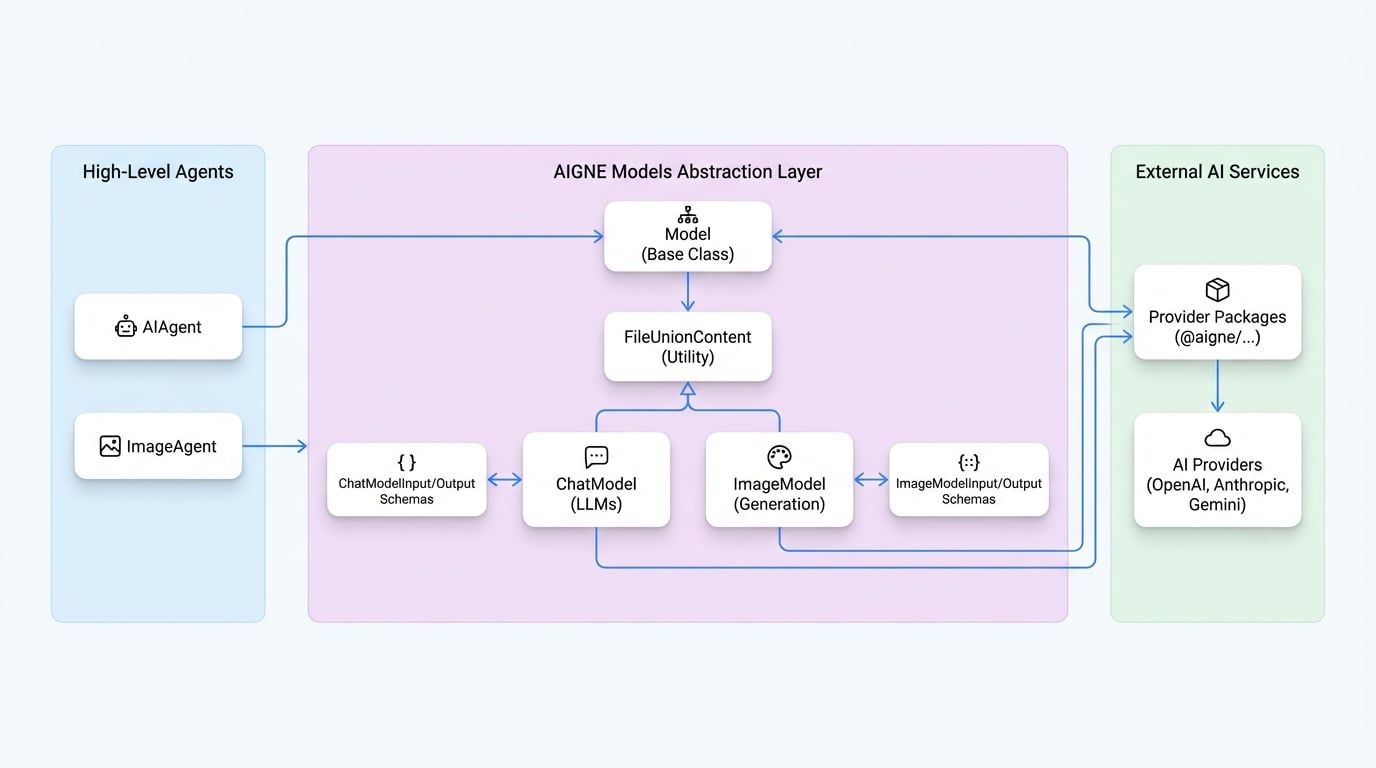
The AIGNE Framework defines a base Model class, which is extended by two primary specializations: ChatModel for text-based conversational AI and ImageModel for image generation tasks. These abstractions are the foundation upon which higher-level agents like AIAgent and ImageAgent are built.
Core Concepts#
The Model layer is designed to streamline interactions with different AI providers. Instead of writing provider-specific code for each service (like OpenAI, Anthropic, or Google Gemini), you interact with the standardized ChatModel or ImageModel interface. The AIGNE framework, through specific model packages (e.g., @aigne/openai), handles the translation between this standard format and the provider's native API.
This design offers several key advantages:
- Provider Agnostic: Swap out underlying AI models with minimal code changes. For example, you can switch from OpenAI's GPT-4 to Anthropic's Claude 3 by simply changing the model instantiation.
- Standardized Data Structures: All models use consistent input and output schemas (
ChatModelInput,ImageModelOutput, etc.), simplifying data handling and agent composition. - Simplified API: The models provide a clean, high-level API that abstracts away the nuances of authentication, request formatting, and error handling for each external service.
The following diagram illustrates the relationship between the base Agent, the Model abstractions, and the external AI services they connect to.
ChatModel Abstraction#
The ChatModel is an abstract class designed for interfacing with Large Language Models (LLMs). It provides a structured way to handle conversational interactions, including multi-turn dialogues, tool usage, and structured data extraction.
ChatModelInput#
The ChatModelInput interface defines the data structure for requests sent to a language model. It standardizes how messages, tools, and other configurations are passed.
An array of message objects that form the conversation history and the current prompt.
Specifies the desired format for the model's output, such as plain text or structured JSON based on a provided schema.
A list of available tools (functions) that the model can request to call to perform actions or retrieve information.
Controls how the model uses the provided tools. It can be set to "auto", "none", "required", or to force a specific function call.
A container for provider-specific options, such as temperature, topP, or parallelToolCalls.
Specifies the desired format for any file-based outputs, either as a local file path (local) or a base64-encoded string (file).
ChatModelInputMessage#
Each message in the messages array follows a defined structure.
The role of the message sender. system provides instructions, user represents user input, agent is for model responses, and tool is for the output of a tool call.
The content of the message. It can be a simple string or an array for multimodal content, combining text and images (FileUnionContent).
Used in an agent message to indicate one or more tool calls initiated by the model.
Used in a tool message to link the tool's output back to the corresponding toolCalls request.
ChatModelOutput#
The ChatModelOutput interface standardizes the response received from a language model.
The text-based content of the model's response.
The JSON object returned by the model when responseFormat is set to "json_schema".
An array of tool call requests made by the model. Each object includes the function name and arguments.
An object containing token usage statistics, including inputTokens and outputTokens.
The identifier of the model that generated the response.
An array of files generated by the model, if any.
ImageModel Abstraction#
The ImageModel is an abstract class for interfacing with image generation models. It provides a simplified contract for creating or editing images based on textual prompts.
ImageModelInput#
The ImageModelInput interface defines the request structure for an image generation task.
A textual description of the desired image.
An optional array of input images, used for tasks like image editing or creating variations.
The number of images to generate. Defaults to 1.
Specifies whether the output images should be saved as local files (local) or returned as base64-encoded strings (file).
A container for provider-specific options, such as image dimensions, quality, or style presets.
ImageModelOutput#
The ImageModelOutput interface defines the response structure from an image generation service.
An array of the generated images. The format of each element depends on the outputFileType specified in the input.
An object containing usage statistics, which may include token counts or other provider-specific metrics.
The identifier of the model that generated the images.
File Content Types#
Models handle various forms of file inputs for multimodal tasks through the FileUnionContent type. This discriminated union allows files to be represented in three ways:
LocalContent: Represents a file stored on the local filesystem.type: "local"path: The absolute path to the file.
UrlContent: Represents a file accessible via a public URL.type: "url"url: The URL of the file.
FileContent: Represents a file as a base64-encoded string.type: "file"data: The base64-encoded content of the file.
The Model base class includes a transformFileType method that can automatically convert between these formats as needed, simplifying file handling across different agents and model providers.
Summary#
The ChatModel and ImageModel abstractions are core components that make the AIGNE Framework flexible and provider-agnostic. They provide a stable, standardized interface for interacting with a wide range of external AI services.
- To learn how to use these models in practice, see the documentation for the AI Agent and Image Agent.
- For details on configuring specific providers like OpenAI, Anthropic, or Google Gemini, refer to the guides in the Models section.