OpenRouter
OpenRouter serves as a unified gateway to a diverse range of AI models from various providers, including OpenAI, Anthropic, and Google. The @aigne/open-router package provides a standardized interface for integrating these models into the AIGNE Framework. This allows developers to switch between different models with minimal code changes and implement robust fallback mechanisms.
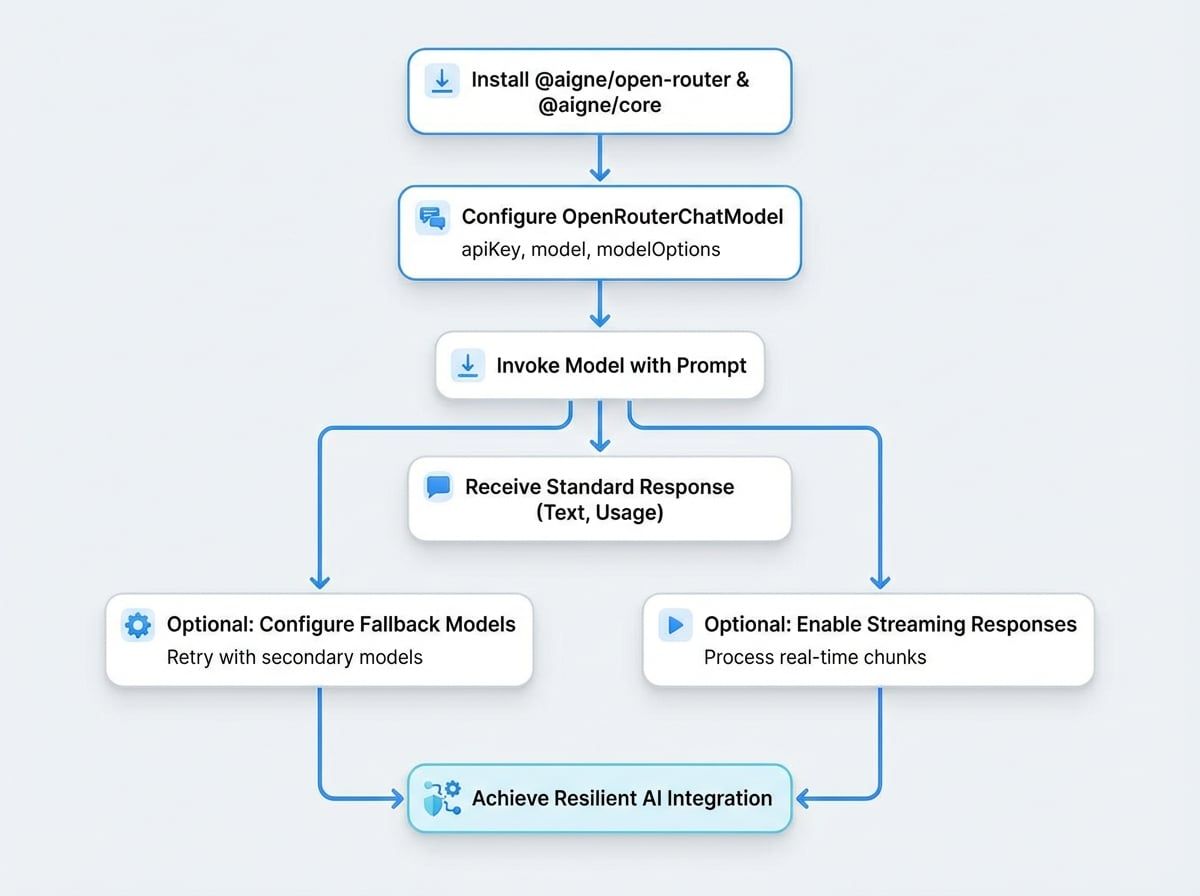
This guide details the process of installing, configuring, and utilizing the @aigne/open-router package to leverage multiple AI models.
Installation#
To begin, install the @aigne/open-router and @aigne/core packages. The following commands demonstrate installation using npm, yarn, and pnpm.
npm
npm install @aigne/open-router @aigne/coreyarn
yarn add @aigne/open-router @aigne/corepnpm
pnpm add @aigne/open-router @aigne/coreConfiguration and Usage#
The OpenRouterChatModel class is the primary interface for interacting with the OpenRouter API. To use it, you must provide your OpenRouter API key. This can be done directly in the constructor via the apiKey option or by setting the OPEN_ROUTER_API_KEY environment variable.
Basic Example#
Below is a standard implementation of the OpenRouterChatModel to send a chat request. This example uses Anthropic's claude-3-opus model.
Basic Usage
import { OpenRouterChatModel } from "@aigne/open-router";

const model = new OpenRouterChatModel({
  // Provide API key directly or use environment variable OPEN_ROUTER_API_KEY
  apiKey: "your-api-key", // Optional if set in env variables
  // Specify model (defaults to 'openai/gpt-4o')
  model: "anthropic/claude-3-opus",
  modelOptions: {
    temperature: 0.7,
  },
});

const result = await model.invoke({
  messages: [{ role: "user", content: "Which model are you using?" }],
});

console.log(result);
The expected output will contain the text response, the model identifier, and token usage metrics.
Output
{
  "text": "I am currently using the anthropic/claude-3-opus model, accessed through OpenRouter.",
  "model": "anthropic/claude-3-opus",
  "usage": {
    "inputTokens": 15,
    "outputTokens": 23
  }
}
Constructor Options#
The OpenRouterChatModel is extended from the @aigne/openai package's OpenAIChatModel and accepts the same constructor options.
Your OpenRouter API key. If not provided, the client will check for the OPEN_ROUTER_API_KEY environment variable.
The identifier for the model you wish to use (e.g., anthropic/claude-3-opus).
An array of model identifiers to use as fallbacks in case the primary model fails.
The base URL for the OpenRouter API. Can be overridden for testing or proxies.
An object containing parameters to pass to the model provider, such as temperature, max_tokens, or top_p.
Using Multiple Models with Fallbacks#
A key feature of the @aigne/open-router package is the ability to specify fallback models. If the primary model request fails, the system will automatically retry the request with the next model in the fallbackModels list. This ensures greater application reliability.
Model Fallbacks
import { OpenRouterChatModel } from "@aigne/open-router";

const modelWithFallbacks = new OpenRouterChatModel({
  apiKey: "your-api-key",
  model: "openai/gpt-4o",
  fallbackModels: ["anthropic/claude-3-opus", "google/gemini-1.5-pro"], // Fallback order
  modelOptions: {
    temperature: 0.7,
  },
});

// Will try gpt-4o first, then claude-3-opus if that fails, then gemini-1.5-pro
const fallbackResult = await modelWithFallbacks.invoke({
  messages: [{ role: "user", content: "Which model are you using?" }],
});

console.log(fallbackResult);
Streaming Responses#
For applications requiring real-time interaction, you can enable streaming to process response chunks as they become available. Set the streaming: true option in the invoke method.
The response stream must be iterated over to assemble the complete message.
Streaming Example
import { isAgentResponseDelta } from "@aigne/core";
import { OpenRouterChatModel } from "@aigne/open-router";

const model = new OpenRouterChatModel({
  apiKey: "your-api-key",
  model: "anthropic/claude-3-opus",
});

const stream = await model.invoke(
  {
    messages: [{ role: "user", content: "Which model are you using?" }],
  },
  { streaming: true },
);

let fullText = "";
const json = {};

for await (const chunk of stream) {
  if (isAgentResponseDelta(chunk)) {
    const text = chunk.delta.text?.text;
    if (text) fullText += text;
    if (chunk.delta.json) Object.assign(json, chunk.delta.json);
  }
}
See all 3 lines
The final fullText and json objects will contain the aggregated response data.
Output
I am currently using the anthropic/claude-3-opus model, accessed through OpenRouter.
{ model: 'anthropic/claude-3-opus', usage: { inputTokens: 15, outputTokens: 23 } }Summary#
The @aigne/open-router package simplifies access to a wide array of language models through a unified and resilient interface. By leveraging features like model fallbacks and streaming, you can build more robust and responsive AI applications.
For more information on the fundamental concepts of models in the AIGNE Framework, refer to the Models overview.