MCP Agent
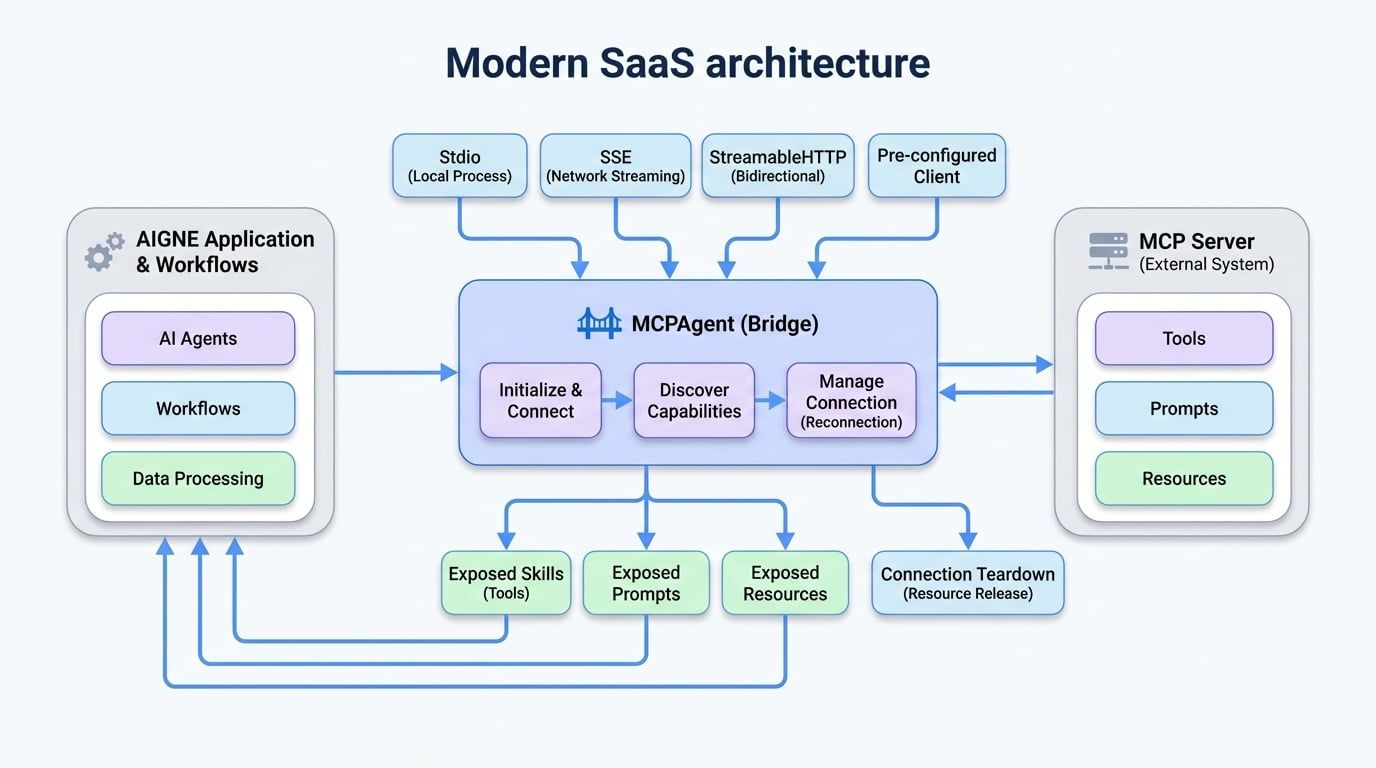
The MCPAgent is a specialized agent designed to interact with external systems that adhere to the Model Context Protocol (MCP). It acts as a bridge, allowing your AIGNE application to connect to remote MCP servers and utilize their capabilities—such as tools, prompts, and resources—as if they were native components of the framework.
This enables seamless integration with a wide range of external services, from database connectors and web automation tools to proprietary enterprise systems, provided they expose an MCP-compliant interface.
Key functionalities include:
- Multiple Transport Protocols: Connect to MCP servers via standard I/O (
stdio), Server-Sent Events (sse), orstreamableHttp. - Automatic Discovery: Automatically discovers and registers the tools, prompts, and resources available on the connected MCP server.
- Robust Connection Management: Features automatic reconnection for network-based transports to handle transient connectivity issues.
How MCPAgent Works#
The MCPAgent encapsulates the logic for connecting to an MCP server and translating its offerings into AIGNE constructs. When an MCPAgent is initialized, it connects to the specified server and queries for its available tools, prompts, and resources. These are then dynamically attached to the agent instance as skills, prompts, and resources, respectively, making them directly accessible within your AIGNE workflows.
Creating an MCPAgent#
You can create an MCPAgent instance using the static MCPAgent.from() method. This factory method supports several configuration patterns depending on how you need to connect to the MCP server.
1. Connecting via Standard I/O (Stdio)#
This method is ideal for running an MCP server as a local child process. The MCPAgent communicates with the server through its standard input and output streams.
Connecting to a Local Filesystem Server
import { MCPAgent } from "@aigne/core";

// Create an MCPAgent by running a command-line server
await using mcpAgent = await MCPAgent.from({
  command: "npx",
  args: ["-y", "@modelcontextprotocol/server-filesystem", "."],
});

console.log('Connected to:', mcpAgent.name);

// Access the skills provided by the filesystem server
const fileReader = mcpAgent.skills.read_file;
if (fileReader) {
  const result = await fileReader.invoke({ path: "./package.json" });
  console.log(result);
}
2. Connecting via Network (SSE or StreamableHTTP)#
This is the standard method for connecting to remote MCP servers over a network. You can choose between two transport protocols:
sse: Server-Sent Events, a simple and widely supported protocol for streaming.streamableHttp: A more advanced, bidirectional streaming protocol.
The transport protocol to use. Defaults to sse.
Request timeout in milliseconds.
The maximum number of times to attempt reconnection if the connection is lost. Set to 0 to disable.
A function that returns true if a reconnect should be attempted based on the error received.
Connecting via StreamableHTTP
import { MCPAgent } from "@aigne/core";

// Create an MCPAgent using a StreamableHTTP server connection
await using mcpAgent = await MCPAgent.from({
  url: `http://localhost:3000/mcp`,
  transport: "streamableHttp",
});

console.log('Connected to:', mcpAgent.name);

const echoSkill = mcpAgent.skills.echo;
if (echoSkill) {
  const result = await echoSkill.invoke({ message: "Hello, World!" });
  console.log(result);
}
3. Using a Pre-configured Client#
If you have already instantiated and configured an MCP Client object, you can pass it directly to create an MCPAgent. This is useful for advanced scenarios where you need fine-grained control over the client's configuration.
Creating from a Client Instance
import { MCPAgent } from "@aigne/core";
import { Client } from "@modelcontextprotocol/sdk/client/index.js";
import { StdioClientTransport } from "@modelcontextprotocol/sdk/client/stdio.js";

// Create and configure the client manually
const client = new Client({ name: "test-client", version: "1.0.0" });
const transport = new StdioClientTransport({
  command: "bun",
  args: ["./mock-mcp-server.ts"],
});
await client.connect(transport);

// Create an MCPAgent from the existing client instance
await using mcpAgent = MCPAgent.from({
  name: client.getServerVersion()?.name,
  client,
});

console.log('Connected to:', mcpAgent.name);
Accessing Server Capabilities#
Once an MCPAgent is connected, it exposes the server's tools, prompts, and resources through its properties.
Accessing Skills#
Server-side tools are exposed as skills on the MCPAgent instance. You can access them by name and use their invoke method. These skills can then be passed to other agents, such as an AIAgent, to grant them new capabilities.
Using a Skill from an MCPAgent
// Assuming `mcpAgent` is an initialized MCPAgent
const echoSkill = mcpAgent.skills.echo;

if (echoSkill) {
  const result = await echoSkill.invoke({ message: "Hello from AIGNE!" });
  console.log(result);
  // Expected output:
  // {
  //   "content": [
  //     { "text": "Tool echo: Hello from AIGNE!", "type": "text" }
  //   ]
  // }
}
Accessing Prompts#
Server-defined prompts are available under the prompts property. These are useful for retrieving pre-defined, complex prompt structures from the server.
Accessing a Server-Side Prompt
// Assuming `mcpAgent` is an initialized MCPAgent
const echoPrompt = mcpAgent.prompts.echo;

if (echoPrompt) {
  const result = await echoPrompt.invoke({ message: "Hello!" });
  console.log(result);
  // Expected output:
  // {
  //   "messages": [
  //     {
  //       "content": { "text": "Please process this message: Hello!", "type": "text" },
  //       "role": "user"
  //     },
  //     ...
  //   ]
  // }
}
Accessing Resources#
Server-hosted resources or resource templates can be accessed via the resources property. This allows you to read data from the server by expanding a URI template.
Reading a Server-Side Resource
// Assuming `mcpAgent` is an initialized MCPAgent
const echoResource = mcpAgent.resources.echo;

if (echoResource) {
  const result = await echoResource.invoke({ message: "Hello!" });
  console.log(result);
  // Expected output:
  // {
  //   "contents": [
  //     { "text": "Resource echo: Hello!", "uri": "echo://Hello!" }
  //   ]
  // }
}
Connection Teardown#
It is important to properly close the connection to the MCP server to release resources.
Manual Shutdown#
You can explicitly call the shutdown() method.
Manually Shutting Down an Agent
const mcpAgent = await MCPAgent.from({
  url: `http://localhost:3000/mcp`,
});

// ... use the agent

await mcpAgent.shutdown();
Automatic Shutdown with using#
For environments that support the using declaration (ES2023), the agent's connection will be closed automatically when it goes out of scope. This is the recommended approach for managing the agent's lifecycle.
Automatic Shutdown with 'using'
async function connectAndUseAgent() {
  await using mcpAgent = await MCPAgent.from({
    url: `http://localhost:3000/mcp`,
  });

  // The agent is used here...
  const echo = mcpAgent.skills.echo;
  if (echo) await echo.invoke({ message: "Test" });
} // <-- mcpAgent.shutdown() is called automatically here.Summary#
The MCPAgent is a crucial component for extending the AIGNE framework's capabilities by integrating with external systems. By abstracting the connection and communication logic, it allows you to treat external tools and data sources as first-class citizens in your agentic workflows.
For more information on how to use the skills provided by an MCPAgent, see the AI Agent documentation.