Image Agent
The ImageAgent is a specialized agent responsible for generating images. It acts as an interface to an ImageModel, processing input data to formulate a prompt and then requesting the image generation service to create an image.
This agent is essential for any workflow that requires the dynamic creation of visual content based on textual descriptions. It leverages a PromptBuilder to construct its prompts, enabling the use of templates to generate images from variable inputs.
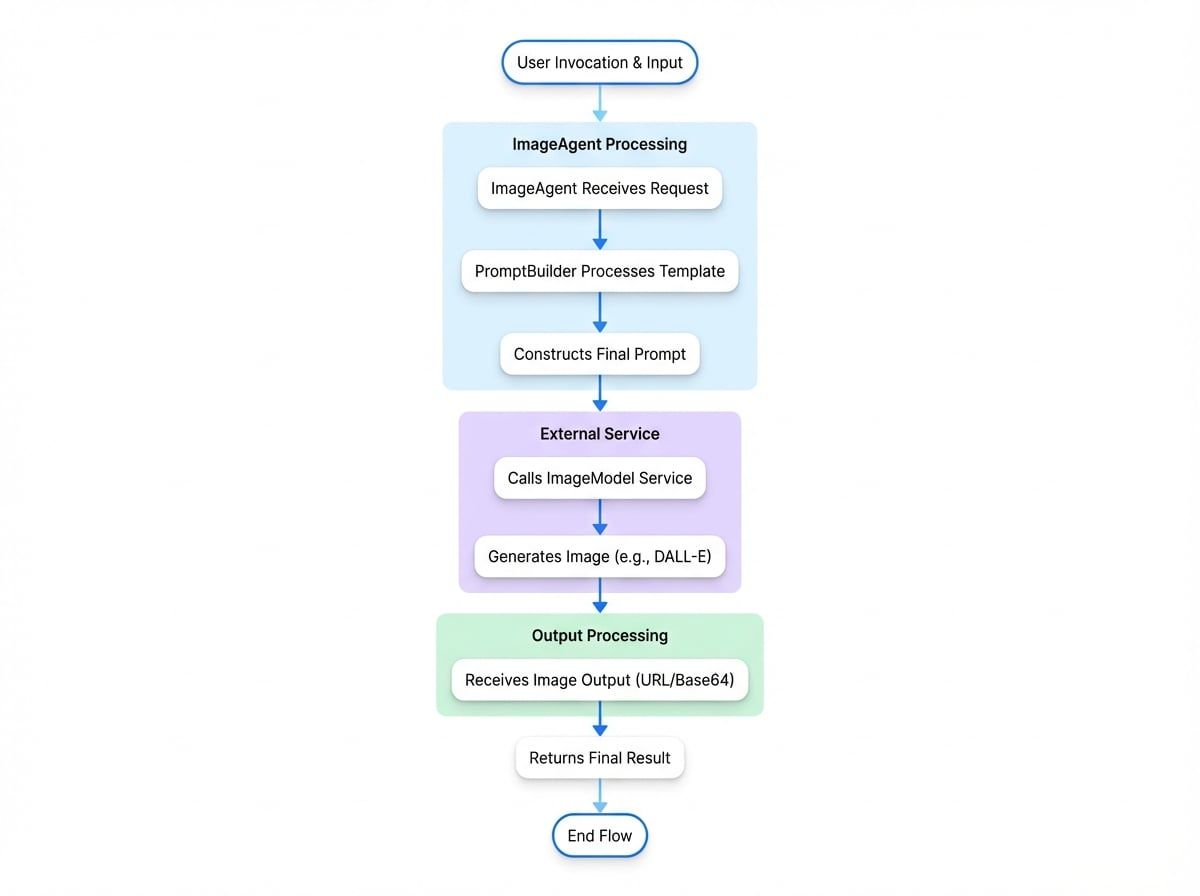
The following diagram illustrates the invocation flow of the ImageAgent, from user request to final output:
Configuration#
An ImageAgent can be configured either programmatically using TypeScript or declaratively using YAML. Both methods require defining the instructions for image generation and optionally specifying model-specific parameters.
TypeScript Configuration#
To create an ImageAgent in TypeScript, use the static ImageAgent.from() method and provide it with ImageAgentOptions.
ImageAgent Configuration
import { AIGNE, ImageAgent } from "@aigne/core";
import { OpenAI } from "@aigne/openai";

// Configure the image model provider
const openai = new OpenAI({
  apiKey: process.env.OPENAI_API_KEY,
});

// Create an instance of the ImageAgent
const architectAgent = ImageAgent.from({
  name: "architect",
  description: "An agent that draws architectural diagrams.",
  instructions: "Create an architectural diagram of a {{subject}}.",
  modelOptions: {
    quality: "hd",
    style: "vivid",
  },
});

// The AIGNE instance must have an imageModel configured
const aigne = new AIGNE({
  imageModel: openai.image("dall-e-3"),
});

async function run() {
See all 10 lines
The code above defines an ImageAgent named "architect". It uses a templated instructions string to generate a prompt. The modelOptions object passes specific parameters to the underlying DALL-E 3 model to request a high-definition, vivid image.
YAML Configuration#
Alternatively, you can define an ImageAgent in a .yaml file. This approach is useful for separating agent definitions from application logic.
image-agent.yaml
type: image
name: style-artist
description: Draws an image of an object in a specific style.
instructions: |
  Draw an image of a {{object}} in the {{style}} style.
input_schema:
  type: object
  properties:
    object:
      type: string
      description: The object to draw.
    style:
      type: string
      description: The style of the image.
  required:
    - object
    - style
In this declarative example, the type: image specifies that this is an ImageAgent. The instructions field contains a multi-line string with placeholders ({{object}}, {{style}}) that will be populated from the input during invocation. The input_schema formally defines the expected input structure.
Parameters#
The behavior of an ImageAgent is controlled by the options provided during its construction.
The prompt template used for image generation. This can be a simple string or a PromptBuilder instance for more complex logic. Placeholders in the format {{key}} will be replaced with values from the input object.
An object containing provider-specific parameters to pass to the underlying ImageModel. This allows for fine-tuned control over the generation process, such as specifying image quality, size, or style. Refer to the specific model provider's documentation for available options.
Specifies the desired format for the output image. The default behavior is determined by the ImageModel, but you can explicitly request either a public URL (url) or a Base64-encoded string (base64).
Invocation and Output#
When an ImageAgent is invoked, it passes the input to its PromptBuilder to generate the final prompt. It then calls the configured ImageModel with this prompt and any specified modelOptions.
The agent's output is an object conforming to the ImageModelOutput schema, which contains the generated image in the requested format.
Example Invocation
Invoking the Agent
const result = await aigne.invoke(styleArtistAgent, { // Assuming styleArtistAgent is loaded from YAML
  input: {
    object: "futuristic city",
    style: "cyberpunk",
  },
});
Example Response
ImageAgent Output
{
  "url": "https://oaidalleapiprodscus.blob.core.windows.net/private/...",
  "base64": null
}
The response contains a url pointing to the generated image. If outputFileType were set to 'base64', the base64 field would be populated instead.
Summary#
The ImageAgent provides a structured and reusable way to integrate image generation capabilities into your AI workflows. By separating the prompt logic from the model interaction, it allows for clear and maintainable agent designs.
For more information on other agent types, refer to the following documentation:
- AI Agent: For interacting with language models.
- Team Agent: For orchestrating multiple agents.
- Function Agent: For wrapping custom code as an agent.