Team Agent
A TeamAgent is a specialized agent that orchestrates a group of other agents (referred to as "skills") to perform complex tasks. It acts as a manager, directing the flow of information and coordinating the execution of its skills according to a defined strategy. This allows for the creation of sophisticated workflows where multiple specialized agents collaborate to achieve a goal that a single agent could not accomplish alone.
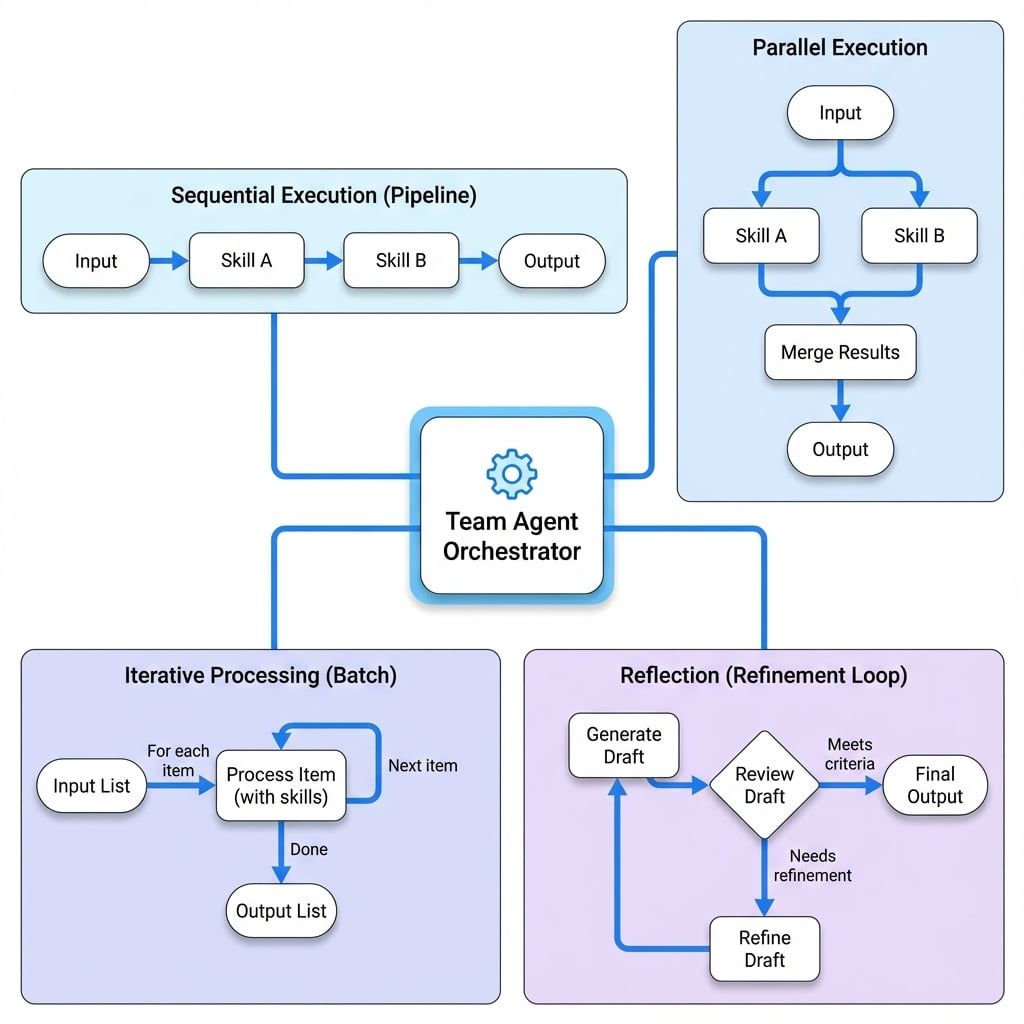
The TeamAgent supports several key patterns of agent orchestration:
- Sequential Execution: Agents run one after another, forming a processing pipeline.
- Parallel Execution: Agents run simultaneously, and their results are merged.
- Iterative Processing: The team processes each item in a list, ideal for batch operations.
- Reflection: The team's output is reviewed and refined in a loop until it meets specific criteria.
This component is fundamental for building modular and powerful AI systems. For details on the individual agents that can be part of a team, refer to the documentation for AI Agent and Function Agent.
Configuration#
A TeamAgent is configured with a set of options that define its behavior, execution mode, and advanced features like iteration and reflection.
The execution strategy for the agents. Can be sequential or parallel.
The key of an input field containing an array. The team will execute once for each item in the array.
When using iterateOn, this sets the number of items to process concurrently.
If true, the output from processing one item in an iterateOn loop is merged back and made available to the next item's execution. This requires concurrency to be 1.
In sequential mode, if true, the output from every intermediate agent is included in the final result, not just the last one.
Execution Modes#
The mode property determines the fundamental workflow of the team.
Sequential Mode#
In sequential mode, agents execute one by one. The output of each agent is merged with the initial input and passed to the next agent in the sequence. This creates a pipeline, suitable for tasks that require a series of transformations or steps.
team-agent-sequential.ts
import { AIAgent, TeamAgent, ProcessMode } from "@aigne/core";
import { model } from "./model"; // Assume model is an initialized ChatModel

const writerAgent = new AIAgent({
  name: "writer",
  model,
  instructions: "You are a creative writer. Write a short story based on the topic: {{topic}}.",
  outputKey: "story",
});

const editorAgent = new AIAgent({
  name: "editor",
  model,
  instructions: "You are an editor. Review the following story and correct any grammatical errors: {{story}}.",
  outputKey: "editedStory",
});

const sequentialTeam = new TeamAgent({
  name: "writingTeam",
  mode: ProcessMode.sequential,
  skills: [writerAgent, editorAgent],
});

// To invoke:
// const result = await aigne.invoke(sequentialTeam, { topic: "a journey to the moon" });
See all 1 lines
In this example, writerAgent first generates a story. The output, containing the story key, is then passed to editorAgent, which uses it to produce the final editedStory.
Parallel Mode#
In parallel mode, all agents execute simultaneously with the same initial input. Their outputs are then merged into a single result. This is efficient for tasks where multiple independent pieces of information need to be generated at the same time.
If multiple agents attempt to write to the same output key, the first agent to produce a value for that key "claims" it, and subsequent writes to that key from other agents are ignored.
team-agent-parallel.ts
import { AIAgent, TeamAgent, ProcessMode } from "@aigne/core";
import { model } from "./model"; // Assume model is an initialized ChatModel

const researcherAgent = new AIAgent({
  name: "researcher",
  model,
  instructions: "Research the key facts about {{topic}}.",
  outputKey: "facts",
});

const summaryAgent = new AIAgent({
  name: "summarizer",
  model,
  instructions: "Provide a brief, one-paragraph summary of {{topic}}.",
  outputKey: "summary",
});

const parallelTeam = new TeamAgent({
  name: "researchTeam",
  mode: ProcessMode.parallel,
  skills: [researcherAgent, summaryAgent],
});

// To invoke:
// const result = await aigne.invoke(parallelTeam, { topic: "the Roman Empire" });
See all 2 lines
Here, both agents start at the same time. The final result will contain both facts and summary once both agents have completed their work.
Advanced Features#
Iteration with iterateOn#
The iterateOn property enables batch processing. You provide the name of an input key that holds an array. The TeamAgent will then execute its entire workflow for each item in that array. This is highly effective for processing multiple data records with the same set of agents.
team-agent-iteration.ts
import { AIAgent, TeamAgent, ProcessMode } from "@aigne/core";
import { model } from "./model"; // Assume model is an initialized ChatModel

const translatorAgent = new AIAgent({
  name: "translator",
  model,
  instructions: "Translate the following text to French: {{text}}.",
  outputKey: "translatedText",
});

const sentimentAgent = new AIAgent({
  name: "sentiment",
  model,
  instructions: "Analyze the sentiment of the following text (positive, negative, or neutral): {{text}}.",
  outputKey: "sentiment",
});

const processingTeam = new TeamAgent({
  name: "batchProcessor",
  mode: ProcessMode.parallel,
  skills: [translatorAgent, sentimentAgent],
  iterateOn: "reviews", // The key holding the array
});

const inputData = {
See all 18 lines
Reflection#
Reflection provides a mechanism for self-correction and quality assurance. When configured, a TeamAgent's output is passed to a designated reviewer agent. The reviewer assesses the output against certain criteria. If the output is not "approved," the entire process runs again, feeding the previous output and the reviewer's feedback into the next iteration. This loop continues until the output is approved or a maxIterations limit is reached.
The configuration for reflection is provided under the reflection key.
A condition for approval. If a string, it's the name of a boolean field in the reviewer's output. If a function, it receives the reviewer's output and must return a truthy value for approval.
If true, the process returns the last generated output upon hitting maxIterations instead of throwing an error.
team-agent-reflection.ts
import { AIAgent, TeamAgent } from "@aigne/core";
import { model } from "./model"; // Assume model is an initialized ChatModel

const planGenerator = new AIAgent({
  name: "planGenerator",
  model,
  instructions: `Generate a 3-step marketing plan for a new {{product}}.
  If you received feedback, incorporate it. Feedback: {{feedback}}`,
  outputKey: "plan",
});

const planReviewer = new AIAgent({
  name: "planReviewer",
  model,
  instructions: `Review the marketing plan: {{plan}}.
  Does it include a budget allocation? If not, provide feedback to add one.
  Output JSON with an 'approved' (boolean) and 'feedback' (string) field.`,
  output: {
    json: {
      schema: {
        type: "object",
        properties: {
          approved: { type: "boolean" },
          feedback: { type: "string" },
        },
See all 18 lines
In this flow, planGenerator creates an initial plan. planReviewer checks it. If no budget is mentioned, it sets approved to false and provides feedback. The TeamAgent then re-runs planGenerator, this time including the feedback, until the plan is approved.
YAML Definition#
You can also define a TeamAgent declaratively using YAML.
team-agent-definition.yaml
type: team
name: test-team-agent
description: Test team agent
skills:
  - sandbox.js # Path to another agent definition
  - chat.yaml
mode: parallel
iterate_on: sections
concurrency: 2
include-all-steps-output: true
reflection:
  reviewer: team-agent-reviewer.yaml
  is_approved: approved
  max_iterations: 5
  return_last_on_max_iterations: true
This YAML defines a parallel team that iterates over an input field named sections and also includes a reflection step for quality control.
Summary#
The TeamAgent is a powerful tool for orchestrating multiple agents to solve complex problems. By combining agents in sequential or parallel workflows and leveraging advanced features like iterateOn for batch processing and reflection for self-correction, you can build robust and sophisticated AI applications.
To learn more about the building blocks of a team, see the AI Agent and Function Agent documentation.