Hooks
Hooks provide a powerful mechanism to observe, intercept, and inject custom logic into an agent's execution lifecycle. They allow you to add functionalities like logging, monitoring, input/output transformation, and custom error handling without altering the core implementation of an agent.
This guide details the agent execution lifecycle, the available hooks, and how to implement them effectively.
Agent Execution Lifecycle#
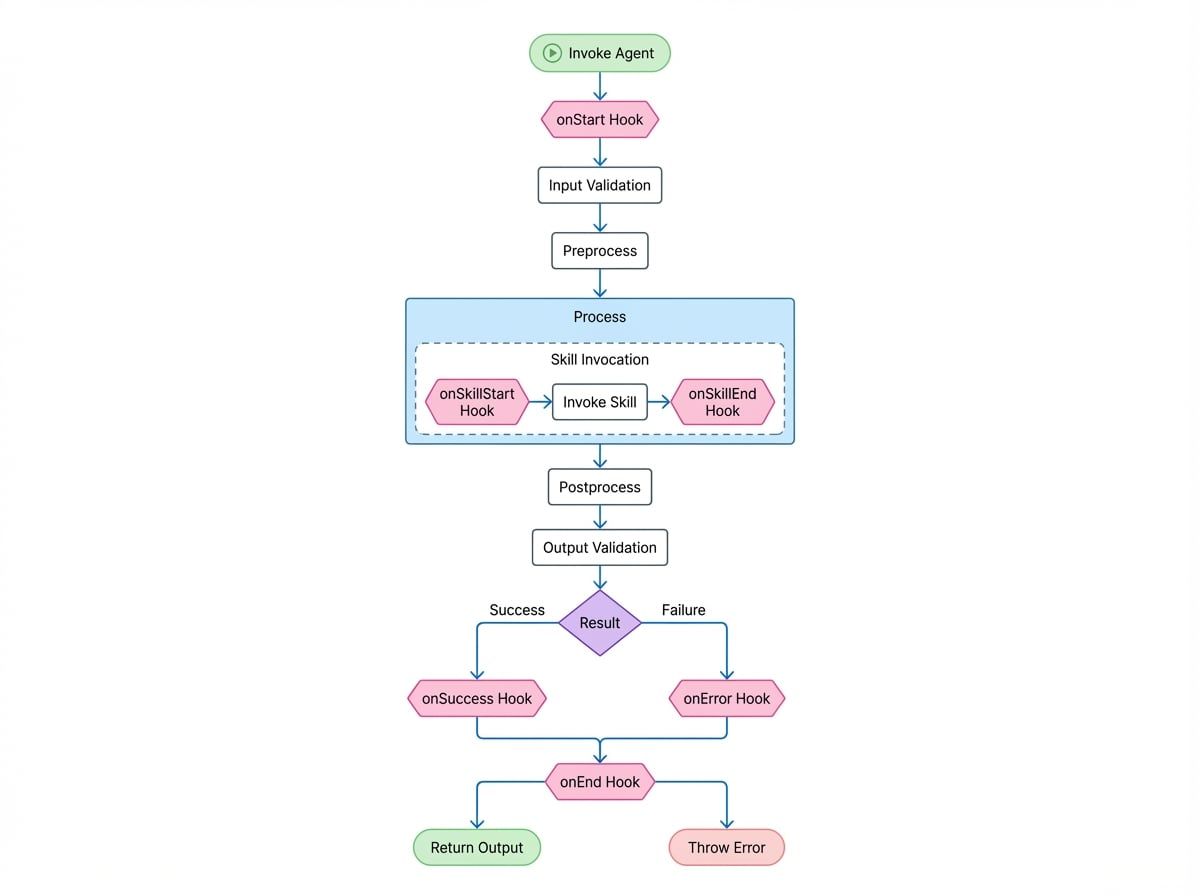
Understanding the agent's execution lifecycle is crucial for using hooks correctly. When an agent is invoked, it proceeds through a series of steps, with hooks being triggered at specific points.
The following diagram illustrates the sequence of events and the corresponding hooks that are called during an agent's invocation.
Available Hooks#
Hooks are defined within an AgentHooks object. Each hook can be implemented as either a function or a separate, dedicated agent.
Triggered at the very beginning of an agent's invocation, before input validation. It can be used to modify the initial input or options.
Triggered after the agent's process method completes successfully and the output has been validated. It can be used to transform the final output.
Triggered when an error is thrown during any stage of the execution. It can be used to implement custom error logging or a retry mechanism by returning { retry: true }.
Triggered at the very end of an agent's invocation, regardless of whether it succeeded or failed. It's suitable for cleanup tasks, final logging, or metric collection.
Triggered just before an agent invokes one of its skills (a sub-agent). This is useful for tracing the delegation of tasks between agents.
Triggered after a skill invocation completes, whether it succeeds or fails. It receives the skill's result or the error.
Triggered when an agent's process method returns another agent instance, effectively handing off control. This allows for monitoring of agent-to-agent transfers.
Implementing Hooks#
Hooks can be attached to an agent in three ways:
- During agent instantiation via the
hooksproperty inAgentOptions. - At invocation time via the
hooksproperty inAgentInvokeOptions. - Globally on the
AIGNEContextinstance.
Example 1: Basic Logging#
Here is a simple example of a hook that logs the start and end of an agent's execution.
Agent Logging Hook
import { Agent, AIGNE, type AgentHooks } from "@aigne/core";

// Define the logging hook
const loggingHook: AgentHooks = {
  onStart: ({ agent, input }) => {
    console.log(`[${agent.name}] Starting execution with input:`, input);
  },
  onEnd: ({ agent, input, output, error }) => {
    if (error) {
      console.error(`[${agent.name}] Execution failed for input:`, input, "Error:", error);
    } else {
      console.log(`[${agent.name}] Execution succeeded with output:`, output);
    }
  },
};

// Define a simple agent
class MyAgent extends Agent {
  async process(input: { message: string }) {
    return { reply: `You said: ${input.message}` };
  }
}

// Instantiate the agent with the hook
const myAgent = new MyAgent({
See all 10 lines
Example 2: Modifying Input with onStart#
The onStart hook can return an object to modify the input that the agent will receive.
Modifying Agent Input
import { Agent, AIGNE, type AgentHooks } from "@aigne/core";

const inputModificationHook: AgentHooks = {
  onStart: ({ input }) => {
    // Add a timestamp to the input message
    const newInput = {
      ...input,
      timestamp: new Date().toISOString(),
    };
    return { input: newInput };
  },
};

class GreeterAgent extends Agent {
  async process(input: { name: string; timestamp?: string }) {
    return { greeting: `Hello, ${input.name}! (processed at ${input.timestamp})` };
  }
}

const agent = new GreeterAgent({ hooks: [inputModificationHook] });

const aigne = new AIGNE();
const result = await aigne.invoke(agent, { name: "Alice" });

console.log(result);
See all 3 lines
Example 3: Custom Retry with onError#
The onError hook can return { retry: true } to signal that the AIGNE should re-attempt the agent's process method. This is useful for handling transient failures.
Custom Retry Hook
import { Agent, AIGNE, type AgentHooks } from "@aigne/core";

let attempt = 0;

const retryHook: AgentHooks = {
  onError: ({ agent, error }) => {
    console.log(`[${agent.name}] Attempt failed: ${error.message}. Retrying...`);
    // Return true to signal a retry, but only for the first 2 attempts
    if (attempt < 2) {
      return { retry: true };
    }
    // Return nothing to let the error propagate
  },
};

class UnreliableAgent extends Agent {
  async process() {
    attempt++;
    if (attempt <= 2) {
      throw new Error("Service temporarily unavailable");
    }
    return { status: "OK" };
  }
}
See all 6 lines
This agent will fail twice, and the retryHook will intercept the error and trigger a retry each time. On the third attempt, the agent succeeds.
Hook Priority#
Hooks can be defined on the agent, at invocation, and on the context. To manage the order of execution, hooks can have a priority property set to "high", "medium", or "low" (default).
Hooks are executed in the order of their priority: high > medium > low.
Hook Priority Example
const highPriorityHook: AgentHooks = {
  priority: 'high',
  onStart: () => console.log('High priority hook executed.'),
};

const mediumPriorityHook: AgentHooks = {
  priority: 'medium',
  onStart: () => console.log('Medium priority hook executed.'),
};

const lowPriorityHook: AgentHooks = {
  // priority defaults to 'low'
  onStart: () => console.log('Low priority hook executed.'),
};

class MonitoredAgent extends Agent {
  async process(input: {}) {
    console.log('Agent processing...');
    return { success: true };
  }
}

const agent = new MonitoredAgent({
  hooks: [lowPriorityHook, highPriorityHook, mediumPriorityHook],
});
See all 10 lines
This predictable execution order is essential when one hook's logic depends on the outcome of another.
Summary#
Hooks are an essential tool for building robust and observable agent-based systems. They provide a clean, non-invasive way to add cross-cutting concerns like logging, instrumentation, and resilience patterns to your agents. By understanding the agent lifecycle and the capabilities of each hook, you can create sophisticated, production-ready AI applications.