The @aigne/poe package provides a standardized interface for integrating with Poe, a service that offers access to a wide range of third-party language models, including those from OpenAI, Anthropic, and Google. By leveraging an OpenAI-compatible API endpoint, this package allows you to seamlessly use various models within the AIGNE Framework.
This guide provides a step-by-step process for installing, configuring, and utilizing the PoeChatModel. For more general information on model integration, refer to the Models Overview documentation.
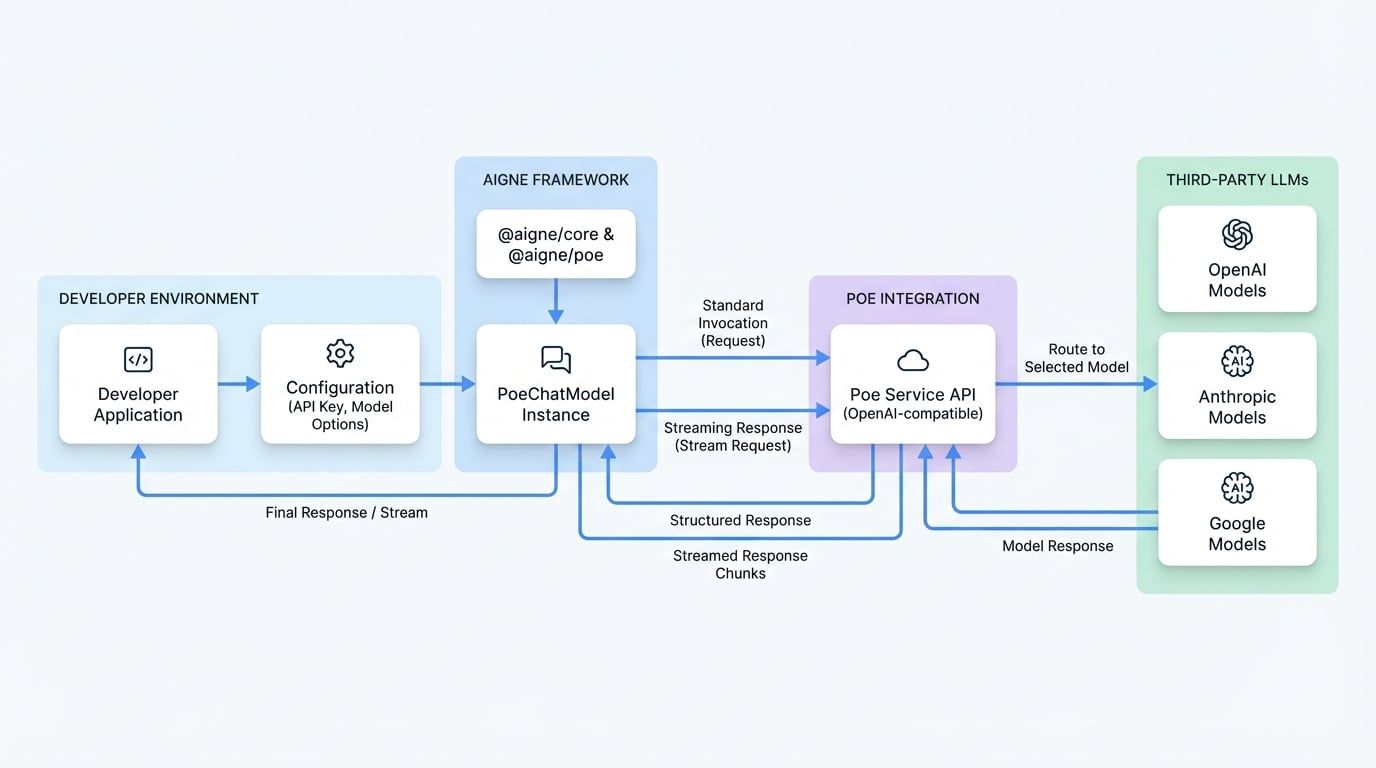
The following diagram illustrates the data flow from a developer's application through the AIGNE Framework to the Poe service and the underlying language models.
Installation#
To begin, install the necessary packages using your preferred package manager. You will need both @aigne/core and the Poe-specific package.
npm install @aigne/poe @aigne/core
yarn add @aigne/poe @aigne/core
pnpm add @aigne/poe @aigne/core
Configuration#
The PoeChatModel class is the primary interface for interacting with the Poe API. To instantiate it, you must provide your Poe API key and specify the desired model.
Your API key can be set in two ways:
- Directly in the constructor via the
apiKey property. - As an environment variable named
POE_API_KEY.
Your Poe API key. While this is optional in the constructor, the key must be available either here or in the POE_API_KEY environment variable for authentication to succeed.
model
string
default:gpt-5-mini
The identifier for the model you wish to use. Poe provides access to models like claude-3-opus, gpt-4o, etc. If not specified, it defaults to gpt-5-mini.
Additional options to pass to the model API, such as temperature, topP, or maxTokens. These parameters are sent directly to the underlying model provider.
baseURL
string
default:https://api.poe.com/v1
The base URL for the Poe API. This should not be changed unless you are using a custom proxy.
Usage#
The following examples demonstrate how to create a PoeChatModel instance and use it for both standard and streaming chat completions.
Standard Invocation#
For simple request-response interactions, use the invoke method. This method sends the request and waits for the complete response from the model.
import { PoeChatModel } from "@aigne/poe";

const model = new PoeChatModel({
  // Provide API key directly or set the POE_API_KEY environment variable
  apiKey: "your-poe-api-key",
  // Specify the desired model available through Poe
  model: "claude-3-opus",
  modelOptions: {
    temperature: 0.7,
  },
});

const result = await model.invoke({
  messages: [{ role: "user", content: "Which model are you using?" }],
});

console.log(result);
The invoke method returns a structured response containing the model's output and usage metadata.
{
  "text": "I'm powered by Poe, using the Claude 3 Opus model from Anthropic.",
  "model": "claude-3-opus",
  "usage": {
    "inputTokens": 5,
    "outputTokens": 14
  }
}
Streaming Responses#
For real-time applications, you can stream the response as it's generated. Set the streaming: true option in the invoke call to receive an asynchronous stream of response chunks.
import { isAgentResponseDelta } from "@aigne/core";
import { PoeChatModel } from "@aigne/poe";

const model = new PoeChatModel({
  apiKey: "your-poe-api-key",
  model: "claude-3-opus",
});

const stream = await model.invoke(
  {
    messages: [{ role: "user", content: "Which model are you using?" }],
  },
  { streaming: true },
);

let fullText = "";
const json = {};

for await (const chunk of stream) {
  if (isAgentResponseDelta(chunk)) {
    const text = chunk.delta.text?.text;
    if (text) {
      fullText += text;
      process.stdout.write(text);
    }
When iterating through the stream, each chunk provides a delta of the response. The complete text and metadata must be assembled from these individual chunks.
I'm powered by Poe, using the Claude 3 Opus model from Anthropic.
--- Final Assembled Data ---
Full Text: I'm powered by Poe, using the Claude 3 Opus model from Anthropic.
Metadata: { model: "anthropic/claude-3-opus", usage: { inputTokens: 5, outputTokens: 14 } }
Further Reading#
- For a complete list of available models and their capabilities, please consult the official Poe documentation.
- To understand how models fit into the broader AIGNE architecture, see the Core Concepts: Models page.