Streaming
The AIGNE Framework provides robust support for handling streaming responses from agents. This is particularly useful for applications requiring real-time data processing, such as chatbots, live data feeds, or any user interface that benefits from immediate, incremental updates. By processing data as it becomes available, you can create more responsive and interactive user experiences.
This guide details the methodology for enabling and consuming streamed responses within the framework.
Enabling Streaming#
To receive a streamed response from an agent, you must set the stream option to true in the invoke call. When this option is enabled, the invoke method returns an AgentResponseStream, which is a ReadableStream of AgentResponseChunk objects, instead of a fully formed response object.
AIGNE Invoke with Streaming
import { AIGNE, AIAgent } from "@aigne/core";
import { OpenAI } from "@aigne/openai";

const llm = new OpenAI({
  apiKey: process.env.OPENAI_API_KEY,
  model: "gpt-4o",
});

const agent = new AIAgent({
  model: llm,
  instructions: "You are a helpful assistant.",
});

const aigne = new AIGNE({
  model: llm,
  agents: { agent },
});

async function run() {
  // Enable streaming by setting the `stream` option to true
  const stream = await aigne.invoke("agent", {
    prompt: "Tell me a short story.",
  }, { stream: true });

  // The 'stream' variable is now a ReadableStream
See all 7 lines
Consuming the Stream#
The returned stream consists of AgentResponseChunk objects. Each chunk represents a piece of the total response. There are two primary types of data within a chunk's delta:
delta.text: Contains partial text content. This is used for streaming text from language models.delta.json: Contains partial JSON data. This is used when an agent is configured to return structured output. The framework incrementally builds the final JSON object.
Processing Chunks#
You can iterate over the stream using a for await...of loop to process each chunk as it arrives. The following example demonstrates how to accumulate both text and the final structured JSON from a stream.
Processing Stream Chunks
import { AIGNE, AIAgent, Message } from "@aigne/core";
import { OpenAI } from "@aigne/openai";
import { agentResponseStreamToObject } from "@aigne/core/utils";

// Assume aigne and agent are configured as in the previous example

interface StoryOutput extends Message {
  protagonist: string;
  setting: string;
  plotSummary: string;
  storyText: string;
}

async function processStream() {
  const aigne = new AIGNE({
    model: new OpenAI(),
    agents: {
      agent: new AIAgent({
        model: new OpenAI(),
      })
    },
  });
  const stream = await aigne.invoke<StoryOutput>("agent", {
      prompt: "Write a short story about a robot who discovers music. Return the protagonist's name, the setting, a plot summary, and the full story text.",
      // Assuming the agent is configured for structured output
See all 30 lines
Utility: agentResponseStreamToObject#
If you only need the final, fully-formed object and do not need to process intermediate chunks, the framework provides the agentResponseStreamToObject utility. This function consumes the entire stream and returns a single promise that resolves with the complete response object.
This is useful when you want the benefits of streaming on the backend (e.g., lower time-to-first-byte from the LLM) but only need to deliver the final result to the caller.
Using agentResponseStreamToObject
import { AIGNE, AIAgent } from "@aigne/core";
import { OpenAI } from "@aigne/openai";
import { agentResponseStreamToObject } from "@aigne/core/utils";
// ... setup aigne and agent

async function getFinalObject() {
  const aigne = new AIGNE({
    model: new OpenAI(),
    agents: {
      agent: new AIAgent({
        model: new OpenAI(),
      })
    },
  });
  const stream = await aigne.invoke("agent", {
    prompt: "Tell me a short story.",
  }, { stream: true });

  // Consumes the stream and returns the final aggregated object
  const result = await agentResponseStreamToObject(stream);

  console.log("--- Complete Response ---");
  console.log(result.text);
}
See all 1 lines
Streaming to the Frontend with Server-Sent Events (SSE)#
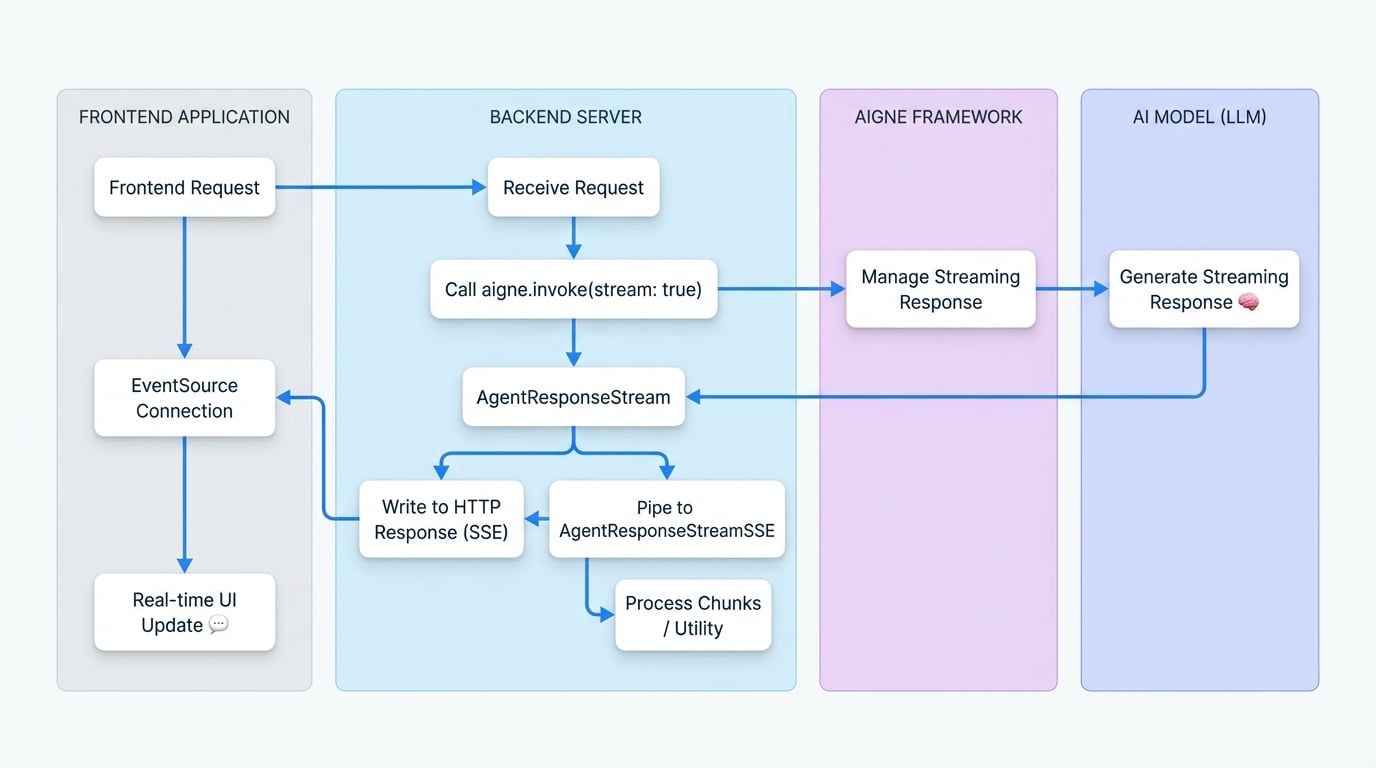
A common use case for streaming is to send real-time updates to a web frontend. The AIGNE framework simplifies this by providing an AgentResponseStreamSSE class, which converts an AgentResponseStream into a format compatible with Server-Sent Events (SSE).
Data Flow Diagram#
The following diagram illustrates the data flow from the backend AIGNE to the frontend application when using SSE.
Backend Implementation#
On your server, create an endpoint that initiates the agent invoke call with streaming enabled. Then, pipe the resulting AgentResponseStream into an AgentResponseStreamSSE and write its output to the HTTP response.
The example below uses a generic web server structure.
SSE Backend Endpoint
import { AIGNE, AIAgent } from "@aigne/core";
import { OpenAI } from "@aigne/openai";
import { AgentResponseStreamSSE } from "@aigne/core/utils";
// ... setup aigne

// Example using a generic server context (e.g., Express, Hono, etc.)
async function handleSseRequest(req, res) {
  const aigne = new AIGNE({
    model: new OpenAI(),
    agents: {
      agent: new AIAgent({
        model: new OpenAI(),
      })
    },
  });
  res.writeHead(200, {
    "Content-Type": "text/event-stream",
    "Connection": "keep-alive",
    "Cache-Control": "no-cache",
  });

  try {
    const stream = await aigne.invoke("agent", {
      prompt: req.body.prompt,
    }, { stream: true });
See all 16 lines
Frontend Implementation#
On the frontend, use the native EventSource API to connect to your SSE endpoint. You can then listen for message events to receive chunks and error events to handle issues.
SSE Frontend Client
const promptInput = document.getElementById('prompt-input');
const submitButton = document.getElementById('submit-button');
const responseContainer = document.getElementById('response');

submitButton.addEventListener('click', async () => {
  const prompt = promptInput.value;
  responseContainer.innerHTML = ''; // Clear previous response

  const eventSource = new EventSource('/api/chat-stream', {
    method: 'POST',
    headers: { 'Content-Type': 'application/json' },
    body: JSON.stringify({ prompt }),
  });

  eventSource.onmessage = (event) => {
    const chunk = JSON.parse(event.data);

    if (chunk.delta?.text?.text) {
      responseContainer.innerHTML += chunk.delta.text.text;
    }
  };

  eventSource.onerror = (error) => {
    console.error('EventSource failed:', error);
    responseContainer.innerHTML += '<p style="color: red;">Error receiving stream.</p>';
See all 8 lines
This architecture enables building highly responsive UIs where text appears word-by-word, exactly as it is generated by the AI model.
Summary#
The streaming capabilities of the AIGNE Framework are essential for building modern, real-time AI applications. By enabling the stream option in the invoke method, you can process data incrementally, improve perceived performance, and efficiently pipe agent responses to frontends using Server-Sent Events. For further details on agent invocation, refer to the AI Agent documentation.