Running in AWS
We provide a Blocklet Server AMI image to quickly run a server based on our AMI image when creating EC2.
Step 1: Find Blocklet Server AMI
- Open the Amazon EC2 console page at https://console.aws.amazon.com/ec2/
- Select the
Images -> AMIpage in the sidebar - Select
Public Mirrorin the filter criteria - Enter
Blocklet Serverto search - Select the latest version of the mirror, the latest version is blocklet-server-1.8.26 as shown below:
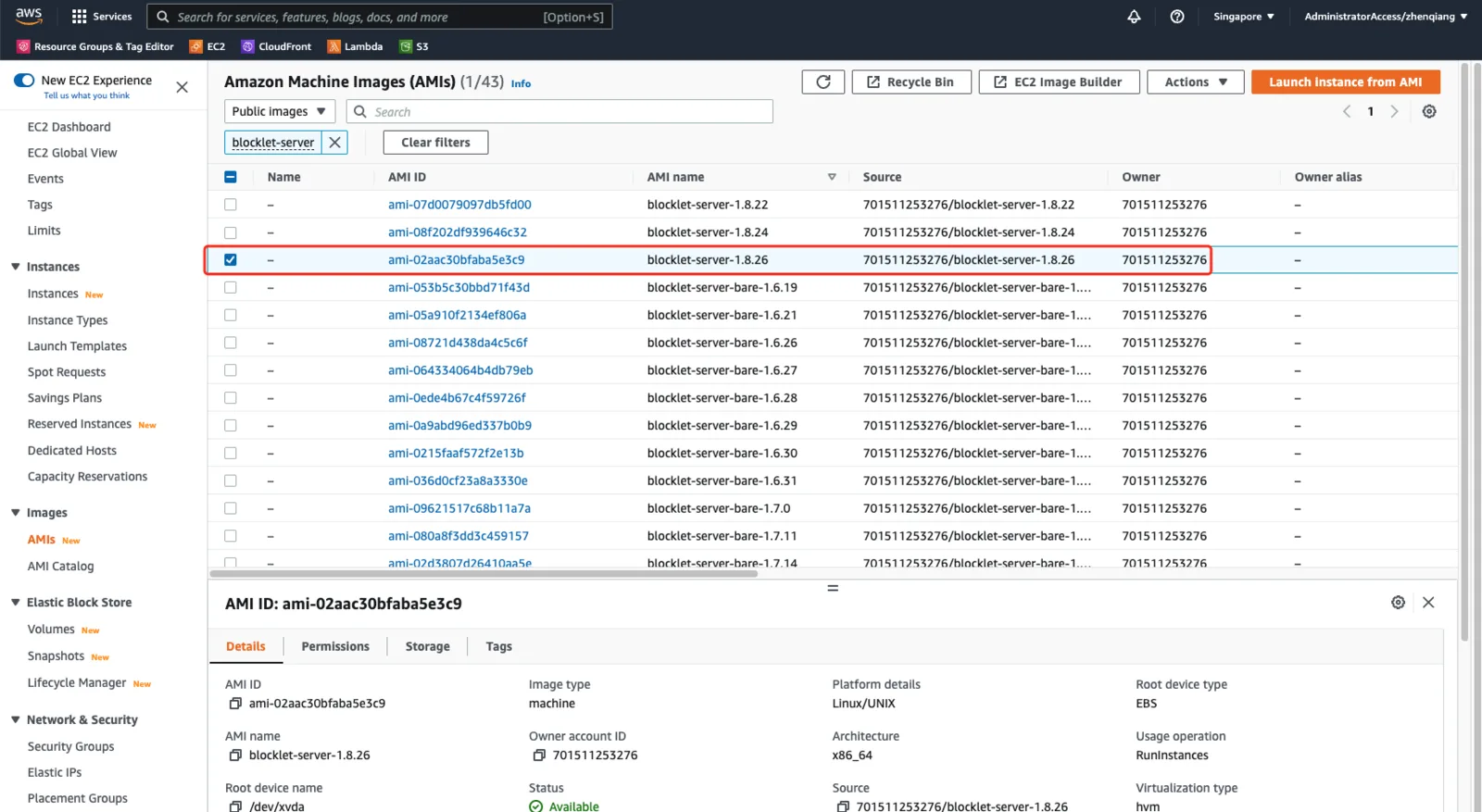
!!!Note: Do not select the blocklet-server-bare-xxx image,
- Click on "Launch instance from AMI"
Step 2: Set up security groups and other basic information
- Fill in the instance name
- Select the instance type, the minimum memory requirement for Blocklet Server is 1G
- Select the secret key pair
- Configure the network security group, Blocklet Server requires open ports 80 and 443
- Configure storage, the recommended minimum storage is 20G
- Other configurations can be set according to the actual situation
- Click "Launch Instance", wait for the instance to start successfully
Step 3: Access the server via IP Echo address
EC2 instances can be accessed through their public IP Echo addresses after they are started. For example, if the public IP is 192.168.0.10, then the IP Echo address is https://192-168-0-10.ip.abtnet.io/.