注意: 交互模式目前处于测试阶段。虽然功能齐全,但您可能会遇到意外行为。在我们不断改进此体验的过程中,我们非常感谢您的反馈。
本指南将引导您启动 aigne web chat,用自然语言与 WebSmith 对话,并让助手代您触发生成/更新/发布操作。
chat 命令提供了一个交互式的对话界面,用于构建和管理您的网站。您无需运行像 generate 或 update 这样的单个命令,而是可以用简单的语言描述您的需求,AI 助手将引导您完成整个过程。对于偏好更有指导性体验的用户来说,这是一个理想的起点。
工作原理
交互模式由一个专用的 AI agent 提供支持,该 agent 能理解您的请求,并能使用其他 WebSmith 工具来执行任务。它会记住您的对话内容,让您可以进行连续的更改并在之前的操作基础上继续构建。
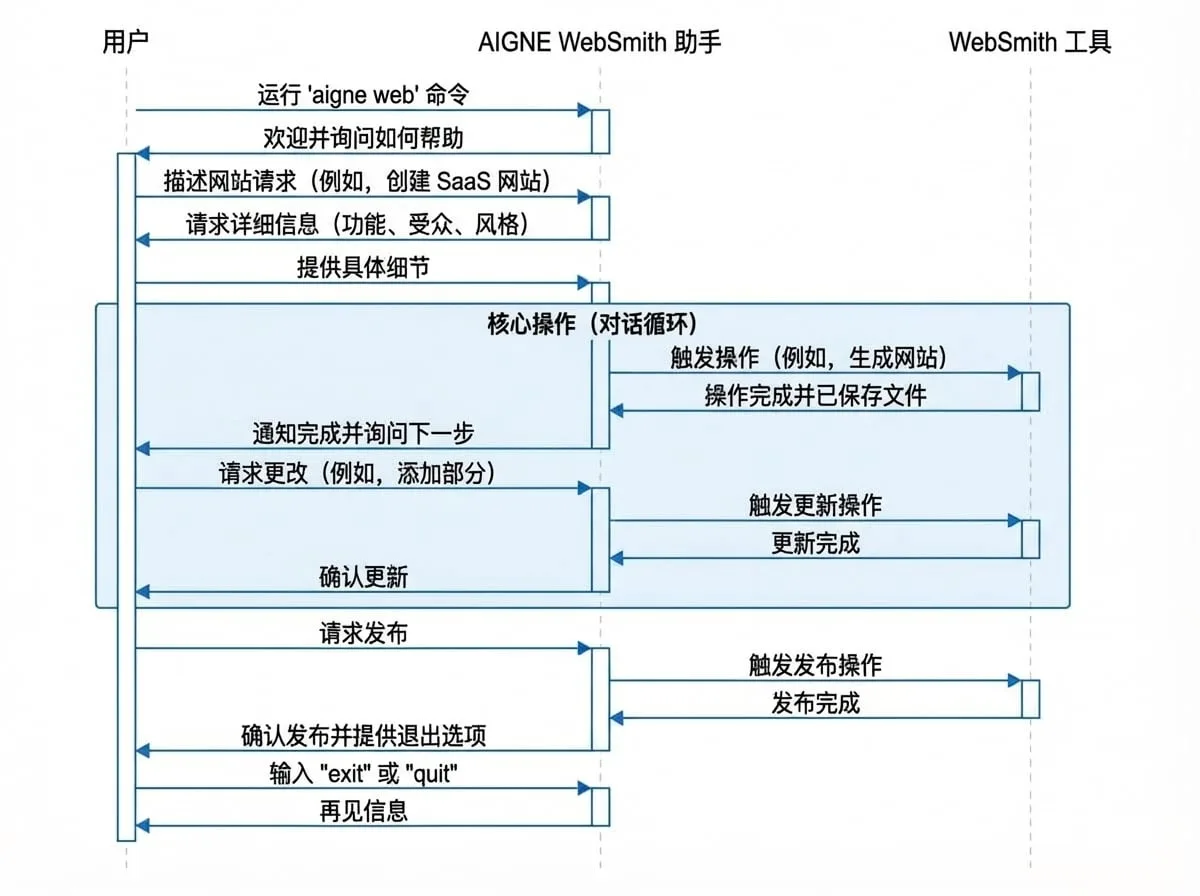
总体工作流程遵循一个简单的对话循环,如下图所示:
启动交互式会话
首先,在您的终端中运行 chat 命令:
命令
aigne web这将启动助手,它会向您问好并等待您的指令。
您可以做什么
聊天助手可以执行 AIGNE WebSmith CLI 中可用的大多数核心任务。您可以直接要求它:
- 生成一个新网站:描述您的网站需求、目标受众和期望的风格。
- 更新现有内容:指明您想更改哪个页面或部分,并提供新的详细信息。
- 翻译页面:请求将特定页面翻译成另一种语言。
- 发布您的网站:告诉助手您已准备好将网站发布到 Pages Kit。
- 管理文件:要求查看当前的文件结构或特定页面的内容。
对话示例
以下是一个示例,展示了如何使用交互模式来创建、修改和发布一个简单的网站。
命令行
aigne web

> Welcome to the AIGNE WebSmith interactive assistant!
> How can I help you build your website today?

You:
I need to create a website for a new SaaS product that helps teams manage their projects.

> Of course. Could you please provide a few more details?
> - What are the core features of the product?
> - Who is the target audience?
> - What style should the website have (e.g., business, modern, playful)?

You:
The main features are task tracking, team collaboration, and reporting. The target audience is small to medium-sized business owners. Let's go with a modern business style.

> Thank you. I have enough information to plan the website structure.
> I will now generate the following pages:
> - Home
> - Features
> - Pricing
> - About Us
> - Contact
> ...
> [Generation process starts]
> ...
> Website generation is complete. The files have been saved to the 'output' directory.
> What would you like to do next?

You:
On the homepage, add a section for customer testimonials.

> Understood. I will add a customer testimonials section to the homepage.
> [Update process starts]
> ...
> The homepage has been updated. Is there anything else?

You:
No, that's all for now. Please publish the website.

> I will now publish the website to your configured Pages Kit project.
> [Publishing process starts]
> ...
> Your website has been successfully published.
> You can now exit the chat by typing 'exit'.

You:
exit

> Goodbye!
退出交互模式
要随时结束会话,请输入 exit 或 quit 并按 Enter 键。
交互模式是一种强大的方式,可以管理您的整个网站生命周期,而无需记住特定的命令和参数。如果需要更直接的控制,您始终可以使用后续章节中详述的标准命令。