TeamAgent は、他の Agent のグループ(「スキル」と呼ばれる)をオーケストレーションして複雑なタスクを実行する、特化した Agent です。マネージャーとして機能し、定義された戦略に従って情報の流れを指示し、スキルの実行を調整します。これにより、複数の特化した Agent が協力して、単一の Agent では単独で達成できない目標を達成する、洗練されたワークフローを作成できます。
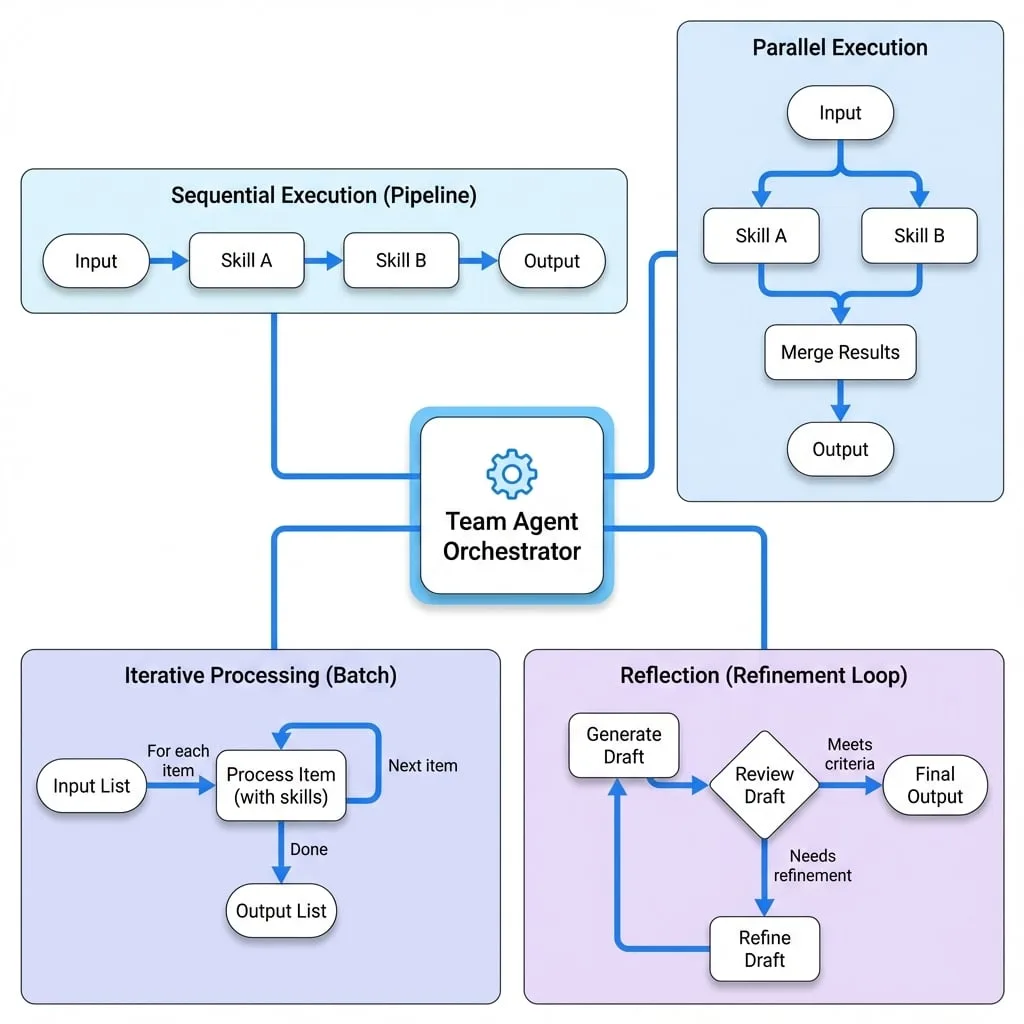
TeamAgent は、Agent のオーケストレーションに関するいくつかの主要なパターンをサポートしています:
- シーケンシャル実行: Agent が次々に実行され、処理パイプラインを形成します。
- パラレル実行: Agent が同時に実行され、その結果がマージされます。
- 反復処理: チームがリスト内の各アイテムを処理し、バッチ操作に最適です。
- リフレクション: チームの出力が特定の基準を満たすまで、ループ内でレビューされ、改善されます。
このコンポーネントは、モジュール式で強力な AI システムを構築するための基本です。チームの一部となる個々の Agent の詳細については、AI Agent および Function Agent のドキュメントを参照してください。
設定
TeamAgent は、その振る舞い、実行モード、および反復やリフレクションなどの高度な機能を定義する一連のオプションで設定されます。
- skills
Agent[](required) — チームを構成する Agent インスタンスの配列。 - mode
ProcessMode(default:sequential) - reflection
ReflectionMode— 反復的な自己修正プロセスを有効にするための設定。 - iterateOn
string - concurrency
number(default:1) - iterateWithPreviousOutput
boolean(default:false) - includeAllStepsOutput
boolean(default:false)
実行モード
mode プロパティは、チームの基本的なワークフローを決定します。
シーケンシャルモード
sequential モードでは、Agent は一つずつ実行されます。各 Agent の出力は初期入力とマージされ、シーケンス内の次の Agent に渡されます。これにより、一連の変換やステップを必要とするタスクに適したパイプラインが作成されます。
team-agent-sequential.ts
import { AIAgent, TeamAgent, ProcessMode } from "@aigne/core";
import { model } from "./model"; // model は初期化された ChatModel であると仮定

const writerAgent = new AIAgent({
  name: "writer",
  model,
  instructions: "You are a creative writer. Write a short story based on the topic: {{topic}}.",
  outputKey: "story",
});

const editorAgent = new AIAgent({
  name: "editor",
  model,
  instructions: "You are an editor. Review the following story and correct any grammatical errors: {{story}}.",
  outputKey: "editedStory",
});

const sequentialTeam = new TeamAgent({
  name: "writingTeam",
  mode: ProcessMode.sequential,
  skills: [writerAgent, editorAgent],
});

// 呼び出すには:
// const result = await aigne.invoke(sequentialTeam, { topic: "a journey to the moon" });
// console.log(result.editedStory);この例では、writerAgent が最初に story を生成します。story キーを含む出力は、次に editorAgent に渡され、それが最終的な editedStory を生成するために使用されます。
パラレルモード
parallel モードでは、すべての Agent が同じ初期入力で同時に実行されます。その出力は、単一の結果にマージされます。これは、複数の独立した情報を同時に生成する必要があるタスクに効率的です。
複数の Agent が同じ出力キーに書き込もうとした場合、そのキーの値を最初に生成した Agent がそのキーを「確保」し、他の Agent からのそのキーへの後続の書き込みは無視されます。
team-agent-parallel.ts
import { AIAgent, TeamAgent, ProcessMode } from "@aigne/core";
import { model } from "./model"; // model は初期化された ChatModel であると仮定

const researcherAgent = new AIAgent({
  name: "researcher",
  model,
  instructions: "Research the key facts about {{topic}}.",
  outputKey: "facts",
});

const summaryAgent = new AIAgent({
  name: "summarizer",
  model,
  instructions: "Provide a brief, one-paragraph summary of {{topic}}.",
  outputKey: "summary",
});

const parallelTeam = new TeamAgent({
  name: "researchTeam",
  mode: ProcessMode.parallel,
  skills: [researcherAgent, summaryAgent],
});

// 呼び出すには:
// const result = await aigne.invoke(parallelTeam, { topic: "the Roman Empire" });
// console.log(result.facts);
// console.log(result.summary);
ここでは、両方の Agent が同時に開始します。両方の Agent が作業を完了すると、最終結果には facts と summary の両方が含まれます。
高度な機能
iterateOn による反復
iterateOn プロパティはバッチ処理を可能にします。配列を保持する入力キーの名前を指定します。TeamAgent はその配列内の各アイテムに対して、そのワークフロー全体を実行します。これは、同じ Agent のセットで複数のデータレコードを処理する場合に非常に効果的です。
team-agent-iteration.ts
import { AIAgent, TeamAgent, ProcessMode } from "@aigne/core";
import { model } from "./model"; // model は初期化された ChatModel であると仮定

const translatorAgent = new AIAgent({
  name: "translator",
  model,
  instructions: "Translate the following text to French: {{text}}.",
  outputKey: "translatedText",
});

const sentimentAgent = new AIAgent({
  name: "sentiment",
  model,
  instructions: "Analyze the sentiment of the following text (positive, negative, or neutral): {{text}}.",
  outputKey: "sentiment",
});

const processingTeam = new TeamAgent({
  name: "batchProcessor",
  mode: ProcessMode.parallel,
  skills: [translatorAgent, sentimentAgent],
  iterateOn: "reviews", // 配列を保持するキー
});

const inputData = {
  reviews: [
    { text: "This product is amazing!" },
    { text: "I am very disappointed with the quality." },
    { text: "It works as expected." },
  ],
};

// 呼び出すには:
// const result = await aigne.invoke(processingTeam, inputData);
// console.log(result.reviews);
/*
出力は次のようになります:
[
  { translatedText: "Ce produit est incroyable !", sentiment: "positive" },
  { translatedText: "Je suis très déçu de la qualité.", sentiment: "negative" },
  { translatedText: "Cela fonctionne comme prévu.", sentiment: "neutral" }
]
*/
リフレクション
リフレクションは、自己修正と品質保証のメカニズムを提供します。設定されると、TeamAgent の出力は指定された reviewer Agent に渡されます。レビュアーは特定の基準に対して出力を評価します。出力が「承認」されない場合、プロセス全体が再度実行され、前の出力とレビュアーのフィードバックが次の反復に供給されます。このループは、出力が承認されるか、maxIterations の上限に達するまで続きます。
リフレクションの設定は reflection キーの下で提供されます。
- reviewer
Agent(required) — チームの出力を評価する責任を持つ Agent。 - isApproved
string | Function(required) - maxIterations
number(default:3) — 失敗するまでのレビュー・改善サイクルの最大数。 - returnLastOnMaxIterations
boolean(default:false) - customErrorMessage
string— 承認なしで最大反復回数に達したときにスローするカスタムエラーメッセージ。
team-agent-reflection.ts
import { AIAgent, TeamAgent } from "@aigne/core";
import { model } from "./model"; // model は初期化された ChatModel であると仮定

const planGenerator = new AIAgent({
  name: "planGenerator",
  model,
  instructions: `Generate a 3-step marketing plan for a new {{product}}.
  If you received feedback, incorporate it. Feedback: {{feedback}}`,
  outputKey: "plan",
});

const planReviewer = new AIAgent({
  name: "planReviewer",
  model,
  instructions: `Review the marketing plan: {{plan}}.
  Does it include a budget allocation? If not, provide feedback to add one.
  Output JSON with an 'approved' (boolean) and 'feedback' (string) field.`,
  output: {
    json: {
      schema: {
        type: "object",
        properties: {
          approved: { type: "boolean" },
          feedback: { type: "string" },
        },
      },
    },
  },
});

const reflectionTeam = new TeamAgent({
  name: "planningTeam",
  skills: [planGenerator],
  reflection: {
    reviewer: planReviewer,
    isApproved: "approved", // レビュアーの出力にある 'approved' フィールドをチェック
    maxIterations: 3,
  },
});

// 呼び出すには:
// const result = await aigne.invoke(reflectionTeam, { product: "smart watch" });
// console.log(result.plan);このフローでは、planGenerator が初期計画を作成します。planReviewer がそれをチェックします。予算が記載されていない場合、approved を false に設定し、フィードバックを提供します。その後、TeamAgent は planGenerator を再実行し、今度はフィードバックを含めて、計画が承認されるまで繰り返します。
YAML 定義
YAML を使用して TeamAgent を宣言的に定義することもできます。
team-agent-definition.yaml
type: team
name: test-team-agent
description: Test team agent
skills:
  - sandbox.js # 別の Agent 定義へのパス
  - chat.yaml
mode: parallel
iterate_on: sections
concurrency: 2
include-all-steps-output: true
reflection:
  reviewer: team-agent-reviewer.yaml
  is_approved: approved
  max_iterations: 5
  return_last_on_max_iterations: true
この YAML は、sections という名前の入力フィールドを反復処理し、品質管理のためのリフレクションステップも含むパラレルチームを定義します。
まとめ
TeamAgent は、複数の Agent をオーケストレーションして複雑な問題を解決するための強力なツールです。sequential または parallel ワークフローで Agent を組み合わせ、バッチ処理のための iterateOn や自己修正のための reflection などの高度な機能を活用することで、堅牢で洗練された AI アプリケーションを構築できます。
チームの構成要素についてさらに学ぶには、AI Agent および Function Agent のドキュメントを参照してください。