AIGNE フレームワークは、Agent からのストリーミングレスポンスを処理するための堅牢なサポートを提供します。これは、チャットボット、ライブデータフィード、または即時かつインクリメンタルな更新の恩恵を受けるあらゆるユーザーインターフェースなど、リアルタイムのデータ処理を必要とするアプリケーションに特に役立ちます。データが利用可能になった時点で処理することにより、より応答性が高くインタラクティブなユーザーエクスペリエンスを創出できます。
このガイドでは、フレームワーク内でストリーミングレスポンスを有効化し、利用するための方法論について詳しく説明します。
ストリーミングの有効化
Agent からストリーミングレスポンスを受け取るには、 invoke 呼び出しで stream オプションを true に設定する必要があります。このオプションが有効になると、 invoke メソッドは完全に形成されたレスポンスオブジェクトの代わりに、 AgentResponseChunk オブジェクトの ReadableStream である AgentResponseStream を返します。
ストリーミングを使用した AIGNE の呼び出し
import { AIGNE, AIAgent } from "@aigne/core";
import { OpenAI } from "@aigne/openai";

const llm = new OpenAI({
  apiKey: process.env.OPENAI_API_KEY,
  model: "gpt-4o",
});

const agent = new AIAgent({
  model: llm,
  instructions: "You are a helpful assistant.",
});

const aigne = new AIGNE({
  model: llm,
  agents: { agent },
});

async function run() {
  // `stream` オプションを true に設定してストリーミングを有効化
  const stream = await aigne.invoke("agent", {
    prompt: "Tell me a short story.",
  }, { stream: true });

  // 'stream' 変数は ReadableStream になります
  for await (const chunk of stream) {
    // 各チャンクが到着するたびに処理します
    process.stdout.write(chunk.delta.text?.text || "");
  }
}

run();
ストリームの利用
返されるストリームは AgentResponseChunk オブジェクトで構成されます。各チャンクは、レスポンス全体の一部を表します。チャンクの delta 内には、主に2種類のデータがあります:
delta.text: 部分的なテキストコンテンツを含みます。これは、言語モデルからテキストをストリーミングするために使用されます。delta.json: 部分的な JSON データを含みます。これは、Agent が構造化された出力を返すように設定されている場合に使用されます。フレームワークは、最終的な JSON オブジェクトを段階的に構築します。
チャンクの処理
for await...of ループを使用してストリームを反復処理し、各チャンクが到着するたびに処理できます。次の例は、ストリームからテキストと最終的な構造化 JSON の両方を蓄積する方法を示しています。
ストリームチャンクの処理
import { AIGNE, AIAgent, Message } from "@aigne/core";
import { OpenAI } from "@aigne/openai";
import { agentResponseStreamToObject } from "@aigne/core/utils";

// aigne と agent は前の例と同様に設定されていると仮定します

interface StoryOutput extends Message {
  protagonist: string;
  setting: string;
  plotSummary: string;
  storyText: string;
}

async function processStream() {
  const aigne = new AIGNE({
    model: new OpenAI(),
    agents: {
      agent: new AIAgent({
        model: new OpenAI(),
      })
    },
  });
  const stream = await aigne.invoke<StoryOutput>("agent", {
      prompt: "Write a short story about a robot who discovers music. Return the protagonist's name, the setting, a plot summary, and the full story text.",
      // Agent が構造化出力用に設定されていると仮定します
    },
    { stream: true }
  );

  let fullText = "";
  const finalResult: Partial<StoryOutput> = {};

  for await (const chunk of stream) {
    if (chunk.delta.text?.storyText) {
      const partialText = chunk.delta.text.storyText;
      fullText += partialText;
      process.stdout.write(partialText); // テキストで UI をライブ更新
    }

    if (chunk.delta.json) {
      // フレームワークは、関連する各チャンクで部分的にマージされた JSON オブジェクトを提供します
      Object.assign(finalResult, chunk.delta.json);
    }
  }

  console.log("\n\n--- Final Structured Output ---");
  console.log(finalResult);

  // ユーティリティを使用して最終的なオブジェクトを直接取得することもできます
  // 注意:これはストリームを消費するため、ループの代わりに使用する必要があります
  // const finalObject = await agentResponseStreamToObject(stream);
  // console.log(finalObject);
}

processStream();
ユーティリティ: agentResponseStreamToObject
中間チャンクを処理する必要がなく、最終的に完全に形成されたオブジェクトだけが必要な場合、フレームワークは agentResponseStreamToObject ユーティリティを提供します。この関数はストリーム全体を消費し、完全なレスポンスオブジェクトで解決される単一のプロミスを返します。
これは、バックエンドでストリーミングの利点(例:LLMからの最初のバイトまでの時間の短縮)を享受しつつ、呼び出し元には最終結果のみを配信する必要がある場合に便利です。
agentResponseStreamToObject の使用
import { AIGNE, AIAgent } from "@aigne/core";
import { OpenAI } from "@aigne/openai";
import { agentResponseStreamToObject } from "@aigne/core/utils";
// ... aigne と agent のセットアップ

async function getFinalObject() {
  const aigne = new AIGNE({
    model: new OpenAI(),
    agents: {
      agent: new AIAgent({
        model: new OpenAI(),
      })
    },
  });
  const stream = await aigne.invoke("agent", {
    prompt: "Tell me a short story.",
  }, { stream: true });

  // ストリームを消費し、最終的に集約されたオブジェクトを返します
  const result = await agentResponseStreamToObject(stream);

  console.log("--- Complete Response ---");
  console.log(result.text);
}

getFinalObject();
Server-Sent Events (SSE) を使用したフロントエンドへのストリーミング
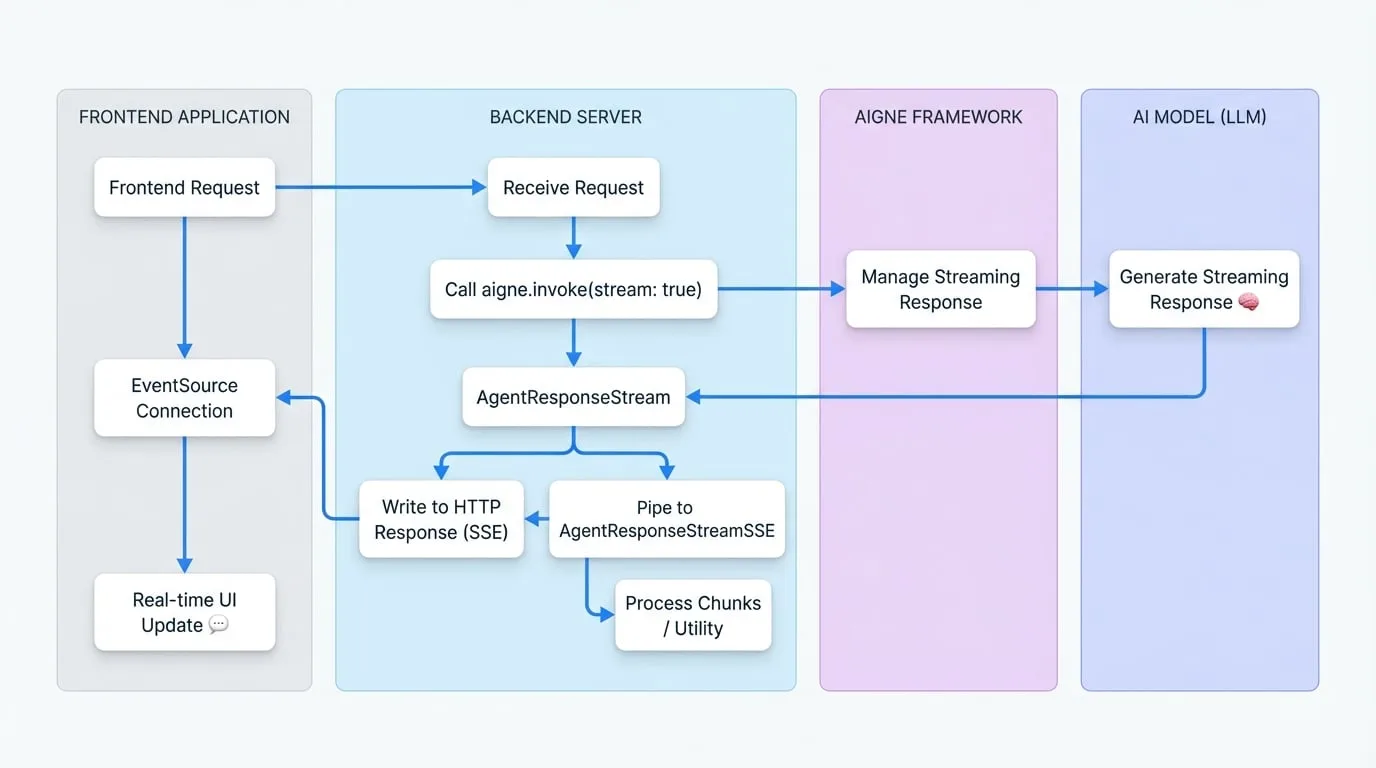
ストリーミングの一般的なユースケースは、Web フロントエンドにリアルタイムの更新を送信することです。AIGNE フレームワークは、 AgentResponseStream を Server-Sent Events (SSE) と互換性のある形式に変換する AgentResponseStreamSSE クラスを提供することで、これを簡素化します。
データフロー図
以下の図は、SSE を使用する際のバックエンドの AIGNE からフロントエンドアプリケーションへのデータフローを示しています。
バックエンドの実装
サーバー上で、ストリーミングを有効にして Agent の invoke 呼び出しを開始するエンドポイントを作成します。次に、結果の AgentResponseStream を AgentResponseStreamSSE にパイプし、その出力を HTTP レスポンスに書き込みます。
以下の例では、一般的な Web サーバーの構造を使用しています。
SSE バックエンドエンドポイント
import { AIGNE, AIAgent } from "@aigne/core";
import { OpenAI } from "@aigne/openai";
import { AgentResponseStreamSSE } from "@aigne/core/utils";
// ... aigne のセットアップ

// 汎用サーバーコンテキスト(例:Express、Hono など)を使用した例
async function handleSseRequest(req, res) {
  const aigne = new AIGNE({
    model: new OpenAI(),
    agents: {
      agent: new AIAgent({
        model: new OpenAI(),
      })
    },
  });
  res.writeHead(200, {
    "Content-Type": "text/event-stream",
    "Connection": "keep-alive",
    "Cache-Control": "no-cache",
  });

  try {
    const stream = await aigne.invoke("agent", {
      prompt: req.body.prompt,
    }, { stream: true });

    // Agent ストリームを SSE ストリームに変換
    const sseStream = new AgentResponseStreamSSE(stream);

    // SSE ストリームを HTTP レスポンスにパイプ
    for await (const sseChunk of sseStream) {
      res.write(sseChunk);
    }
  } catch (error) {
    console.error("SSE stream error:", error);
    const sseError = `event: error\ndata: ${JSON.stringify({ message: error.message })}\n\n`;
    res.write(sseError);
  } finally {
    res.end();
  }
}
フロントエンドの実装
フロントエンドでは、ネイティブの EventSource API を使用して SSE エンドポイントに接続します。その後、 message イベントをリッスンしてチャンクを受信し、 error イベントをリッスンして問題を処理できます。
SSE フロントエンドクライアント
const promptInput = document.getElementById('prompt-input');
const submitButton = document.getElementById('submit-button');
const responseContainer = document.getElementById('response');

submitButton.addEventListener('click', async () => {
  const prompt = promptInput.value;
  responseContainer.innerHTML = ''; // 以前のレスポンスをクリア

  const eventSource = new EventSource('/api/chat-stream', {
    method: 'POST',
    headers: { 'Content-Type': 'application/json' },
    body: JSON.stringify({ prompt }),
  });

  eventSource.onmessage = (event) => {
    const chunk = JSON.parse(event.data);

    if (chunk.delta?.text?.text) {
      responseContainer.innerHTML += chunk.delta.text.text;
    }
  };

  eventSource.onerror = (error) => {
    console.error('EventSource failed:', error);
    responseContainer.innerHTML += '<p style="color: red;">Error receiving stream.</p>';
    eventSource.close();
  };

  // 'open' イベントは接続が確立されたときに発火します
  eventSource.onopen = () => {
    console.log('Connection to server opened.');
  };
});
このアーキテクチャにより、AI モデルによって生成されたとおりにテキストが単語単位で表示される、応答性の高い UI を構築できます。
まとめ
AIGNE フレームワークのストリーミング機能は、最新のリアルタイム AI アプリケーションを構築するために不可欠です。 invoke メソッドで stream オプションを有効にすることで、データを段階的に処理し、体感パフォーマンスを向上させ、Server-Sent Events を使用して Agent のレスポンスをフロントエンドに効率的にパイプできます。Agent の呼び出しに関する詳細は、AI Agent のドキュメントを参照してください。