フックは、Agent の実行ライフサイクルを監視、インターセプトし、カスタムロジックを注入するための強力な仕組みを提供します。これにより、Agent のコア実装を変更することなく、ロギング、モニタリング、入力/出力の変換、カスタムエラー処理などの機能を追加できます。
このガイドでは、Agent の実行ライフサイクル、利用可能なフック、そしてそれらを効果的に実装する方法について詳しく説明します。
Agent 実行ライフサイクル
フックを正しく使用するためには、Agent の実行ライフサイクルを理解することが不可欠です。Agent が呼び出されると、一連のステップを経て実行され、特定の時点でフックがトリガーされます。
以下の図は、Agent の呼び出し中に発生するイベントのシーケンスと、それに対応して呼び出されるフックを示しています。
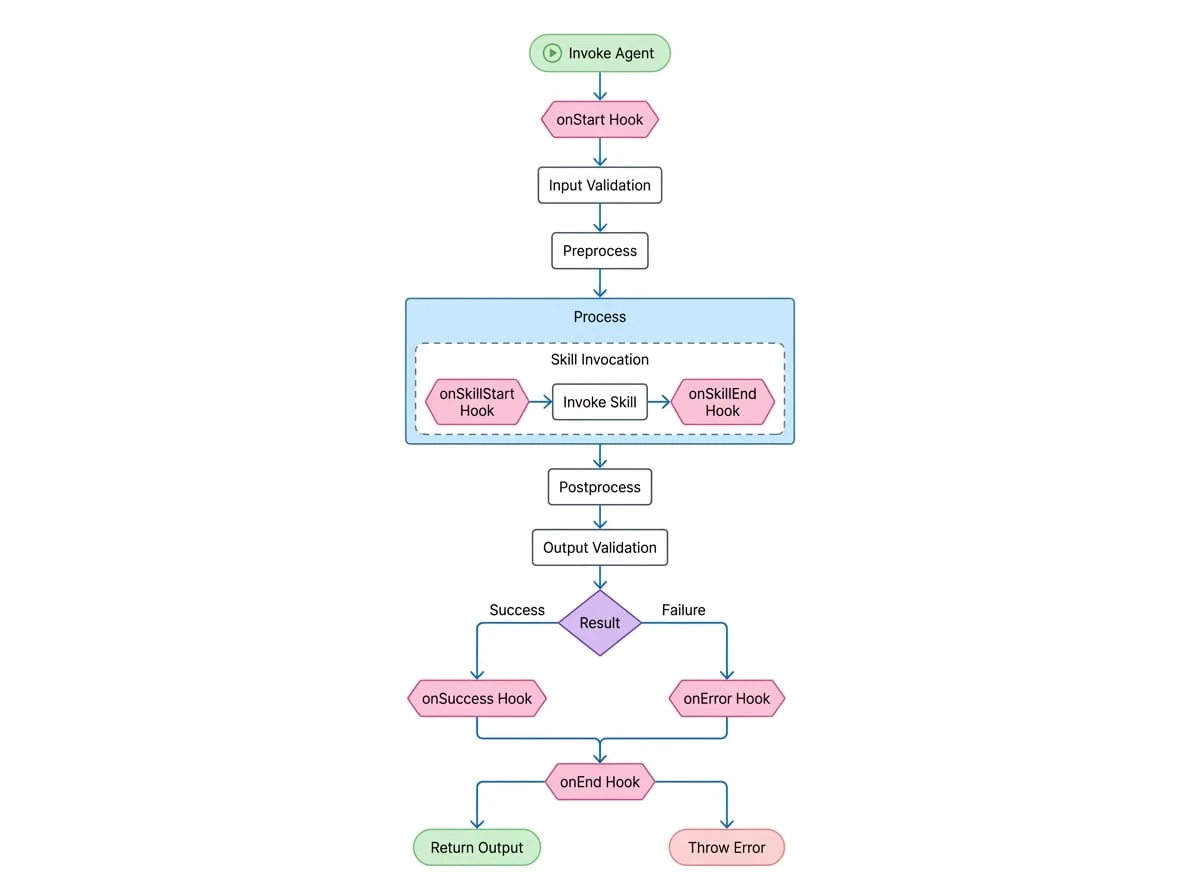
利用可能なフック
フックは AgentHooks オブジェクト内で定義されます。各フックは、関数または独立した専用の Agent として実装できます。
- onStart
function | Agent— Agent の呼び出しの最初に、入力検証の前にトリガーされます。初期の input や options を変更するために使用できます。 - onSuccess
function | Agent— Agent の process メソッドが正常に完了し、出力が検証された後にトリガーされます。最終的な output を変換するために使用できます。 - onError
function | Agent— 実行のどの段階でエラーがスローされてもトリガーされます。カスタムのエラーロギングや、{ retry: true } を返すことによるリトライメカニズムを実装するために使用できます。 - onEnd
function | Agent— Agent の呼び出しの最後に、成功したか失敗したかに関わらずトリガーされます。クリーンアップタスク、最終的なロギング、またはメトリクスの収集に適しています。 - onSkillStart
function | Agent— Agent がそのスキル(サブ Agent)の一つを呼び出す直前にトリガーされます。これは Agent 間のタスクの委任をトレースするのに役立ちます。 - onSkillEnd
function | Agent— スキルの呼び出しが完了した後、成功したか失敗したかに関わらずトリガーされます。スキルの結果またはエラーを受け取ります。 - onHandoff
function | Agent— Agent の process メソッドが別の Agent インスタンスを返し、実質的に制御を引き渡すときにトリガーされます。これにより、Agent から Agent への転送を監視できます。
フックの実装
フックは、3つの方法で Agent にアタッチできます:
- Agent のインスタンス化時に、
AgentOptionsのhooksプロパティを介して。 - 呼び出し時に、
AgentInvokeOptionsのhooksプロパティを介して。 AIGNEContextインスタンス上でグローバルに。
例 1: 基本的なロギング
以下は、Agent の実行開始と終了をログに記録するフックの簡単な例です。
Agent のロギングフック
import { Agent, AIGNE, type AgentHooks } from "@aigne/core";

// ロギングフックを定義
const loggingHook: AgentHooks = {
  onStart: ({ agent, input }) => {
    console.log(`[${agent.name}] Starting execution with input:`, input);
  },
  onEnd: ({ agent, input, output, error }) => {
    if (error) {
      console.error(`[${agent.name}] Execution failed for input:`, input, "Error:", error);
    } else {
      console.log(`[${agent.name}] Execution succeeded with output:`, output);
    }
  },
};

// シンプルな Agent を定義
class MyAgent extends Agent {
  async process(input: { message: string }) {
    return { reply: `You said: ${input.message}` };
  }
}

// フックを使用して Agent をインスタンス化
const myAgent = new MyAgent({
  name: "EchoAgent",
  hooks: [loggingHook],
});

const aigne = new AIGNE();
await aigne.invoke(myAgent, { message: "hello" });

// コンソール出力:
// [EchoAgent] Starting execution with input: { message: 'hello' }
// [EchoAgent] Execution succeeded with output: { reply: 'You said: hello' }
例 2: onStart で入力を変更する
onStart フックは、Agent が受け取る input を変更するためにオブジェクトを返すことができます。
Agent の入力を変更
import { Agent, AIGNE, type AgentHooks } from "@aigne/core";

const inputModificationHook: AgentHooks = {
  onStart: ({ input }) => {
    // 入力メッセージにタイムスタンプを追加
    const newInput = {
      ...input,
      timestamp: new Date().toISOString(),
    };
    return { input: newInput };
  },
};

class GreeterAgent extends Agent {
  async process(input: { name: string; timestamp?: string }) {
    return { greeting: `Hello, ${input.name}! (processed at ${input.timestamp})` };
  }
}

const agent = new GreeterAgent({ hooks: [inputModificationHook] });

const aigne = new AIGNE();
const result = await aigne.invoke(agent, { name: "Alice" });

console.log(result);
// {
//   greeting: "Hello, Alice! (processed at 2023-10-27T10:00:00.000Z)"
// }
例 3: onError でのカスタムリトライ
onError フックは { retry: true } を返すことで、AIGNE が Agent の process メソッドを再試行するよう通知できます。これは、一時的な障害を処理するのに役立ちます。
カスタムリトライフック
import { Agent, AIGNE, type AgentHooks } from "@aigne/core";

let attempt = 0;

const retryHook: AgentHooks = {
  onError: ({ agent, error }) => {
    console.log(`[${agent.name}] Attempt failed: ${error.message}. Retrying...`);
    // true を返してリトライを通知しますが、最初の2回の試行のみです
    if (attempt < 2) {
      return { retry: true };
    }
    // 何も返さないことでエラーを伝播させます
  },
};

class UnreliableAgent extends Agent {
  async process() {
    attempt++;
    if (attempt <= 2) {
      throw new Error("Service temporarily unavailable");
    }
    return { status: "OK" };
  }
}

const agent = new UnreliableAgent({ hooks: [retryHook] });

const aigne = new AIGNE();
const result = await aigne.invoke(agent, {});

console.log(result); // { status: 'OK' }
この Agent は2回失敗し、retryHook がエラーをインターセプトして毎回リトライをトリガーします。3回目の試行で Agent は成功します。
フックの優先度
フックは Agent、呼び出し時、およびコンテキストで定義できます。実行順序を管理するために、フックは priority プロパティを "high"、"medium"、または "low"(デフォルト)に設定できます。
フックは優先度の順に実行されます:high > medium > low。
フックの優先度の例
const highPriorityHook: AgentHooks = {
  priority: 'high',
  onStart: () => console.log('High priority hook executed.'),
};

const mediumPriorityHook: AgentHooks = {
  priority: 'medium',
  onStart: () => console.log('Medium priority hook executed.'),
};

const lowPriorityHook: AgentHooks = {
  // priority はデフォルトで 'low' になります
  onStart: () => console.log('Low priority hook executed.'),
};

class MonitoredAgent extends Agent {
  async process(input: {}) {
    console.log('Agent processing...');
    return { success: true };
  }
}

const agent = new MonitoredAgent({
  hooks: [lowPriorityHook, highPriorityHook, mediumPriorityHook],
});

const aigne = new AIGNE();
await aigne.invoke(agent, {});

// コンソール出力:
// High priority hook executed.
// Medium priority hook executed.
// Low priority hook executed.
// Agent processing...
この予測可能な実行順序は、あるフックのロジックが別のフックの結果に依存する場合に不可欠です。
まとめ
フックは、堅牢で観測可能な Agent ベースのシステムを構築するための不可欠なツールです。これらは、ロギング、計装、回復力パターンなどの横断的関心事を、クリーンで非侵襲的な方法で Agent に追加する手段を提供します。Agent のライフサイクルと各フックの機能を理解することで、洗練された、本番環境に対応可能な AI アプリケーションを作成できます。