AIGNE 框架为处理来自 Agent 的流式响应提供了强大的支持。这对于需要实时数据处理的应用尤其有用,例如聊天机器人、实时数据源或任何受益于即时增量更新的用户界面。通过在数据可用时立即处理,您可以创建响应更迅速、交互性更强的用户体验。
本指南详细介绍了在框架内启用和消费流式响应的方法。
启用流式传输
要从 Agent 接收流式响应,您必须在 invoke 调用中将 stream 选项设置为 true。启用此选项后,invoke 方法将返回一个 AgentResponseStream,它是一个由 AgentResponseChunk 对象组成的 ReadableStream,而不是一个完全成形的响应对象。
AIGNE Invoke with Streaming
import { AIGNE, AIAgent } from "@aigne/core";
import { OpenAI } from "@aigne/openai";

const llm = new OpenAI({
  apiKey: process.env.OPENAI_API_KEY,
  model: "gpt-4o",
});

const agent = new AIAgent({
  model: llm,
  instructions: "You are a helpful assistant.",
});

const aigne = new AIGNE({
  model: llm,
  agents: { agent },
});

async function run() {
  // 通过将 `stream` 选项设置为 true 来启用流式传输
  const stream = await aigne.invoke("agent", {
    prompt: "Tell me a short story.",
  }, { stream: true });

  // 'stream' 变量现在是一个 ReadableStream
  for await (const chunk of stream) {
    // 在每个数据块到达时进行处理
    process.stdout.write(chunk.delta.text?.text || "");
  }
}

run();
消费流
返回的流由 AgentResponseChunk 对象组成。每个数据块代表总响应的一部分。数据块的 delta 中主要有两种类型的数据:
delta.text:包含部分文本内容。用于从语言模型流式传输文本。delta.json:包含部分 JSON 数据。当 Agent 配置为返回结构化输出时使用。框架会增量构建最终的 JSON 对象。
处理数据块
您可以使用 for await...of 循环遍历流,以便在每个数据块到达时进行处理。以下示例演示了如何从流中累积文本和最终的结构化 JSON。
Processing Stream Chunks
import { AIGNE, AIAgent, Message } from "@aigne/core";
import { OpenAI } from "@aigne/openai";
import { agentResponseStreamToObject } from "@aigne/core/utils";

// 假设 aigne 和 agent 的配置与前一个示例相同

interface StoryOutput extends Message {
  protagonist: string;
  setting: string;
  plotSummary: string;
  storyText: string;
}

async function processStream() {
  const aigne = new AIGNE({
    model: new OpenAI(),
    agents: {
      agent: new AIAgent({
        model: new OpenAI(),
      })
    },
  });
  const stream = await aigne.invoke<StoryOutput>("agent", {
      prompt: "Write a short story about a robot who discovers music. Return the protagonist's name, the setting, a plot summary, and the full story text.",
      // 假设 Agent 已配置为结构化输出
    },
    { stream: true }
  );

  let fullText = "";
  const finalResult: Partial<StoryOutput> = {};

  for await (const chunk of stream) {
    if (chunk.delta.text?.storyText) {
      const partialText = chunk.delta.text.storyText;
      fullText += partialText;
      process.stdout.write(partialText); // 用文本实时更新 UI
    }

    if (chunk.delta.json) {
      // 框架在每个相关的数据块中提供部分合并的 JSON 对象
      Object.assign(finalResult, chunk.delta.json);
    }
  }

  console.log("\n\n--- Final Structured Output ---");
  console.log(finalResult);

  // 您也可以使用一个实用工具直接获取最终对象
  // 注意:这将消费整个流,因此应替代循环使用
  // const finalObject = await agentResponseStreamToObject(stream);
  // console.log(finalObject);
}

processStream();
实用工具:agentResponseStreamToObject
如果您只需要最终完全形成的对象,而不需要处理中间的数据块,框架提供了 agentResponseStreamToObject 实用工具。该函数会消费整个流,并返回一个解析为完整响应对象的 Promise。
当您希望在后端享受流式传输的好处(例如,从 LLM 获得更低的首页字节时间),但只需要向调用者交付最终结果时,这非常有用。
Using agentResponseStreamToObject
import { AIGNE, AIAgent } from "@aigne/core";
import { OpenAI } from "@aigne/openai";
import { agentResponseStreamToObject } from "@aigne/core/utils";
// ... 设置 aigne 和 agent

async function getFinalObject() {
  const aigne = new AIGNE({
    model: new OpenAI(),
    agents: {
      agent: new AIAgent({
        model: new OpenAI(),
      })
    },
  });
  const stream = await aigne.invoke("agent", {
    prompt: "Tell me a short story.",
  }, { stream: true });

  // 消费流并返回最终的聚合对象
  const result = await agentResponseStreamToObject(stream);

  console.log("--- Complete Response ---");
  console.log(result.text);
}

getFinalObject();
使用服务器发送事件 (SSE) 将流传输到前端
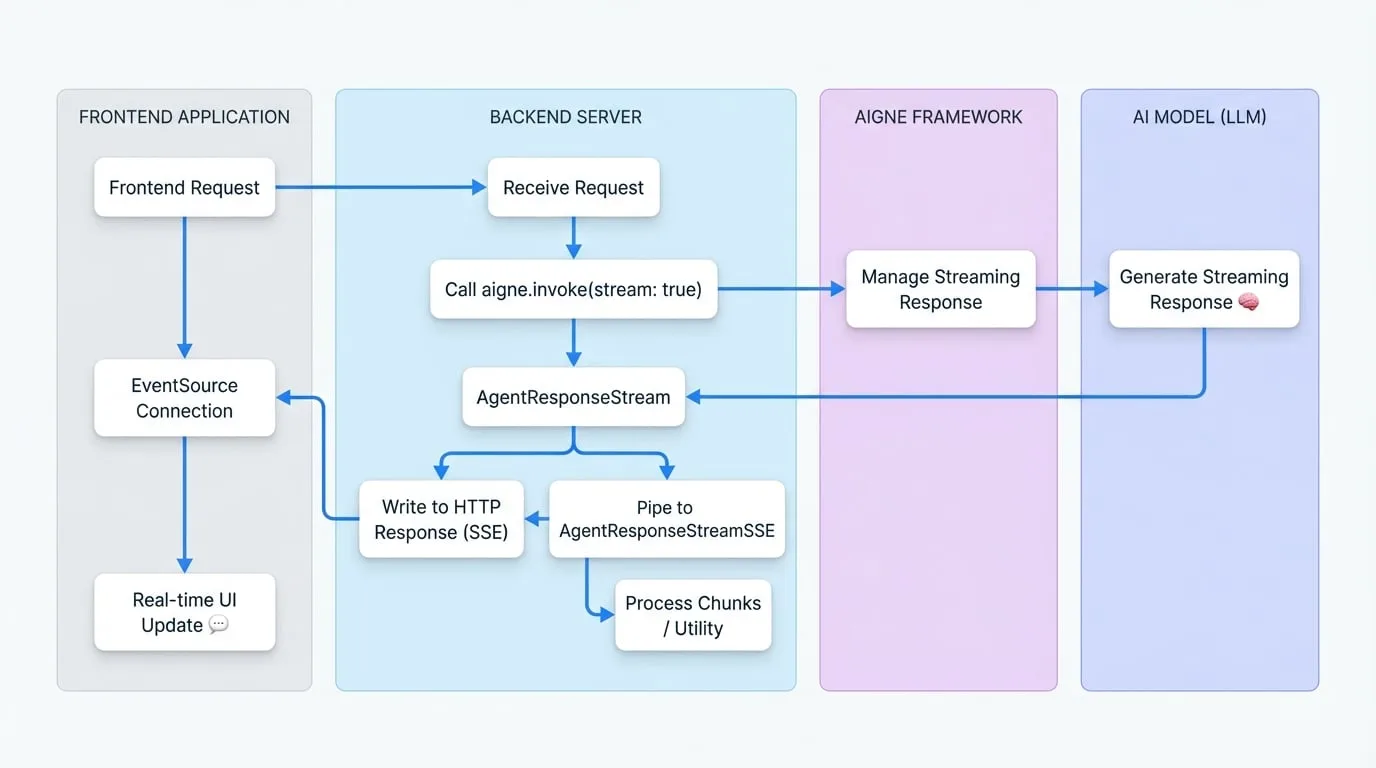
流式传输的一个常见用例是向 Web 前端发送实时更新。AIGNE 框架通过提供 AgentResponseStreamSSE 类简化了这一过程,该类可将 AgentResponseStream 转换为与服务器发送事件 (SSE) 兼容的格式。
数据流图
下图说明了使用 SSE 时从后端 AIGNE 到前端应用程序的数据流。
后端实现
在您的服务器上,创建一个端点来发起启用了流式传输的 Agent invoke 调用。然后,将生成的 AgentResponseStream 通过管道传输到 AgentResponseStreamSSE 中,并将其输出写入 HTTP 响应。
以下示例使用了一个通用的 Web 服务器结构。
SSE Backend Endpoint
import { AIGNE, AIAgent } from "@aigne/core";
import { OpenAI } from "@aigne/openai";
import { AgentResponseStreamSSE } from "@aigne/core/utils";
// ... 设置 aigne

// 示例使用通用服务器上下文(例如 Express、Hono 等)
async function handleSseRequest(req, res) {
  const aigne = new AIGNE({
    model: new OpenAI(),
    agents: {
      agent: new AIAgent({
        model: new OpenAI(),
      })
    },
  });
  res.writeHead(200, {
    "Content-Type": "text/event-stream",
    "Connection": "keep-alive",
    "Cache-Control": "no-cache",
  });

  try {
    const stream = await aigne.invoke("agent", {
      prompt: req.body.prompt,
    }, { stream: true });

    // 将 Agent 流转换为 SSE 流
    const sseStream = new AgentResponseStreamSSE(stream);

    // 将 SSE 流通过管道传输到 HTTP 响应
    for await (const sseChunk of sseStream) {
      res.write(sseChunk);
    }
  } catch (error) {
    console.error("SSE stream error:", error);
    const sseError = `event: error\ndata: ${JSON.stringify({ message: error.message })}\n\n`;
    res.write(sseError);
  } finally {
    res.end();
  }
}
前端实现
在前端,使用原生的 EventSource API 连接到您的 SSE 端点。然后,您可以监听 message 事件以接收数据块,监听 error 事件以处理问题。
SSE Frontend Client
const promptInput = document.getElementById('prompt-input');
const submitButton = document.getElementById('submit-button');
const responseContainer = document.getElementById('response');

submitButton.addEventListener('click', async () => {
  const prompt = promptInput.value;
  responseContainer.innerHTML = ''; // 清除先前的响应

  const eventSource = new EventSource('/api/chat-stream', {
    method: 'POST',
    headers: { 'Content-Type': 'application/json' },
    body: JSON.stringify({ prompt }),
  });

  eventSource.onmessage = (event) => {
    const chunk = JSON.parse(event.data);

    if (chunk.delta?.text?.text) {
      responseContainer.innerHTML += chunk.delta.text.text;
    }
  };

  eventSource.onerror = (error) => {
    console.error('EventSource failed:', error);
    responseContainer.innerHTML += '<p style="color: red;">Error receiving stream.</p>';
    eventSource.close();
  };

  // 连接建立时触发 'open' 事件
  eventSource.onopen = () => {
    console.log('Connection to server opened.');
  };
});
这种架构能够构建高度响应的用户界面,其中文本会逐字显示,与 AI 模型生成文本的方式完全一致。
总结
AIGNE 框架的流式传输功能对于构建现代化的实时 AI 应用至关重要。通过在 invoke 方法中启用 stream 选项,您可以增量处理数据、提高感知性能,并使用服务器发送事件高效地将 Agent 响应通过管道传输到前端。有关 Agent 调用的更多详细信息,请参阅 AI Agent 文档。