Orchestrator Agent 提供了一种结构化、可靠的解决方案,用于管理复杂的多步骤 AI 工作流。它将高层目标分解为一系列可管理的任务,按顺序执行它们,并将结果合成为一个连贯的最终响应,从而实现自主的任务规划和执行。
本文档详细介绍了 Orchestrator Agent 的架构、配置和实际应用。
概述
Orchestrator Agent 采用一个复杂模式,通过三阶段架构实现自主任务管理:Planner → Worker → Completer。该结构使其能够处理需要多个步骤、工具和迭代优化的复杂目标。
核心组件如下:
- Planner:分析主要目标和当前进度,以确定最合乎逻辑的下一个任务。
- Worker:执行 Planner 分配的具体任务,使用任何可用的工具或技能。
- Completer:一旦所有任务完成,它会审查整个执行历史,并将各个结果合成为一个最终的、全面的输出。
- Execution State:一个记录组件,用于跟踪工作流期间执行的所有任务的历史、状态和结果。
这个迭代过程会持续进行,直到 Planner 确定总体目标已经达成。
架构
该工作流是一个循环,Planner 和 Worker 协同工作直至目标达成,然后由 Completer 执行最后的合成步骤。下图说明了此过程:
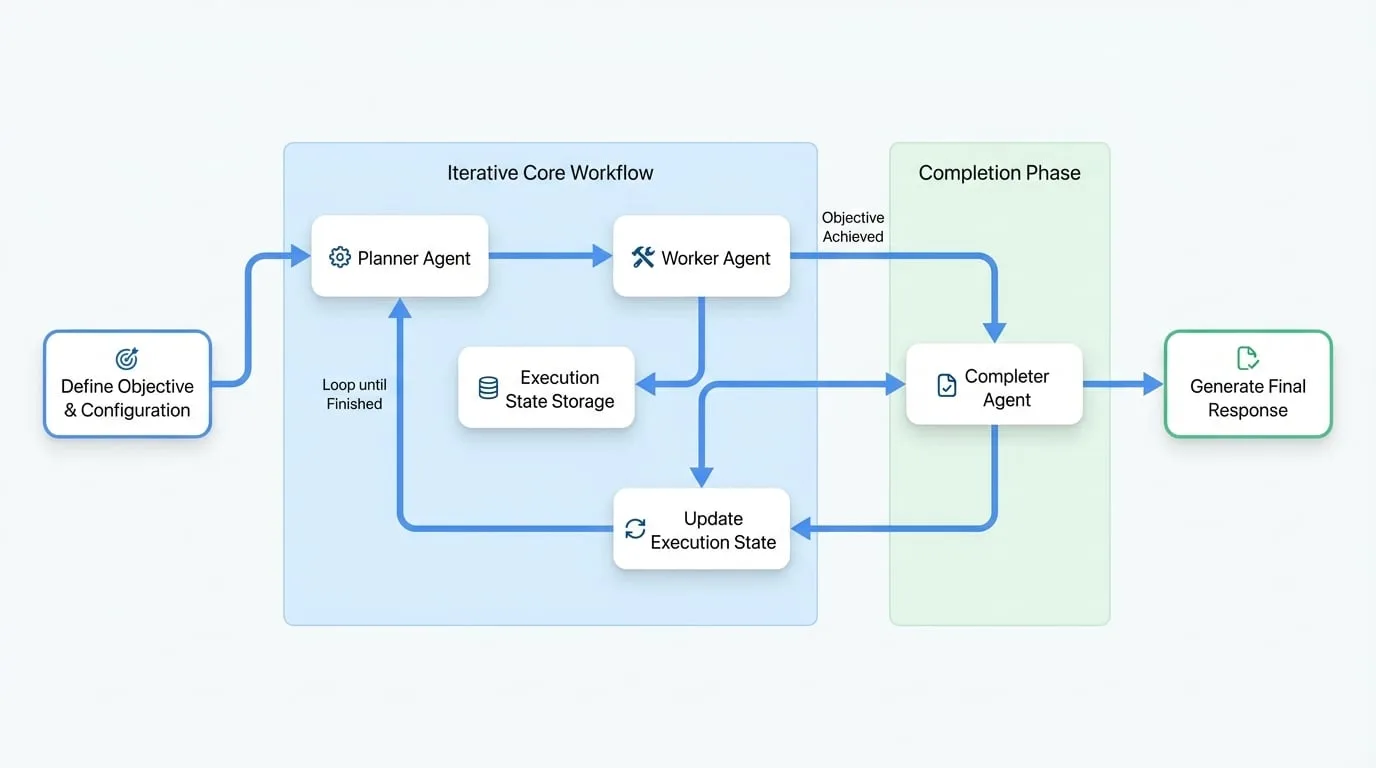
该过程展开如下:
初始化
Orchestrator 接收一个高层目标,并初始化一个空的执行状态。
规划
Planner 检查目标和当前状态(初始为空),并设计出第一个任务。
执行
Worker 从 Planner 接收任务并执行它。结果(成功或失败,以及结果或错误)被记录下来。
状态更新
任务的结果被附加到执行状态中。
迭代
从步骤 2 开始重复此过程。Planner 现在会审查目标和执行状态中更新的历史记录,以确定下一个任务。
完成
当 Planner 决定目标已完成时,它会发出循环结束的信号。然后,Completer 接管工作,审查执行状态中的完整历史,并生成最终响应。
基本用法
配置 Orchestrator Agent 最直接的方法是通过 YAML 定义文件。
配置示例
这是一个创建一个用于分析项目结构的 Orchestrator 的基本设置。
agents/orchestrator.yaml
type: "@aigne/agent-library/orchestrator"
name: orchestrator

# 定义 Agent 的总体目标。
# 可以使用外部文件以实现更清晰的分离。
objective:
  url: objective.md

# 配置状态管理以控制工作流的执行。
state_management:
  max_iterations: 20      # 设置规划-执行周期的上限。
  max_tokens: 100000      # 为执行状态上下文设置令牌限制。
  keep_recent: 20         # 压缩状态时保留最近的 20 个任务。

# 配置 Agent 文件系统 (AFS) 以提供工作区。
afs:
  modules:
    - module: local-fs
      options:
        name: workspace
        localPath: .
        description: Orchestrator Agent 的工作区目录。
objective.md 文件包含了 Agent 的主要目标。
agents/objective.md
Analyze the project structure and generate a comprehensive report.

- Ignore node_modules, .git, dist, build directories.
- Provide accurate information based on actual file contents.
- Include key findings and recommendations.

{% if message %}
## User Instructions
{{ message }}
{% endif %}
最后,主 aigne.yaml 文件将所有内容整合在一起。
aigne.yaml
#!/usr/bin/env aigne

model: google/gemini-1.5-pro
agents:
  - agents/orchestrator.yaml
配置参考
Orchestrator Agent 通过一组选项进行配置,这些选项定义了其行为、组件和约束。
顶层选项
- objective
PromptBuilder(required) — Orchestrator 要实现的总体目标。 - planner
Agent— 一个用于处理规划阶段的自定义 Agent。如果未提供,则使用默认的 Planner。 - worker
Agent— 一个用于处理执行阶段的自定义 Agent。如果未提供,则使用默认的 Worker。 - completer
Agent— 一个用于处理完成阶段的自定义 Agent。如果未提供,则使用默认的 Completer。 - stateManagement
object— 用于管理执行状态的配置。 - inputSchema
ZodSchema— 用于验证输入数据的模式。如果在目标模板中使用自定义变量,则此项为必需。 - outputSchema
ZodSchema— 用于验证 Completer 最终输出的模式。 - afs
AFSOptions— Agent 文件系统的配置,使文件和目录对所有组件可用。 - skills
Agent[]— 可供 Worker Agent 使用的工具或技能列表。 - model
string— 供所有组件(Planner、Worker、Completer)使用的默认模型,除非在组件的特定配置中被覆盖。
说明
当在 objective 提示中使用自定义输入变量(如 {{ message }})时,您必须在 inputSchema 中声明它们。任何未声明的变量都不会传递给模板。
StateManagementOptions
这些选项控制执行循环,并防止无限运行或上下文溢出。
- maxIterations
number(default:20) — 要执行的规划-执行周期的最大数量。 - maxTokens
number— 传递给 Agent 的执行状态历史所允许的最大令牌数。 - keepRecent
number— 当状态因令牌限制而被压缩时要保留的最近任务数。
自定义组件
您可以用自己的自定义 Agent 替换默认的 Planner、Worker 或 Completer,以使 Orchestrator 的逻辑适应特定领域。这通常通过创建具有自定义指令的 AI Agent 来完成。
自定义 Planner
Planner 的角色是决定下一个动作。
- 标准输入:
objective、skills、executionState。 - 标准输出:一个包含
nextTask(string) 和finished(boolean) 的对象。
配置示例:
agents/orchestrator.yaml
type: "@aigne/agent-library/orchestrator"
objective:
  url: objective.md
planner:
  type: ai
  instructions:
    url: custom-planner.md
指令示例 (custom-planner.md):
## Your Role
You are a strategic planner for code analysis tasks. Your responsibility is to decide the next single task to perform based on the overall objective and the history of completed tasks.

## Objective
{{ objective }}

## Available Skills
{{ skills | yaml.stringify }}

## Current Execution State
{{ executionState | yaml.stringify }}

## Planning Guidelines
- Review `executionState` to avoid repeating work.
- Decompose the objective into small, logical steps.
- Plan only one task at a time.
- If all work is done, set `finished: true`.

## Output Format
Return a JSON object with the following fields:
- `nextTask`: A string describing the next task to execute. Omit this field if finished.
- `finished`: A boolean indicating if the objective is complete.
自定义 Worker
Worker 的角色是执行单个任务。
- 标准输入:
objective、task、executionState。 - 标准输出:一个包含
success(boolean)、result(string, 成功时) 和error(带有message的对象, 失败时) 的对象。
配置示例:
agents/orchestrator.yaml
# ...
worker:
  type: ai
  instructions:
    url: custom-worker.md
指令示例 (custom-worker.md):
## Your Role
You are a professional code analysis worker. Your job is to execute the assigned task using the available tools.

## Overall Objective (For Context Only)
{{ objective }}

## Current Task
{{ task }}

## Execution Guidelines
- Focus strictly on completing the `Current Task`.
- Use the provided tools and skills to accomplish the task.
- If successful, provide the result. If not, explain the failure in the error message.

## Output Format
Return a JSON object with the following fields:
- `success`: A boolean indicating if the task succeeded.
- `result`: A string with the task's output. Required on success.
- `error`: An object with a `message` field. Required on failure.
自定义 Completer
Completer 的角色是合成最终报告。
- 标准输入:
objective、executionState。 - 标准输出:一个用户定义的结构,根据 Orchestrator 的
output_schema进行验证。
配置示例:
agents/orchestrator.yaml
# ...
completer:
  type: ai
  instructions:
    url: custom-completer.md
  output_schema:
    type: object
    properties:
      summary:
        type: string
        description: An executive summary of the findings.
      recommendations:
        type: array
        items:
          type: string
        description: A list of actionable recommendations.
    required: [summary]
指令示例 (custom-completer.md):
## Your Role
You are responsible for synthesizing all task results from the execution history into a final, structured response.

## User Objective
{{ objective }}

## Execution Results
{{ executionState | yaml.stringify }}

## Synthesis Guidelines
- Analyze all successful and failed tasks in `executionState`.
- Consolidate the individual results into a coherent report.
- Structure your response according to the defined output schema.

## Output Format
Return a JSON object conforming to the output schema.
最佳实践
为最大限度地发挥 Orchestrator Agent 的效能,请遵循以下原则。
1. 定义明确的目标
提供具体、可操作且明确的目标。一个定义明确的目标对于 Planner 创建逻辑任务序列至关重要。
- 好的示例:“分析
/src/auth中的认证系统,识别安全漏洞,并为发现的每个问题提供具体的建议。” - 不好的示例:“看看代码,告诉我有什么问题。”
2. 专门化组件角色
确保每个组件专注于其指定的角色。Planner 只应规划,不应执行。Worker 只应执行其当前任务,不应规划未来的任务。
3. 对长工作流使用状态压缩
对于可能需要多次迭代的复杂目标,请配置状态管理,以防止上下文变得过大而超出模型的处理能力。
state_management:
  max_iterations: 50
  max_tokens: 80000      # 防止上下文溢出
  keep_recent: 25        # 保留最近的任务历史作为上下文
4. 为不同组件使用不同模型
根据每个组件的需求为其分配不同的模型,以优化成本和性能。为规划和合成使用功能强大的模型,为执行使用更快、更便宜的模型,通常是一种成本效益高的策略。
planner:
  type: ai
  model: anthropic/claude-3-5-sonnet-20240620

worker:
  type: ai
  model: google/gemini-1.5-flash

completer:
  type: ai
  model: anthropic/claude-3-5-sonnet-20240620
5. 验证输入和输出
使用 input_schema 和 output_schema 来强制执行类型安全,并确保 Agent 接收和产生的数据格式符合预期。当目标提示使用模板变量时,这一点尤其重要。