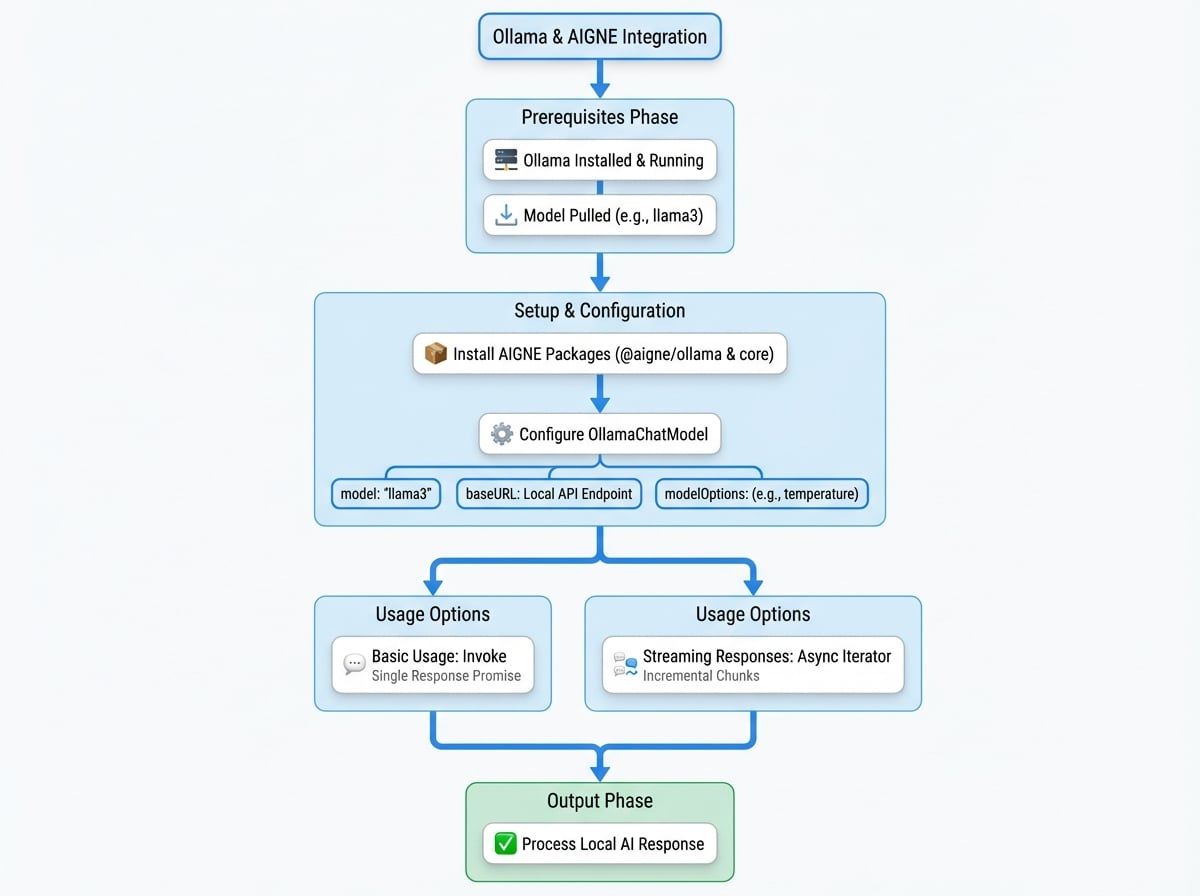
The @aigne/ollama package provides a seamless integration between the AIGNE Framework and AI models hosted locally via Ollama. This allows developers to leverage a wide variety of open-source language models running on their own hardware, ensuring privacy and offline access to AI capabilities.
This guide covers the necessary steps to configure and use the OllamaChatModel in your AIGNE applications. For information on other model providers, please see the Models Overview.
Prerequisites#
Before using this package, you must have Ollama installed and running on your local machine. You also need to have pulled at least one model. For detailed instructions, please refer to the official Ollama website.
Installation#
To get started, install the necessary AIGNE packages using your preferred package manager.
npm
```bash
npm install @aigne/ollama @aigne/core
```
yarn
```bash
yarn add @aigne/ollama @aigne/core
```
pnpm
```bash
pnpm add @aigne/ollama @aigne/core
```
Configuration#
The OllamaChatModel class is the primary interface for interacting with Ollama. When instantiating the model, you can provide several configuration options to customize its behavior.
OllamaChatModel Instantiation
import { OllamaChatModel } from "@aigne/ollama";

const model = new OllamaChatModel({
  // Specify the Ollama model to use
  model: "llama3",

  // The base URL of your local Ollama instance
  baseURL: "http://localhost:11434/v1",

  // Optional parameters to pass to the model
  modelOptions: {
    temperature: 0.7,
  },
});
The constructor accepts the following parameters:
model
string
default:llama3.2
The name of the model to use (e.g., llama3, mistral). Ensure the model has been pulled in your Ollama instance.
baseURL
string
default:http://localhost:11434/v1
The base URL for the Ollama API. This can also be configured using the OLLAMA_BASE_URL environment variable.
apiKey
string
default:ollama
A placeholder API key. Ollama does not require authentication by default, but the AIGNE framework requires a non-empty key. It defaults to "ollama" and can be set with the OLLAMA_API_KEY environment variable.
An object containing additional parameters to pass to the Ollama API, such as temperature, top_p, etc. These options allow for fine-tuning the model's response generation.
Basic Usage#
To run the model, use the invoke method. Pass a message payload to generate a chat completion.
import { OllamaChatModel } from "@aigne/ollama";

const model = new OllamaChatModel({
  model: "llama3",
  modelOptions: {
    temperature: 0.8,
  },
});

const result = await model.invoke({
  messages: [{ role: "user", content: "Explain the importance of local AI models." }],
});

console.log(result.text);
The invoke method returns a promise that resolves to an object containing the model's response.
Example Response
{
  "text": "Local AI models are crucial for several reasons. Firstly, they offer enhanced privacy and security since data is processed on-device and never leaves the user's machine...",
  "model": "llama3"
}
Streaming Responses#
For applications requiring real-time interaction, you can stream the model's response. Set the streaming option to true in the invoke method. The method will return an async iterator that yields response chunks as they become available.
import { isAgentResponseDelta } from "@aigne/core";
import { OllamaChatModel } from "@aigne/ollama";

const model = new OllamaChatModel({
  model: "llama3",
});

const stream = await model.invoke(
  {
    messages: [{ role: "user", content: "Tell me a short story about a robot." }],
  },
  { streaming: true },
);

let fullText = "";
process.stdout.write("Response: ");

for await (const chunk of stream) {
  if (isAgentResponseDelta(chunk)) {
    const text = chunk.delta.text?.text;
    if (text) {
      fullText += text;
      process.stdout.write(text);
    }
  }
This example demonstrates how to process a stream. Each chunk is a delta of the full response. You can accumulate the text from each chunk to reconstruct the complete message.
Summary#
The @aigne/ollama package offers a robust and straightforward way to integrate local, open-source models into your AIGNE applications. By following the steps in this guide, you can set up the OllamaChatModel, configure it for your needs, and leverage both standard and streaming completions.
For further reading on other available models, please see the following guides: