AIGNE
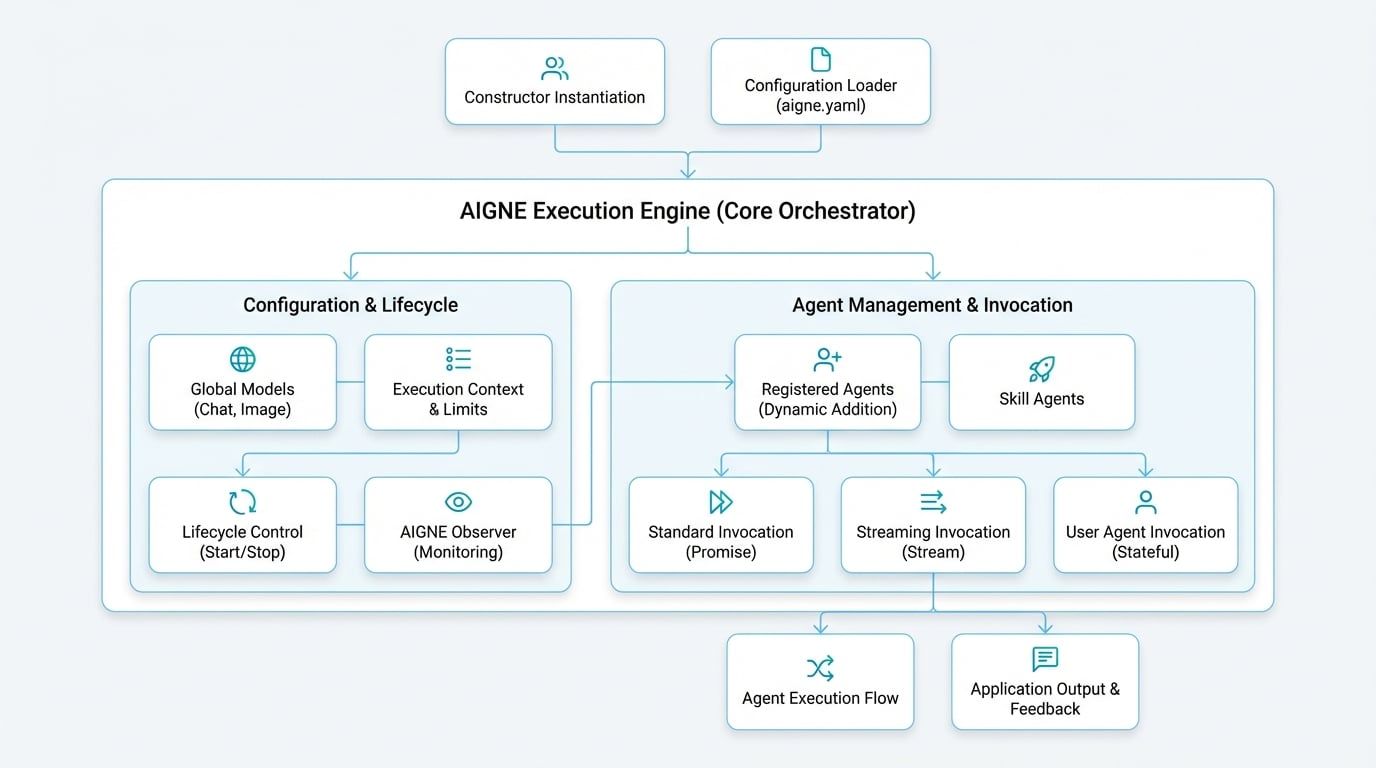
The AIGNE class is the central execution engine of the framework. It orchestrates multiple agents to build complex AI applications, serving as the main coordination point for agent interactions, message passing, and the overall execution flow.
This guide covers how to instantiate and configure the AIGNE engine, execute agents using the invoke method, and manage the application lifecycle.
Overview#
AIGNE acts as the container for your entire agentic application. Its primary responsibilities include:
- Agent Management: Manages the lifecycle of all registered agents and skills.
- Model Configuration: Provides a global default configuration for chat and image models, which can be inherited or overridden by individual agents.
- Execution Context: Creates and manages isolated contexts for each invocation, ensuring that concurrent operations do not interfere with each other.
- Lifecycle Control: Offers methods to gracefully start and stop the application, ensuring all resources are properly handled.
Instantiation#
There are two primary ways to create an AIGNE instance: programmatically using the constructor or by loading a configuration from a directory.
Using the Constructor#
The most direct method is to use the AIGNE constructor, passing in an options object. This approach is ideal for applications where configuration is managed dynamically in code.
Instantiating AIGNE
import { AIGNE } from "@aigne/core";
import { OpenAIChatModel } from "@aigne/openai";

const aigne = new AIGNE({
  name: "MyFirstAIGNEApp",
  model: new OpenAIChatModel({
    apiKey: process.env.OPENAI_API_KEY,
    model: "gpt-4o-mini",
  }),
});
Loading from Configuration#
For more complex projects, it is best practice to define your application structure in a directory containing an aigne.yaml file and other agent definitions. The static AIGNE.load() method reads this directory and constructs a fully configured instance. This promotes separation of configuration from logic.
Loading AIGNE from a Directory
import { AIGNE } from "@aigne/core";
import { join } from "node:path";

const configPath = join(process.cwd(), "my-aigne-project");
const aigne = await AIGNE.load(configPath);
Configuration Options#
The AIGNE constructor accepts an AIGNEOptions object to control its behavior.
Agent and Lifecycle Management#
Once an instance is created, you can manage agents and control the application lifecycle.
Adding Agents#
While agents can be provided in the constructor, you can also add them dynamically using the addAgent method. Each agent is attached to the AIGNE instance, giving it access to shared resources like the global model.
Dynamically Adding an Agent
import { AIAgent } from "@aigne/core";
import { AIGNE } from "@aigne/core";

// Assuming 'aigne' is an existing AIGNE instance
const aigne = new AIGNE();

const myAgent = new AIAgent({
  instructions: "You are a helpful assistant.",
});

aigne.addAgent(myAgent);
Shutting Down#
To ensure a clean exit and proper resource cleanup, call the shutdown method. This is crucial for long-running applications to prevent resource leaks. The engine also automatically handles process exit signals like SIGINT.
Graceful Shutdown
// Assuming 'aigne' is an existing AIGNE instance
await aigne.shutdown();
Invoking Agents#
The invoke method is the primary entry point for executing an agent. It is an overloaded method that supports several patterns, from simple request-response to real-time streaming.
Standard Invocation#
The most common use case is to provide an agent and an input message. This returns a promise that resolves with the agent's final output.
Standard Agent Invocation
// Assuming 'aigne' and 'myAgent' are configured
const result = await aigne.invoke(myAgent, {
  message: "What is the AIGNE Framework?",
});

console.log(result.message);
// Expected output: A descriptive answer about the framework.
Streaming Responses#
For interactive applications like chatbots, you can enable streaming to receive the response incrementally. Setting streaming: true in the options returns an AgentResponseStream. You can then iterate over the stream to process chunks of data as they arrive.
Streaming Agent Responses
import { isAgentResponseDelta } from "@aigne/core";

// Assuming 'aigne' and 'myAgent' are configured
const stream = await aigne.invoke(
  myAgent,
  { message: "Tell me a short story." },
  { streaming: true }
);

let fullResponse = "";
for await (const chunk of stream) {
  if (isAgentResponseDelta(chunk)) {
    const textDelta = chunk.delta.text?.message ?? "";
    fullResponse += textDelta;
    process.stdout.write(textDelta);
  }
}

console.log("\n--- End of Story ---");
Creating a User Agent#
Invoking an agent without a message creates a UserAgent. This is a stateful wrapper that preserves the conversation context across multiple calls, making it ideal for building conversational experiences.
Creating a Stateful UserAgent
// Assuming 'aigne' and 'myAgent' are configured

// Create a UserAgent to maintain context
const userAgent = aigne.invoke(myAgent);

// First interaction
const response1 = await userAgent.invoke({ message: "My name is Bob." });
console.log(response1.message); // e.g., "Nice to meet you, Bob!"

// Second interaction preserves context
const response2 = await userAgent.invoke({ message: "What is my name?" });
console.log(response2.message); // e.g., "Your name is Bob."
The invoke method offers additional overloads for advanced scenarios, such as returning the final active agent in a multi-agent team. Refer to the API reference for a complete list of signatures.
With a clear understanding of the AIGNE engine, you are now prepared to explore the different types of Agents that form the building blocks of your application.