AI Agent
The AIAgent is the primary component for interacting with large language models (LLMs). It serves as a direct interface to a ChatModel, enabling sophisticated conversational AI, function calling (tool usage), and structured data extraction. This agent handles the complexities of prompt construction, model invocation, response parsing, and tool execution loops.
This guide provides a comprehensive overview of the AIAgent, its configuration, and its core functionalities. For a broader understanding of how agents fit into the AIGNE framework, please refer to the Agents core concept guide.
How It Works#
The AIAgent follows a systematic process to handle user input and generate a response. This process often involves multiple interactions with an LLM, especially when tools are used.
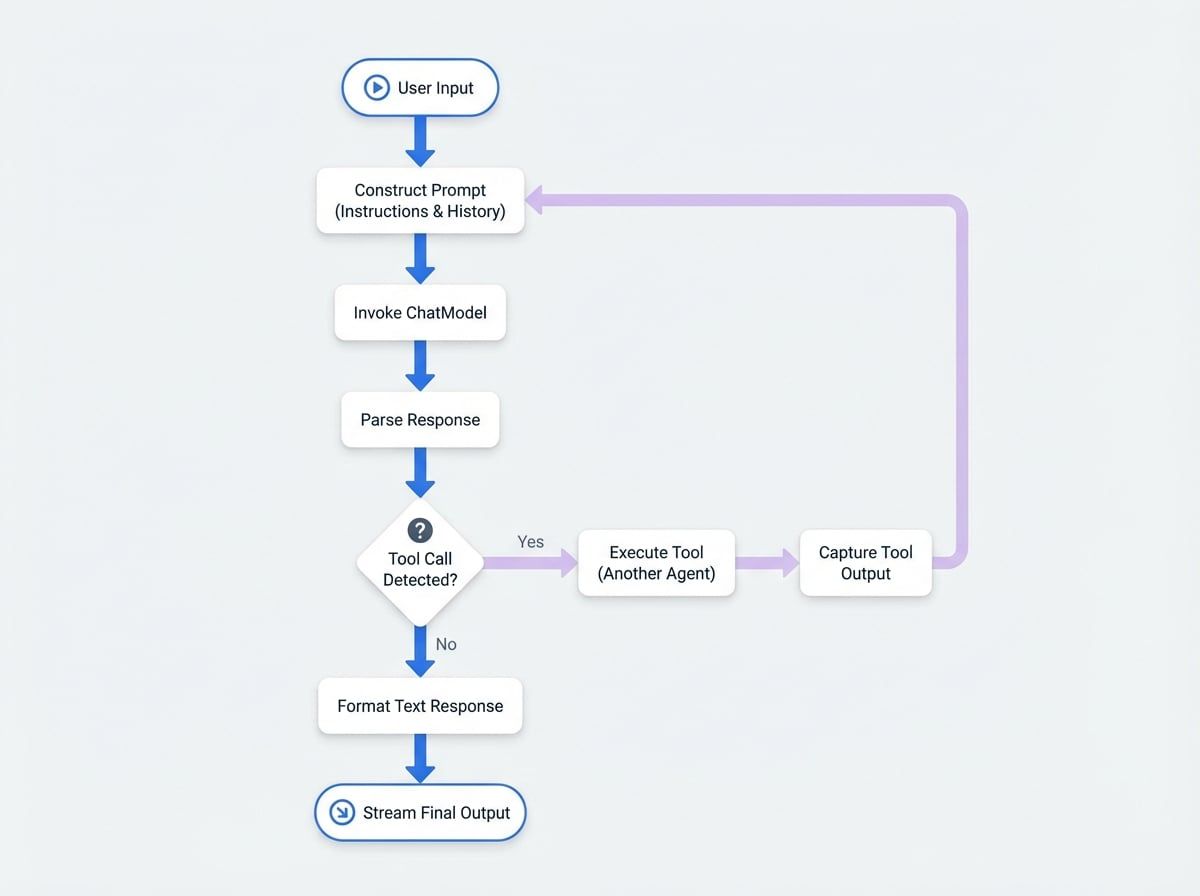
The diagram above illustrates the typical lifecycle of a request:
- Prompt Construction: The
AIAgentuses aPromptBuilderto assemble the final prompt from itsinstructions, the user input, and the history of any previous tool calls. - Model Invocation: The fully formed prompt is sent to the configured
ChatModel. - Response Parsing: The agent receives the model's raw output.
- Tool Call Detection: It checks if the response contains a request to call a tool.
- If No, the agent formats the text response and returns it.
- If Yes, it proceeds to the tool execution loop.
- Tool Execution: The agent identifies and invokes the requested tool (which is another agent), captures its output, and formats it into a message for the model. The process then loops back to step 1, sending the tool's result back to the model for the next generation step.
- Final Output: Once the model generates a final text response without any tool calls, the agent formats it and streams it back to the user.
Configuration#
An AIAgent is configured through its constructor options. Below is a detailed breakdown of the available parameters.
Specifies which key from the input message object should be treated as the main user query. If not set, instructions must be provided.
Defines the key under which the agent's final text response will be placed in the output object. Defaults to message.
Specifies the key from the input message that contains file data to be sent to the model.
Defines the key under which any files generated by the model will be placed in the output object. Defaults to files.
Controls how the agent uses its available tools (skills). See the Tool Usage section below for details.
The maximum number of tool calls that can be executed concurrently in a single turn.
If true, the agent will catch errors from tool executions and feed the error message back to the model. If false, an error will halt the entire process.
Enables a mode for extracting structured JSON data from the model's streaming response. See the Structured Output section for more information.
When true, attached MemoryAgent instances are exposed to the model as callable tools, allowing the agent to explicitly read from or write to its memory.
Basic Example#
Here is an example of a simple AIAgent configured to act as a helpful assistant.
Basic Chat Agent
import { AIAgent } from "@aigne/core";
import { OpenAI } from "@aigne/openai";

// Configure the model to use
const model = new OpenAI({
  apiKey: process.env.OPENAI_API_KEY,
  model: "gpt-4o",
});

// Create the AI Agent
const chatAgent = new AIAgent({
  instructions: "You are a helpful assistant.",
  inputKey: "question",
  outputKey: "answer",
});

// To run the agent, you would use the AIGNE's invoke method
// const aigne = new AIGNE({ model });
// const response = await aigne.invoke(chatAgent, { question: "What is AIGNE?" });
// console.log(response.answer);
This agent takes an input object with a question key and produces an output object with an answer key.
Tool Usage#
A powerful feature of AIAgent is its ability to use other agents as tools. By providing a list of skills during invocation, the AIAgent can decide to call these tools to gather information or perform actions. The toolChoice option dictates this behavior.
| Description |
|---|---|
| (Default) The model decides whether to call a tool based on the context of the conversation. |
| Disables tool usage entirely. The model will not attempt to call any tools. |
| Forces the model to call one or more tools. |
| A specialized mode where the model is forced to choose exactly one tool. The agent then directly routes the request to that tool and streams its response as the final output. This is highly efficient for creating dispatcher agents. |
Tool Usage Example#
Imagine you have a FunctionAgent that can fetch weather information. You can provide this to an AIAgent as a skill.
Agent with a Tool
import { AIAgent, FunctionAgent } from "@aigne/core";
import { OpenAI } from "@aigne/openai";

// A simple function to get the weather
function getCurrentWeather(location) {
  if (location.toLowerCase().includes("tokyo")) {
    return JSON.stringify({ location: "Tokyo", temperature: "15", unit: "celsius" });
  }
  return JSON.stringify({ location, temperature: "unknown" });
}

// Wrap the function in a FunctionAgent to make it a tool
const weatherTool = new FunctionAgent({
  name: "get_current_weather",
  description: "Get the current weather in a given location",
  inputSchema: {
    type: "object",
    properties: { location: { type: "string", description: "The city and state" } },
    required: ["location"],
  },
  process: ({ location }) => getCurrentWeather(location),
});

// Configure the model
const model = new OpenAI({
See all 15 lines
In this scenario, the AIAgent will receive the query, recognize the need for weather information, call the weatherTool, receive its JSON output, and then use that data to formulate a natural language response.
Structured Output#
For tasks that require extracting specific, structured information (like sentiment analysis, classification, or entity extraction), structuredStreamMode is invaluable. When enabled, the agent actively parses the model's streaming output to find and extract a JSON object.
By default, the model must be instructed to place its structured data inside <metadata>...</metadata> tags in YAML format.
Structured Output Example#
This example configures an agent to analyze the sentiment of a user message and return a structured JSON object.
Structured Sentiment Analysis
import { AIAgent } from "@aigne/core";
import { OpenAI } from "@aigne/openai";

const sentimentAnalyzer = new AIAgent({
  instructions: `
    Analyze the sentiment of the user's message.
    Respond with a single word summary, followed by a structured analysis.
    Place the structured analysis in YAML format inside <metadata> tags.
    The structure should contain 'sentiment' (positive, negative, or neutral) and a 'score' from -1.0 to 1.0.
  `,
  inputKey: "message",
  outputKey: "summary",
  structuredStreamMode: true,
});

// When invoked, the output will contain both the text summary
// and the parsed JSON object.
// const aigne = new AIGNE({ model: new OpenAI(...) });
// const result = await aigne.invoke(sentimentAnalyzer, { message: "AIGNE is an amazing framework!" });
/*
  Expected result:
  {
    summary: "Positive.",
    sentiment: "positive",
    score: 0.9
See all 2 lines
You can customize the parsing logic, including the start/end tags and the parsing function (e.g., to support JSON directly), using the customStructuredStreamInstructions option.
Summary#
The AIAgent is a foundational building block for creating advanced AI applications. It provides a robust and flexible interface to language models, complete with support for tool usage, structured data extraction, and memory integration.
For more complex workflows, you may need to orchestrate multiple agents. To learn how, proceed to the Team Agent documentation. For advanced prompt templating techniques, see the Prompts guide.