The Notification Service is a core component of the Blocklet SDK, enabling your application to send various types of notifications to users and subscribe to real-time events. This service acts as an interface to the underlying ABT Node notification capabilities, handling everything from simple user messages to rich, interactive notifications delivered to DID Wallets, email, and other channels.
Whether you need to alert a user about an important event, send a transactional email, or broadcast a message to all connected clients, the Notification Service provides a unified and straightforward API.
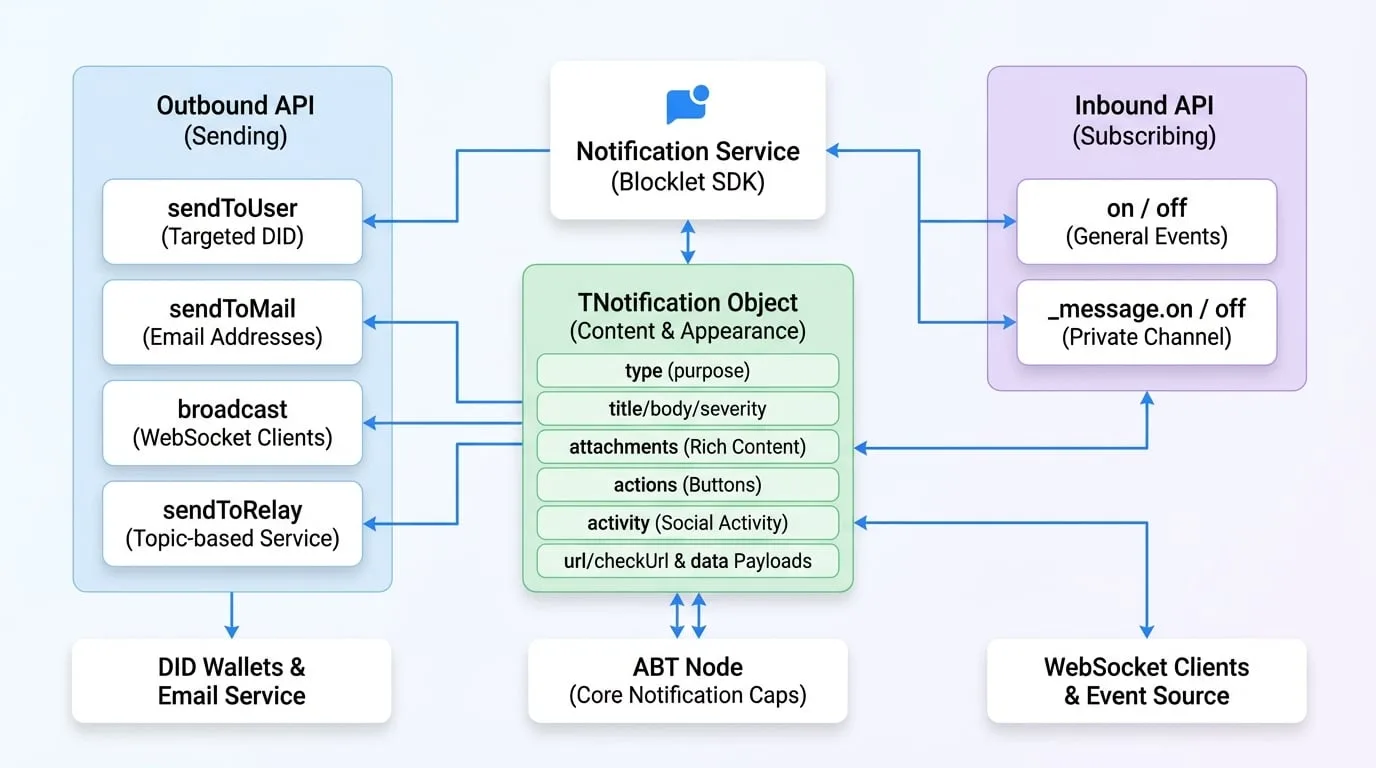
API Reference
sendToUser
Sends a notification directly to one or more users identified by their DIDs. This is the primary method for targeted user communication.
Parameters
- receiver
string | string[](required) — The DID of the recipient. Can be a single DID string, an array of DIDs, or * to send to all users of the blocklet. - notification
TNotification | TNotification[](required) — The notification object or an array of notification objects to send. See the The Notification Object (TNotification) section for a detailed structure. - options
TSendOptions— Additional options for sending the notification.- keepForOfflineUser
boolean— If true, the notification will be stored and delivered when the user comes online. - locale
string— The locale for the notification (e.g., 'en', 'zh'). - channels
('app' | 'email' | 'push' | 'webhook')[]— Specify which channels to deliver the notification through. - ttl
number— Time to live for the message in minutes (0-7200). After this time, the message expires. - allowUnsubscribe
boolean— If true, allows the user to unsubscribe from this type of notification.
- keepForOfflineUser
Returns
- Promise
Promise— A promise that resolves with the response object from the server upon successful sending.
Example
Send a simple notification
import notification from '@blocklet/sdk/service/notification';

async function notifyUser(userDid) {
  try {
    const result = await notification.sendToUser(userDid, {
      type: 'notification',
      title: 'Hello from SDK!',
      body: 'This is a test notification sent to a specific user.',
      severity: 'info',
    });
    console.log('Notification sent successfully:', result);
  } catch (error) {
    console.error('Failed to send notification:', error);
  }
}
Example Response
{
  "status": "ok",
  "message": "Notification sent to 1 user(s)."
}
sendToMail
Sends a notification to one or more recipients via email. The notification object structure is the same as sendToUser.
Parameters
- receiver
string | string[](required) — A single email address or an array of email addresses. - notification
TNotification(required) — The notification object. Thetitleis used as the email subject andbodyorattachmentsform the email content. - options
TSendOptions— Same sending options assendToUser.
Returns
- Promise
Promise— A promise that resolves with the response object from the server.
Example
Send an email notification
import notification from '@blocklet/sdk/service/notification';

async function emailUser(userEmail) {
  try {
    const result = await notification.sendToMail(userEmail, {
      type: 'notification',
      title: 'Your Weekly Report is Ready',
      body: 'Please log in to your dashboard to view the report.',
    });
    console.log('Email sent successfully:', result);
  } catch (error) {
    console.error('Failed to send email:', error);
  }
}
Example Response
{
  "status": "ok",
  "message": "Email sent successfully."
}
broadcast
Broadcasts a message to clients connected to a specific WebSocket channel. By default, it sends to the blocklet's public channel.
Parameters
- notification
TNotificationInput(required) — The notification object to broadcast. - options
object— Options to control the broadcast.- channel
string— The channel to broadcast to. Defaults to the blocklet's public channel, which can be retrieved with getAppPublicChannel(did). - event
string(default:message) — The event name to emit on the client-side. - socketId
string— If provided, sends the message only to this specific socket connection. - userDid
string— If provided, sends the message only to sockets authenticated with this DID.
- channel
Returns
- Promise
Promise— A promise that resolves with the server's response.
Example
Broadcast a message
import notification from '@blocklet/sdk/service/notification';

function broadcastUpdate() {
  notification.broadcast(
    {
      type: 'passthrough',
      passthroughType: 'system_update',
      data: { message: 'A new version is available. Please refresh.' },
    },
    { event: 'system-update' }
  );
}
Example Response
{
  "status": "ok",
  "message": "Broadcast sent."
}
sendToRelay
Sends a message through the relay service to a specific topic, enabling real-time, topic-based communication between different components or even different blocklets.
Parameters
- topic
string(required) — The topic to publish the event to. - event
string(required) — The name of the event being sent. - data
any(required) — The payload data for the event.
Returns
- Promise
Promise— A promise that resolves with the server's response.
Example
Send a relay message
import notification from '@blocklet/sdk/service/notification';

async function publishNewArticle(article) {
  try {
    await notification.sendToRelay('articles', 'new-published', {
      id: article.id,
      title: article.title,
    });
    console.log('Relay message sent.');
  } catch (error) {
    console.error('Failed to send relay message:', error);
  }
}
Example Response
{
  "status": "ok",
  "message": "Relay message sent."
}
on
Subscribes to general events, such as internal blocklet events or team-related events, pushed from the ABT Node. The Notification Service uses an EventEmitter interface for this functionality.
Parameters
- event
string(required) — The name of the event to listen for. - callback
Function(required) — The function to execute when the event is emitted.
Example
Listen for team member removal
import notification from '@blocklet/sdk/service/notification';
import { TeamEvents } from '@blocklet/constant';

function onMemberRemoved(data) {
  console.log('Team member removed:', data.user.did);
  // Add logic to update application state
}

// Subscribe to the event
notification.on(TeamEvents.MEMBER_REMOVED, onMemberRemoved);
off
Removes an event listener that was previously added with on.
Parameters
- event
string(required) — The name of the event to stop listening for. - callback
Function(required) — The specific listener function to remove.
Example
// To unsubscribe from the previous example
// notification.off(TeamEvents.MEMBER_REMOVED, onMemberRemoved);
_message.on
This is a special-purpose listener specifically for messages sent directly to your blocklet's private message channel. It's useful for handling direct responses or commands intended for the blocklet itself.
Parameters
- event
string(required) — Thetypeof the incoming message to listen for. - callback
Function(required) — The function to execute when a message of the specified type is received.
Example
Listen for direct messages
import notification from '@blocklet/sdk/service/notification';

function handleDirectMessage(response) {
  console.log('Received direct message:', response);
}

// The 'message' event from the messageChannel is emitted with the response.type as the event name
// e.g., if response.type is 'payment_confirmation', the event here is 'payment_confirmation'
notification._message.on('payment_confirmation', handleDirectMessage);
_message.off
Removes a direct message listener that was added with _message.on.
Parameters
- event
string(required) — The message type to stop listening for. - callback
Function(required) — The specific listener function to remove.
The Notification Object (TNotification)
The notification object is a flexible data structure that defines the content and appearance of a notification. Its structure can be customized for different use cases.
- type
'notification' | 'connect' | 'feed' | 'hi' | 'passthrough'(required) — The primary type of the notification, which determines its overall purpose and structure. - title
string— The title of the notification. Used fornotificationtype. - body
string— The main content/body of the notification. Used fornotificationtype. - severity
'normal' | 'success' | 'error' | 'warning'— The severity level, which can affect the notification's appearance in the wallet. Used fornotificationtype. - attachments
TNotificationAttachment[]— An array of rich content attachments. These are rendered as blocks in the DID Wallet.- type
string(required) — Type of the attachment. Can be asset, vc, token, text, image, divider, transaction, dapp, link, or section. - data
object— The data payload for the attachment, which varies by type (e.g., a text attachment would have a text property here).
- type
- actions
TNotificationAction[]— An array of action buttons to be displayed with the notification.- name
string(required) — An identifier for the action. - title
string— The text displayed on the button. - link
string— A URL to open when the button is clicked.
- name
- activity
TNotificationActivity— An object describing a social activity, like a comment or a follow. This is a structured way to represent social interactions.- type
'comment' | 'like' | 'follow' | 'tips' | 'mention' | 'assign' | 'un_assign'(required) — Type of activity. - actor
string(required) — The DID of the user who performed the action. - target
TActivityTarget(required) — The object on which the action was performed (e.g., a blog post).
- type
- url
string— Required forconnecttype. The URL for the DID Connect session. - checkUrl
string— Optional forconnecttype. A URL to check the session status. - feedType
string— Required forfeedtype. A string identifying the type of feed. - passthroughType
string— Required forpassthroughtype. A string identifying the type of passthrough data. - data
object— Required forfeedandpassthroughtypes. The data payload for these types.