The Event Bus provides a powerful publish-subscribe mechanism that allows different components within your blocklet and even across different blocklets (within the same ABT Node instance) to communicate with each other in a decoupled manner. This is ideal for broadcasting system-wide state changes or events without components having direct dependencies on one another.
While the Notification Service is designed for sending targeted messages to users, the Event Bus is designed for internal, component-to-component communication.
How It Works
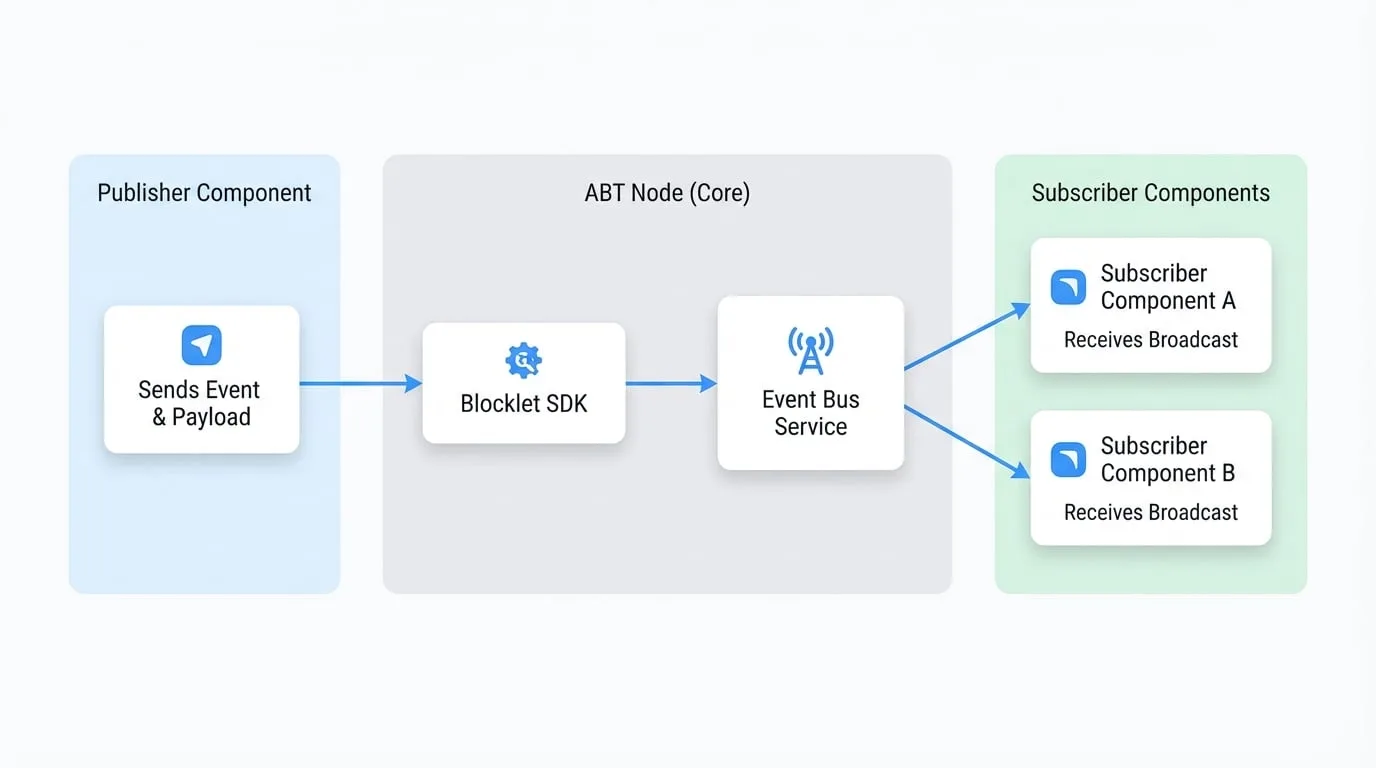
The Event Bus facilitates an asynchronous communication flow:
- A Publisher component sends an event with a specific name and payload.
- The Blocklet SDK sends this event to the central Event Bus service running in ABT Node.
- The Event Bus service then broadcasts this event to all Subscriber components that are listening for that event type.
This process is visualized in the diagram below:
API Reference
publish
Publishes an event to the event bus, making it available to all subscribed listeners. This is an asynchronous operation.
Parameters
- name
string(required) — The name of the event, e.g., user.created or order.shipped. - event
object(required) — An object containing the event details.- id
string— A unique ID for the event. If not provided, one will be generated automatically. - time
string— An ISO 8601 timestamp for when the event occurred. Defaults to the current time. - data
object(required) — The main payload of the event. It can contain any JSON-serializable data. The object_type and object_id fields from this object will be promoted to the top-level event object for easier filtering.
- id
Example
Publishing a user creation event
import eventbus from '@blocklet/sdk/service/eventbus';

async function createUser(userData) {
  // ... logic to create the user in the database
  const newUser = { id: 'user_123', name: 'John Doe' };

  try {
    await eventbus.publish('user.created', {
      data: {
        object_type: 'User',
        object_id: newUser.id,
        object: newUser,
        source_system: 'admin_panel',
      },
    });
    console.log('User creation event published successfully.');
  } catch (error) {
    console.error('Failed to publish event:', error);
  }

  return newUser;
}
subscribe
Registers a callback function to be executed whenever an event is received from the event bus. Note that a component will not receive events that it published itself.
Parameters
- cb
(event: TEvent) => void(required) — A callback function that will be invoked with the event object when an event is received.
Event Object Structure (TEvent)
The callback function receives a single argument: the event object. This object has a standardized structure based on the CloudEvents specification.
- id
string(required) — Unique identifier for the event instance. - source
string(required) — The DID of the component that published the event. - type
string(required) — The name of the event (e.g., user.created). - time
string(required) — ISO 8601 timestamp of when the event was created. - spec_version
string(required) — The CloudEvents specification version, e.g., '1.0.0'. - object_type
string— The type of the primary object in the event data (e.g., User). - object_id
string— The ID of the primary object in the event data. - data
object(required) — The detailed payload of the event.- type
string— Content type of the data, defaults to 'application/json'. - object
any— The actual data payload. - previous_attributes
any— For update events, this may contain the state of the object before the change.
- type
Example
Subscribing to events
import eventbus from '@blocklet/sdk/service/eventbus';

const handleEvent = (event) => {
  console.log(`Received event of type: ${event.type}`);
  console.log('Event details:', event);

  if (event.type === 'user.created') {
    console.log(`A new user was created with ID: ${event.object_id}`);
    // Update UI or perform other actions
  }
};

eventbus.subscribe(handleEvent);

console.log('Listening for events from the event bus...');
unsubscribe
Removes a previously registered event listener. It's crucial to call this function when a component unmounts or no longer needs to listen for events to prevent memory leaks.
Parameters
- cb
(event: TEvent) => void(required) — The exact same callback function reference that was passed to subscribe.
Example
To properly unsubscribe, you must keep a reference to the original callback function.
Full subscription lifecycle
import eventbus from '@blocklet/sdk/service/eventbus';

// 1. Define the handler function
const onUserEvent = (event) => {
  console.log(`User event received: ${event.type}`);
};

// 2. Subscribe to the event bus
eventbus.subscribe(onUserEvent);
console.log('Subscribed to user events.');

// ... later in your application's lifecycle (e.g., component unmount)

// 3. Unsubscribe using the same function reference
eventbus.unsubscribe(onUserEvent);
console.log('Unsubscribed from user events.');