In a Blocklet application composed of multiple components, enabling them to communicate with each other securely and reliably is essential. The Blocklet SDK provides a high-level utility, component.call, designed specifically for this purpose. This method simplifies inter-component API calls by handling service discovery, request signing, and automatic retries.
This approach is more robust than making direct HTTP requests because it abstracts away the complexities of the underlying environment, such as dynamic ports and Docker networking, while ensuring that all communication is authenticated.
Making a Secure API Call
The primary method for inter-component communication is component.call. It acts as a wrapper around an HTTP client (axios) but automatically injects the necessary authentication headers to verify the calling component's identity.
Basic Usage
Here is a basic example of one component calling an API endpoint on another component named 'user-service'.
Calling another component
import component from '@blocklet/sdk/component';

async function getUserProfile(userId) {
  try {
    const response = await component.call({
      name: 'user-service', // Name, DID, or title of the target component
      method: 'GET',
      path: `/api/users/${userId}`,
    });

    console.log('User Profile:', response.data);
    return response.data;
  } catch (error) {
    console.error('Failed to call user-service:', error.message);
  }
}
How It Works
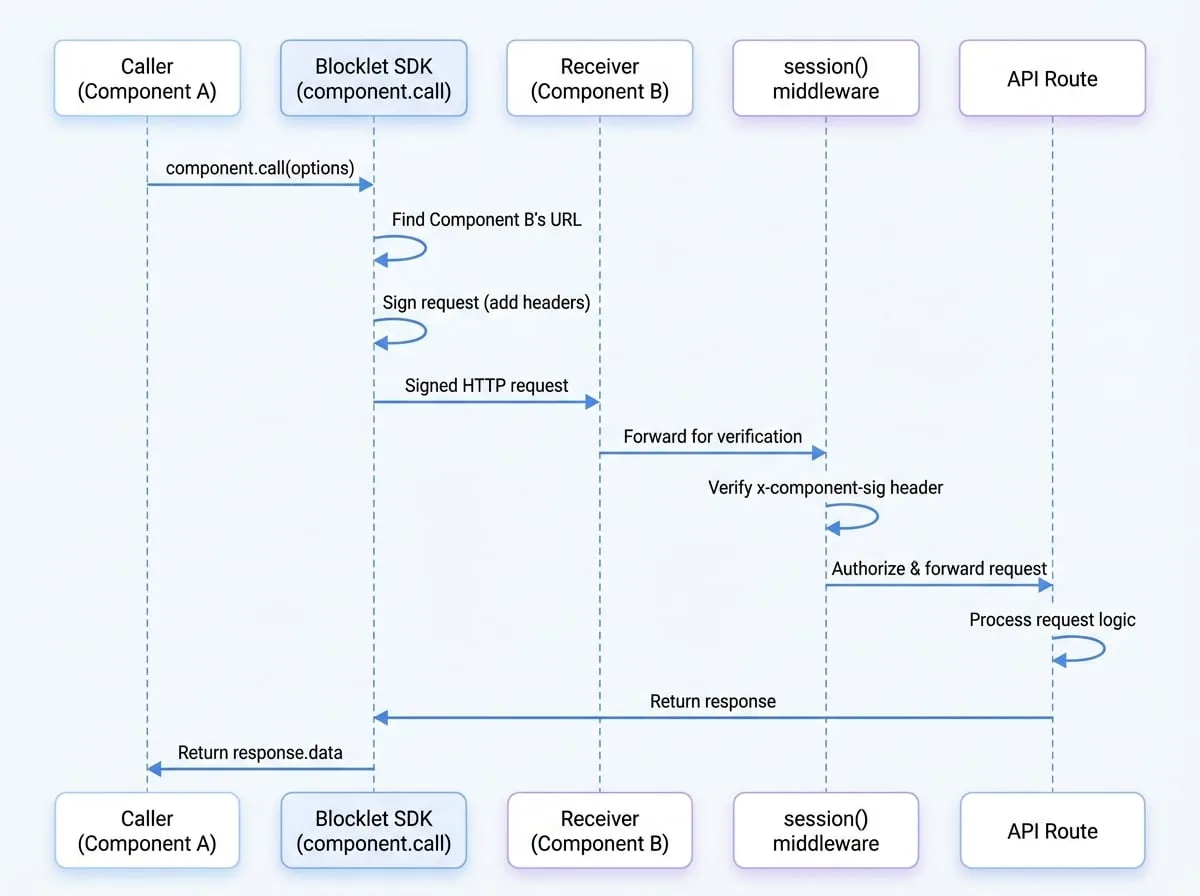
The component.call function streamlines the communication process through several key steps:
Service Discovery
It looks up the target component (e.g., 'user-service') in the application's component registry to find its current location and metadata.
Endpoint Resolution
It constructs the correct internal URL to reach the component, automatically handling complexities like Docker container networking.
Request Signing
Before sending the request, it automatically adds special
x-component-*headers. These headers contain a signature generated using the calling component's secret key, proving its identity.API Call
It executes the HTTP request using the configured method, path, and data.
Automatic Retries
If the request fails due to a transient server error (e.g., a 5xx status code), it will automatically retry the request a few times with an increasing delay (exponential backoff).
This flow ensures that the communication is both reliable and secure. The receiving component can use the session middleware to verify the signature and authorize the request.
call Parameters
The component.call function accepts an options object with the following properties:
- name
string(required) — The name, title, or DID of the target component to call. - method
string(default:POST) — The HTTP method for the request (e.g., 'GET', 'POST', 'PUT', 'DELETE'). - path
string(required) — The API path on the target component (e.g., '/api/v1/resource'). - data
any— The request body, typically used with POST, PUT, or PATCH methods. - params
any— URL query parameters to be appended to the request URL. - headers
object— An object of custom headers to be sent with the request. - timeout
number— Request timeout in milliseconds. - responseType
string— The type of data that the server will respond with. For example, 'stream'.
Return Value
The function returns a Promise that resolves to an AxiosResponse object, which contains properties like data, status, and headers.
Advanced Usage
Customizing Retry Behavior
You can customize the automatic retry logic by passing a second argument to component.call. This is useful for adjusting to the specific reliability needs of an endpoint.
Custom Retry Options
import component from '@blocklet/sdk/component';

const callOptions = {
  name: 'data-processor',
  method: 'POST',
  path: '/api/process',
  data: { job: 'some-long-job' },
};

const retryOptions = {
  retries: 5,       // Attempt 5 times in total
  minTimeout: 1000, // Wait at least 1 second between retries
  factor: 2,        // Double the wait time after each failed attempt
};

async function processData() {
  const response = await component.call(callOptions, retryOptions);
  return response.data;
}
The retryOptions object can have the following properties:
- retries
number(default:3) — The total number of attempts to make. - factor
number(default:2) — The exponential factor to use for backoff. - minTimeout
number(default:500) — The minimum timeout between retries in milliseconds. - maxTimeout
number(default:5000) — The maximum timeout between retries in milliseconds. - randomize
boolean(default:true) — Whether to randomize the timeout. - onFailedAttempt
function— A callback function that is invoked on each failed attempt.
Handling Stream Responses
For endpoints that return a stream (e.g., downloading a large file), you can set responseType: 'stream'. This allows you to process the data as it arrives without buffering the entire response in memory.
Streaming a File
import fs from 'fs';
import component from '@blocklet/sdk/component';

async function downloadBackup() {
  const response = await component.call({
    name: 'backup-service',
    method: 'GET',
    path: '/api/export',
    responseType: 'stream',
  });

  const writer = fs.createWriteStream('backup.zip');
  response.data.pipe(writer);

  return new Promise((resolve, reject) => {
    writer.on('finish', resolve);
    writer.on('error', reject);
  });
}
By using component.call, you can build robust and secure multi-component applications with ease. The next logical step is to learn how to protect your component's API endpoints by verifying these incoming calls. See the Session Middleware guide for details.