The session middleware is a core component of the Blocklet SDK's authentication system. It acts as a gatekeeper for your Express.js routes, verifying the identity of the requester and, upon successful authentication, attaching a SessionUser object to the req.user property. This allows subsequent middleware and route handlers to access authenticated user information easily.
The middleware is highly flexible, supporting several authentication strategies out of the box, including login tokens from DID Connect, programmatic access keys, and secure inter-component calls.
How It Works
The session middleware inspects incoming requests for credentials in a specific order of priority. If a valid credential is found, it populates req.user and passes control to the next handler. If no valid credential is found, its behavior depends on whether strictMode is enabled.
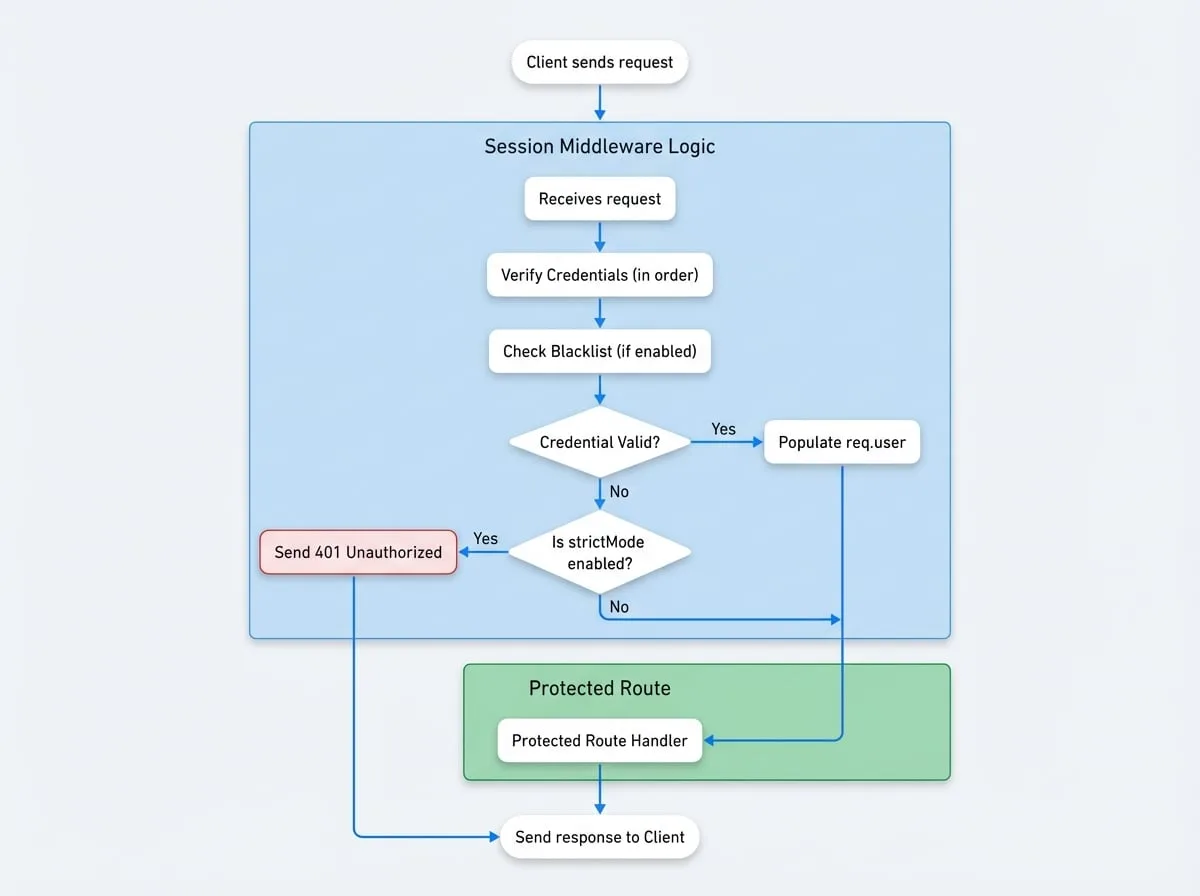
An additional security check is performed if the enableBlacklist feature is turned on in your blocklet's settings. Before validating a login token, the middleware will call a service API to ensure the token has not been revoked or blocked.
Basic Usage
You can apply the session middleware to your entire application or to specific routes that require authentication.
Applying Session Middleware
import express from 'express';
import session from '@blocklet/sdk/middlewares/session';

const app = express();

// Apply to all routes
app.use(session());

// Or apply to a specific route that must be protected
app.get('/api/profile', session({ strictMode: true }), (req, res) => {
  // In strict mode, if req.user is not present, the middleware would have already sent a 401 response.
  if (req.user) {
    res.json(req.user);
  }
});

// A public route that behaves differently for logged-in users
app.get('/api/info', session(), (req, res) => {
  if (req.user) {
    res.json({ message: `Hello, ${req.user.fullName}`});
  } else {
    // In non-strict mode, req.user is undefined for unauthenticated users
    res.json({ message: 'Hello, guest.' });
  }
});

app.listen(3000, () => {
  console.log('Server is running on port 3000');
});
Configuration Options
The sessionMiddleware function accepts an optional configuration object to tailor its behavior.
- strictMode
boolean(default:false) — Iftrue, an invalid or missing token results in a401 Unauthorizedresponse. Iffalse, it callsnext()without auserobject, treating the request as unauthenticated. - loginToken
boolean(default:true) — Enables authentication via standard JWT login tokens, typically from DID Connect, found in thelogin_tokencookie. - accessKey
boolean(default:false) — Enables authentication via long-lived access keys (e.g., for CI/CD or scripts). These are also read from thelogin_tokencookie. - componentCall
boolean(default:false) — Enables authentication for secure, signed requests from other components, verified using headers likex-component-sig. - signedToken
boolean(default:false) — Enables authentication via a temporary, signed JWT passed as a query parameter. - signedTokenKey
string(default:__jwt) — The name of the query parameter used forsignedTokenauthentication.
Example Configurations
Strict API Endpoint
For endpoints that must be protected, `strictMode` ensures unauthenticated requests are rejected immediately.
```javascript
app.use('/api/admin', session({ strictMode: true }));
**Enable Access Keys**

```javascript
app.use('/api/data', session({ accessKey: true }));
The SessionUser Object
When authentication is successful, the req.user object is populated with the following structure. This object provides essential information about the authenticated user or component.
- user
object— The SessionUser object attached toreq.userupon successful authentication.- did
string(required) — The Decentralized Identifier (DID) of the user. - role
string(required) — The role assigned to the user (e.g.,owner,admin,guest). - provider
string(required) — The authentication provider used (e.g.,wallet,accessKey). - fullName
string(required) — The user's full name or a remark associated with the credential. - method
AuthMethod(required) — The specific authentication method used for this session (e.g.,loginToken,accessKey,componentCall). - walletOS
string(required) — The operating system of the wallet used, if applicable. - emailVerified
boolean— Indicates if the user's email has been verified. - phoneVerified
boolean— Indicates if the user's phone has been verified.
- did
Here is an example of what the req.user object might look like after a successful login:
Example req.user Object
{
  "did": "z8iZgeJjzB6Q1bK2rR1BfA2J8cNEJ8cNEJ8c",
  "role": "owner",
  "fullName": "Alice",
  "provider": "wallet",
  "walletOS": "ios",
  "emailVerified": true,
  "phoneVerified": false,
  "method": "loginToken"
}
Next Steps
Once a user is authenticated with the session middleware, you can perform more granular access control based on their role and permissions. Proceed to the next section to learn how to use the Authorization Middleware to protect routes based on user roles.