The Blocklet SDK provides a robust and unified way to manage configuration and environment variables for your application. It aggregates settings from multiple sources into a single, easy-to-use interface, ensuring your blocklet has access to all the necessary information, from application metadata to component-specific settings.
This section will cover the two primary exports for accessing this information: the env object and the components store.
The env Object
The env object is a centralized, read-only container for all configuration variables available to your component at runtime. The SDK automatically populates this object by merging configuration from several sources, including default values, application-level settings, and component-specific environment files.
You can access any configuration property by simply importing env from the SDK.
import { env } from '@blocklet/sdk';

console.log(`Running in app: ${env.appName}`);
console.log(`My data directory is at: ${env.dataDir}`);

// Access user-defined preferences from the blocklet's settings page
const userApiKey = env.preferences.apiKey;
Key Environment Properties
While the env object contains many properties, here are some of the most commonly used ones:
- appName
string— The name of the parent application. - appUrl
string— The full public URL of the application. - componentDid
string— The Decentralized ID (DID) of the current component. - isComponent
boolean— A flag that istrueif the code is running within a component context. - dataDir
string— The absolute path to the component's dedicated data storage directory. - cacheDir
string— The absolute path to the component's dedicated cache directory. - serverVersion
string— The version of the Blocklet Server the application is running on. - preferences
Record<string, any>— An object containing custom configuration values set by the user from the blocklet's settings page.
The components Store
The components store is an array that provides real-time information about all other components running within the same application instance. This is essential for inter-component communication, allowing one component to discover the endpoints and status of another.
import { components } from '@blocklet/sdk';

// Find a running API service component to make a request
const apiService = components.find(c => c.name === 'api-service' && c.status === 1);

if (apiService) {
  const apiUrl = apiService.webEndpoint;
  console.log(`Found API service at: ${apiUrl}`);
  // Now you can make a request to this URL
}
Component Properties
Each object in the components array contains detailed information about a component:
- did
string— The Decentralized ID (DID) of the component. - name
string— The name of the component as defined in itsblocklet.yml. - mountPoint
string— The URL path where the component is mounted (e.g.,/admin,/api). - webEndpoint
string— The full, publicly accessible URL for the component. - status
number— The current status of the component (e.g.,1for running,0for stopped).
Configuration Loading Flow
The SDK builds the env object by layering configurations from different sources. Each subsequent source can override the values from the previous ones, providing a clear and predictable order of precedence.
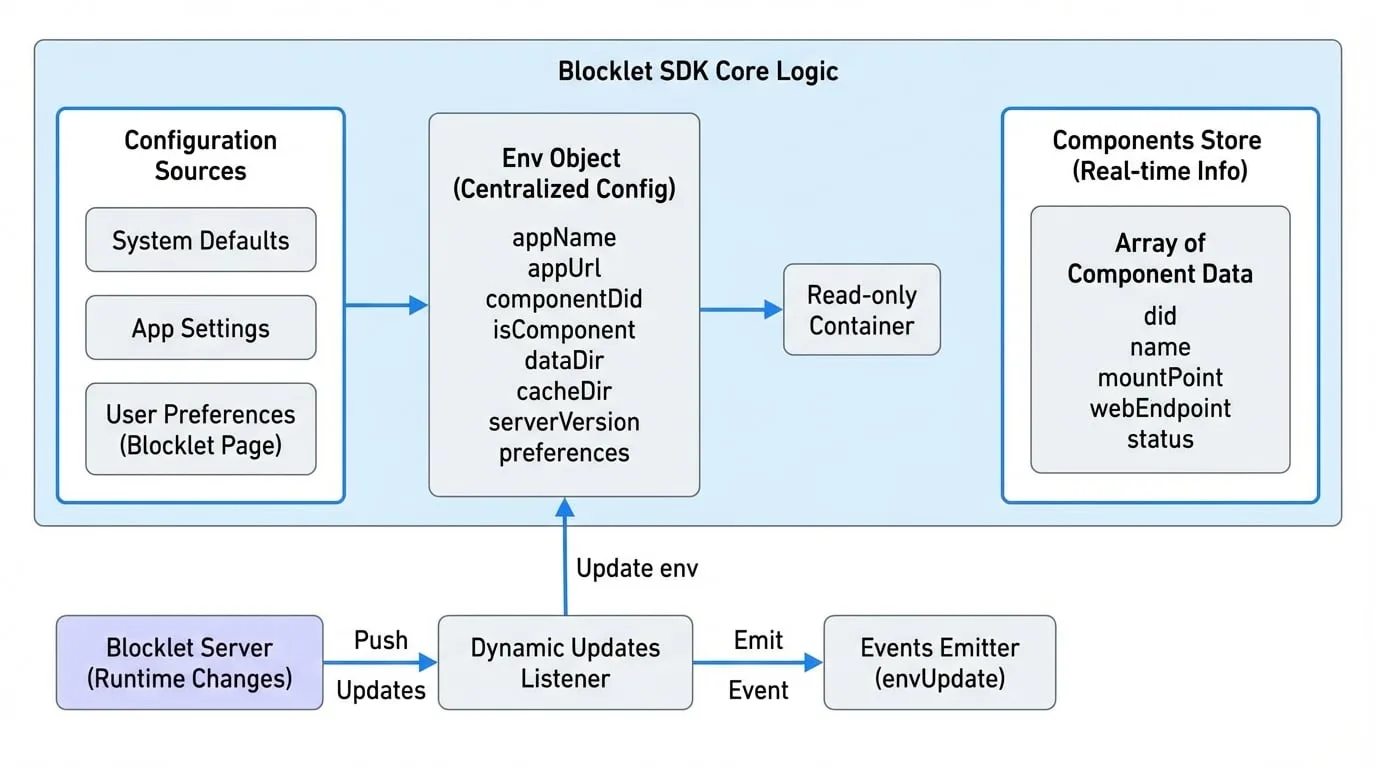
This layered approach provides flexibility, allowing developers and administrators to configure blocklets at different levels.
Dynamic Updates
The configuration is not just static. The Blocklet SDK listens for runtime changes pushed by the Blocklet Server. For instance, if a user updates a setting on the blocklet's configuration page, the SDK will automatically update the env object and emit an event.
You can listen for these changes using the exported events emitter.
import { events, Events } from '@blocklet/sdk';

// Listen for any updates to the environment or preferences
events.on(Events.envUpdate, (updatedValues) => {
  console.log('Configuration was updated:', updatedValues);
  // You can now react to the change, e.g., re-initialize a service
});
This allows you to build applications that can react to configuration changes without requiring a restart.
Now that you understand how to access configuration and environment variables, you can explore how to use them for more specific tasks. A common use case is managing cryptographic keys and wallets, which is covered in the next section.
Next: Wallet Management
Learn how to create and manage wallet instances for signing and authentication.
Read More