This document provides instructions for upgrading the Blocklet Server Command Line Interface (CLI) to the most recent version available.
Command Usage
The upgrade command automates the process of fetching and installing the latest version of the Blocklet Server CLI.
blocklet server upgradeUpgrade Process
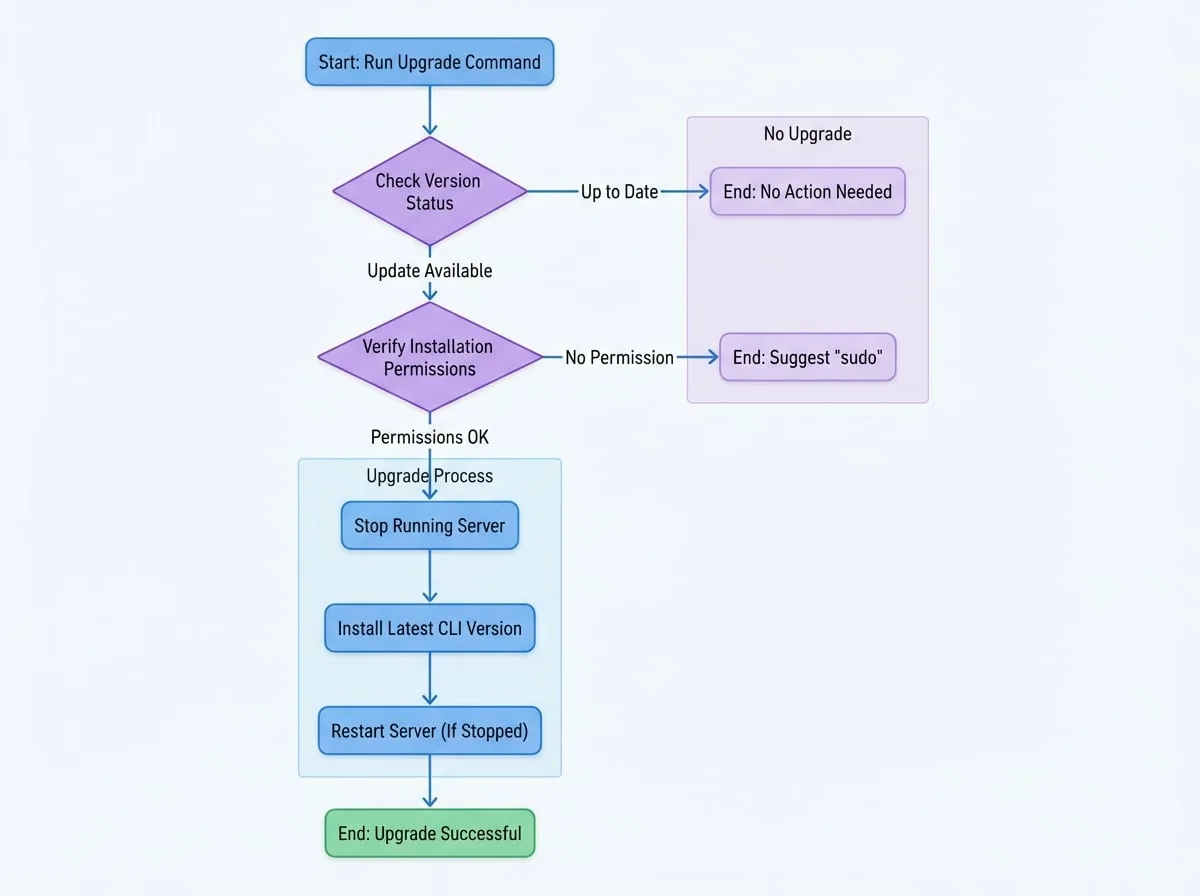
The command executes a series of steps to ensure a safe and successful upgrade. The process is as follows:
Version Check
The command first retrieves the latest available version number from the npm registry and compares it against the currently installed version. If the current version is already the latest, the process terminates.
Permission Verification
It verifies if the current user has the necessary write permissions for the directory where the CLI tool is installed. If permissions are insufficient, the command will fail and suggest re-running with
sudo.Server Shutdown
If a Blocklet Server instance is currently running, the upgrade command will automatically stop the server to prevent any conflicts during the update. The original running state and data directory are saved.
Installation
The command proceeds to download and install the latest version of the CLI package using the system's detected package manager (e.g., npm, yarn).
Server Restart
If the server was running before the upgrade, the command will automatically restart it from its original data directory, ensuring service continuity.
Confirmation
Upon successful completion, a confirmation message is displayed, showing the new, upgraded version number.
The following diagram illustrates the workflow of the upgrade command.
Execution Example
When you run the command, it will display the progress of the upgrade.
$ blocklet server upgrade

ℹ Using blocklet server from /home/user/.nvm/versions/node/v16.20.2/bin/blocklet
ℹ Checking permissions...
ℹ Current version is 1.8.0, found latest version 1.8.1
ℹ Begin upgrade
ℹ Stopping Blocklet Server ...
ℹ Installing Blocklet Server by npm install -g @blocklet/cli@latest ...

+ @blocklet/cli@1.8.1
added 1 package from 1 contributor, updated 1 package and audited 931 packages in 10.2s

ℹ Restarting Blocklet Server ...
✔ Blocklet Server started
✔ Blocklet Server upgrade success, current version is 1.8.1
Insufficient Permissions
If you lack the necessary permissions to modify the installation directory, the command will output an error and provide guidance.
$ blocklet server upgrade

ℹ Using blocklet server from /usr/local/bin/blocklet
ℹ Checking permissions...
✖ Seems you do not have permission to upgrade Blocklet Server version
ℹ Maybe you can try run sudo blocklet server upgrade
In this case, you should run the command with sudo as suggested:
sudo blocklet server upgradeAlready Up to Date
If your Blocklet Server CLI is already at the latest version, the command will inform you that no action is needed.
$ blocklet server upgrade

ℹ Using blocklet server from /home/user/.nvm/versions/node/v16.20.2/bin/blocklet
ℹ Checking permissions...
ℹ The current version 1.8.1 is the latest version, no need to upgrade