The blocklet version command is a convenient utility for updating your blocklet's version number in the blocklet.yml file. It follows the rules of semantic versioning (semver) to ensure consistent and predictable version increments. This is a critical step to perform before you package and distribute a new release of your blocklet.
Usage
The command is run from the root of your blocklet project directory.
Basic Usage
blocklet version [<newversion> | patch | minor | major | prepatch | preminor | premajor | prerelease] [options]How It Works
The command performs the following actions:
- Reads the
blocklet.ymlfile in the current directory. - Parses the
versionfield to determine the current version. - Calculates the next version based on the argument provided (defaults to
patch). - Updates the
versionfield inblocklet.ymlto the new version. - Updates the
specVersionto the latest version supported by the CLI.
Version Argument
The command accepts one optional argument to specify the next version. If you omit this argument, it defaults to patch.
| Argument | Description | Example (from 1.2.3) |
|---|---|---|
(none) / patch | Increments the patch version (e.g., for bug fixes). | 1.2.4 |
minor | Increments the minor version (e.g., for new features). | 1.3.0 |
major | Increments the major version (e.g., for breaking changes). | 2.0.0 |
prepatch | Increments the patch version for a pre-release. | 1.2.4-0 |
prerelease | Increments the pre-release identifier. | from 1.2.4-alpha.0 to 1.2.4-alpha.1 |
<version> | Sets a specific, valid version number. | 3.0.0 |
Options
You can modify the command's behavior with the following options:
| Option | Description |
|---|---|
--gitCommit | Automatically adds blocklet.yml to Git staging and creates a commit with the message blocklet version <new_version>. |
--force | Forces the version update even if it results in downgrading the specVersion. This is generally not recommended unless you are certain about the change. |
Examples
Increment the Patch Version
If your current version is 1.0.0, running the command without arguments will bump it to 1.0.1.
Basic Patch Update
blocklet version

# Output:
# ✔ Blocklet version bumped to 1.0.1
Bump to a New Minor Version
To release a new feature, you can bump the minor version.
Minor Version Bump
blocklet version minor

# Output:
# ✔ Blocklet version bumped to 1.1.0
Set a Specific Version and Commit
You can also set an explicit version number and have the CLI commit the change for you.
Set Version and Commit
blocklet version 2.0.0 --gitCommit

# Output:
# ✔ Blocklet version bumped to 2.0.0
# (Also runs 'git add blocklet.yml' and 'git commit ...')
Versioning in Your Workflow
The version command fits into the packaging and distribution workflow after you've completed your code changes and before you create a distributable bundle.
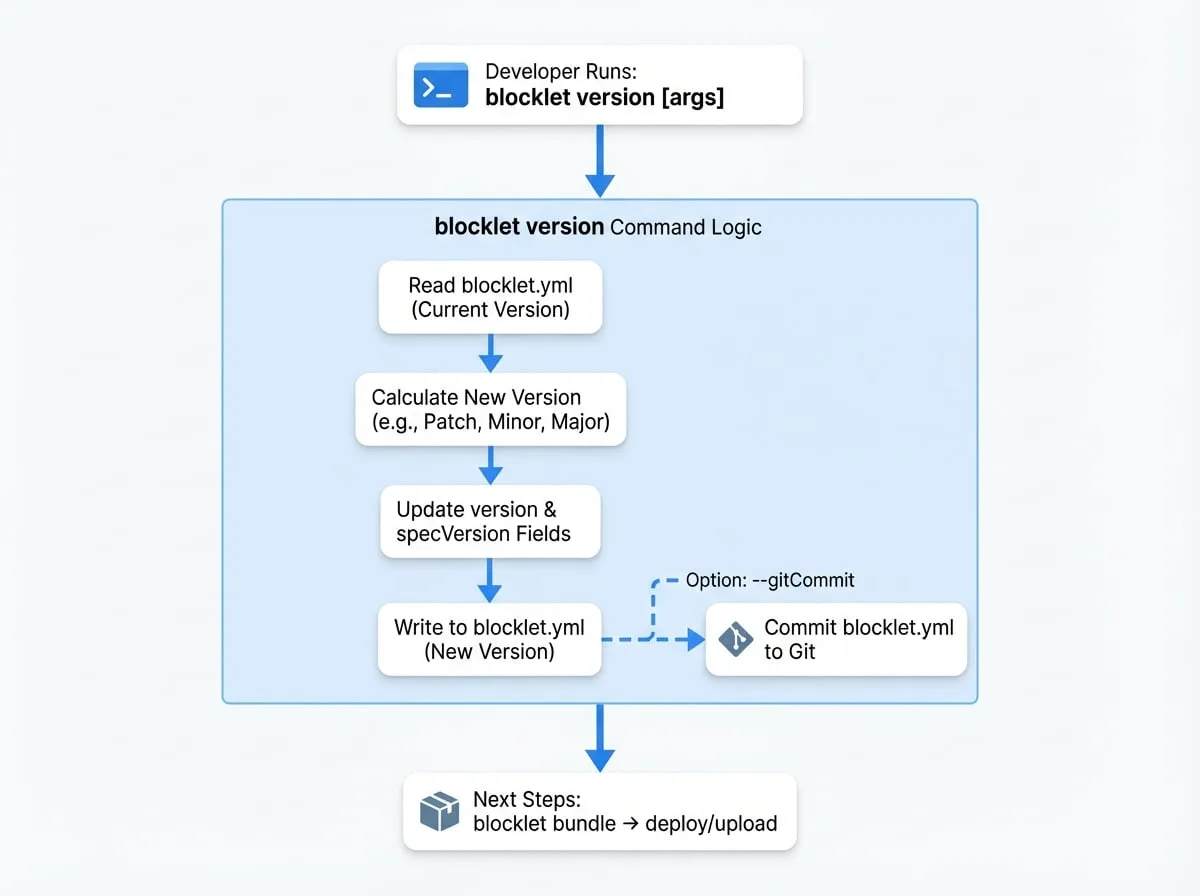
After successfully updating your blocklet's version, you are ready for the next steps in the distribution process.