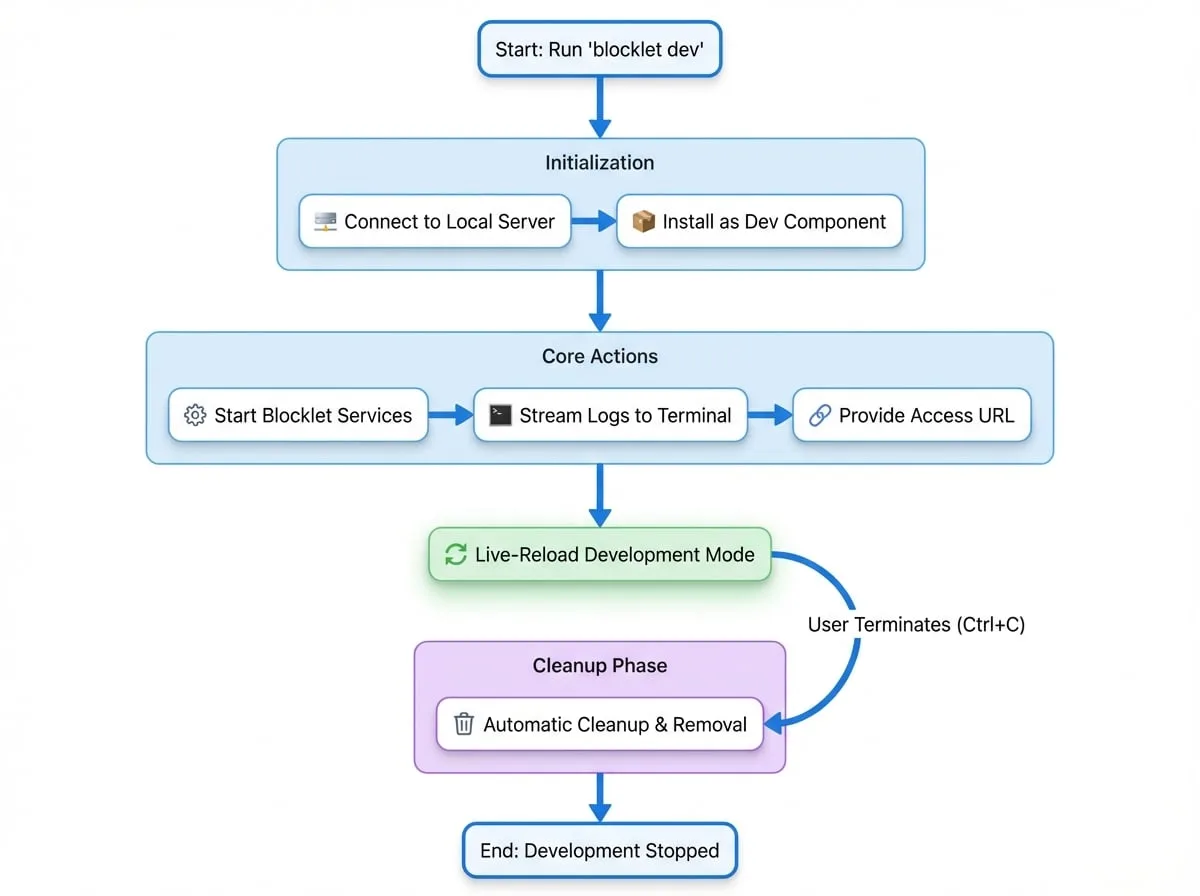
The blocklet dev command is a crucial tool for local development. It runs your blocklet in a live-reloading development mode, connecting it to a running Blocklet Server instance. This allows for rapid iteration by automatically handling the installation, starting, and log streaming of your blocklet as a temporary component.
When you run this command, it performs several key actions:
Connects to Server
It first ensures that a local Blocklet Server is running and establishes a connection.
Installs as Component
It installs the blocklet from your current working directory into the Blocklet Server as a component in "development" mode. If a parent application is specified, it's installed within that application; otherwise, a new container application is created.
Starts Blocklet
It starts the blocklet and any necessary services.
Streams Logs
It pipes the blocklet's logs directly to your terminal for real-time feedback.
Provides Access URL
It outputs the URL where you can access your running blocklet.
Automatic Cleanup
When you terminate the command (e.g., with
Ctrl+C), it automatically removes the development component and cleans up the environment.
This integrated process streamlines the development cycle, letting you focus on coding while the CLI manages the runtime environment.
Command Usage
The primary command for entering development mode is blocklet dev.
blocklet devThis command installs and starts the blocklet from the current directory.
Subcommands
The dev command also includes several subcommands to manage the development lifecycle without starting a full development session.
| Command | Description |
|---|---|
blocklet dev install | Installs the blocklet in development mode but does not start it. Useful for pre-configuring an environment. |
blocklet dev remove | Removes a blocklet that was previously installed in development mode. |
blocklet dev reset | Resets the data for the blocklet, clearing its state without a full re-installation. |
blocklet dev faucet | Claims tokens from a configured testnet faucet for the blocklet's wallet. |
blocklet dev studio | Opens the Component Studio in your browser for the specified blocklet. |
Options
You can customize the behavior of the dev command with the following options:
- --app-did
string— Specify the DID of an existing parent application to install the blocklet into. If omitted, a new application container is created for the blocklet. - --mount-point
string— Define the URL path where the blocklet component will be mounted (e.g., /my-blocklet). Required when using --app-did. - --open
boolean— Automatically open the blocklet's access URL in your default web browser after it starts. - --store-url
string— Specify a component store URL to resolve component dependencies. Overrides the default store URL. - --start-all-components
boolean— When developing a component within a larger application, this flag will start all other components in that application, not just the one being developed. - --host
string— Specifies the faucet host URL when using thefaucetsubcommand. - --token
string— Specifies the token address or symbol to request from the faucet when using thefaucetsubcommand.
Prerequisites
Before using blocklet dev, you must have a Blocklet Server instance running locally. If the server is not running, the command will fail.
You can start the server with the following command:
blocklet server startFor more details, please refer to the Start Server documentation.
Examples
Basic Development
To start developing a blocklet located in your current directory, simply run:
blocklet dev --openThe CLI will install and start the blocklet, stream its logs to your console, and open its URL in your browser.
Developing a Component for an Existing Application
If you are developing a blocklet that is intended to be a component of a larger application, you can specify the parent application's DID and a mount point.
blocklet dev --app-did zNKe4B62j5e9i6rWzM9adcee19s323j4s2pG --mount-point /my-componentThis command will:
- Find the application with the specified DID (
zNKe...). - Install your local blocklet as a component within that application.
- Make it accessible at the
/my-componentpath relative to the application's main URL.
Resetting Blocklet Data
If you need to clear all data and state associated with your development blocklet to test a clean installation flow, use the reset subcommand.
blocklet dev resetThis is much faster than removing and re-installing the blocklet.
Summary
The blocklet dev command is the cornerstone of local blocklet development, providing a seamless and efficient workflow. It bridges the gap between your local source code and a live Blocklet Server environment.
After iterating locally, the next steps are to package your blocklet for distribution. For more information, see the documentation on packaging and versioning.