Once your website is generated, the final step is to make it accessible online. This guide covers the various methods to publish your site using AIGNE WebSmith, ensuring you can choose the option that best fits your technical and budget requirements.
The aigne web publish command is the primary tool for deploying your generated website files. Depending on your needs, you can deploy to the free WebSmith Cloud, integrate with your own existing infrastructure, or set up a new dedicated website.
Publishing Destinations
WebSmith provides three distinct publishing targets. For detailed step-by-step instructions, please refer to the specific guides for each option.
To WebSmith Cloud
Publish to our free, managed hosting platform. Ideal for open-source projects, personal sites, or community sharing.
To Existing Website
Integrate and deploy the generated pages directly onto your current, self-managed website infrastructure.
To New Dedicated Website
Create and publish to a new, fully-managed website with a custom domain and professional hosting. This is a paid service.
General Process
Regardless of the destination, the publishing process is initiated with a single command. The tool will then guide you through any necessary authentication or configuration steps.
- Generate Your Website: Before publishing, ensure your website has been created using the
aigne web generatecommand. - Run the Publish Command: Execute the following command in your terminal: aigne web publish
sh aigne web publish - Follow Interactive Prompts: The CLI will present you with the available publishing options. If you haven't specified a target, you will be asked to select one. For first-time connections to a service, a browser window will open for authentication.

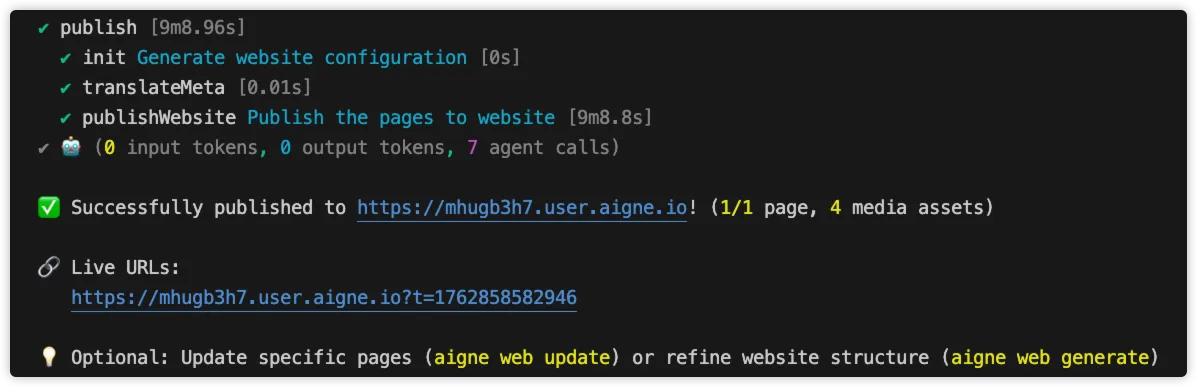
- Validate Deployment: After the command completes, it will output a confirmation message and the live URLs for your published pages. It is recommended to visit these links to verify that the deployment was successful and the website appears as expected.
Summary
Publishing your website is a straightforward process handled by the aigne web publish command. By offering multiple deployment targets, WebSmith ensures flexibility for various use cases.
For specific instructions on each publishing method, refer to the detailed guides: