OpenAPI 3.0.0 是 OpenAPI 规范的第一个正式版本,因为它是由 SmartBear Software 捐赠给 OpenAPI Initiative,并在2015年从 Swagger 规范重命名为 OpenAPI 规范。
Blocklet 平台提供了一种多个应用组合在一起的能力,我们把它称之为 Blocklet 的可组合性。在这其中,就包含了 API 的可组合性这一特性。
在 API 的可组合性方面,我们拥抱 OpenAPI 的标准,使用 OpenAPI 的标准定义来声明 Blocklet 中各个组件提供的 API。
在 Blocklet 中如何声明 OpenAPI
您只需要在 blocklet 项目的根目录下,创建一个 blocklet.openapi.yaml 或 blocklet.openapi.json 文件即可(文件内需要编写符合 OpenAPI 规范的内容,规范请看这里: https://spec.openapis.org/oas/latest.html )
您可以选择通过 Postman 或 Apifox 这样的工具来自动生成 openapi 的规范内容,也可以通过 https://github.com/samchungy/zod-openapi 这样的工具在代码中自动生成
一个简单的例子如下 (blocklet.openapi.yaml):
openapi: 3.0.1
info:
  title: Demo App OpenAPI
  description: 'API list for Demo App'
  version: 1.0.0
paths:
  /api/post/{id}:
    get:
      summary: Fetch post data
      deprecated: false
      description: ''
      tags: []
      parameters:
        - name: login_token
          in: cookie
          description: ''
          required: false
          example: ''
          schema:
            type: string
        - name: id
          in: path
          description: ''
          required: true
          example: '1'
          schema:
            type: string
      responses:
        '200':
          description: succeed
          content:
            application/json:
              schema:
                type: object
                properties:
                  id:
                    type: string
                  title:
                    type: string
                    description: title
                required:
                  - id
                  - title
              examples:
                '1':
                  summary: succeed example
                  value:
                    id: '69'
                    title: 'Hello World'
      security: []
    post:
      summary: Save post data
      deprecated: false
      description: ''
      tags: []
      parameters:
        - name: login_token
          in: cookie
          description: ''
          required: false
          example: ''
          schema:
            type: string
        - name: id
          in: path
          description: ''
          required: true
          example: '1'
          schema:
            type: string
      requestBody:
        content:
          application/json:
            schema:
              type: object
              properties:
                title:
                  type: string
              required:
                - title
            example:
              title: 'Hello Blocklet'
      responses:
        '200':
          description: succeed
          content:
            application/json:
              schema:
                type: object
                properties:
                  id:
                    type: string
                  title:
                    type: string
                    description: title
                required:
                  - id
                  - title
              examples:
                '1':
                  summary: succeed example
                  value:
                    id: '69'
                    title: 'Hello Blocklet'
      security: []
components:
  schemas: {}
  securitySchemes: {}
servers: []
如何查看当前 Blocklet 中包含哪些 OpenAPI 接入点
此时,您可以通过访问当前应用的 /.well-known/service/openapi.json 或 /.well-known/service/openapi.yaml 路径查看当前 blocklet 中包含的所有组件的 OpenAPI,这个地址回自动处理好每个 blocklet 的自定义前缀。
一个简单的例子如下:
openapi: 3.1.0
info:
  title: local-dev
  description: local-dev
  version: 1.0.0
tags:
  - name: openapi-app
    description: A Blocklet DAPP blocklet
paths:
  /openapi-app/api/post/{id}:
    get:
      summary: Fetch post data
      deprecated: false
      description: ""
      tags:
        - openapi-app
      parameters:
        - name: login_token
          in: cookie
          description: ""
          required: false
          example: ""
          schema:
            type: string
        - name: id
          in: path
          description: ""
          required: true
          example: "1"
          schema:
            type: string
      responses:
        "200":
          description: succeed
          content:
            application/json:
              schema:
                type: object
                properties:
                  id:
                    type: string
                  title:
                    type: string
                    description: title
                required:
                  - id
                  - title
              examples:
                "1":
                  summary: succeed example
                  value:
                    id: "69"
                    title: "Hello World"
      security: []
      x-id: z1czx9Q9fH2KvX17C86gACLVFnrrWjucqNk
      x-did: z2qaG1YXpcX99WvLfo5bmVCv1HiXq4NUGgnLd
      x-path: /api/post/{id}
      x-method: get
    post:
      summary: Save post data
      deprecated: false
      description: ""
      tags:
        - openapi-app
      parameters:
        - name: login_token
          in: cookie
          description: ""
          required: false
          example: ""
          schema:
            type: string
        - name: id
          in: path
          description: ""
          required: true
          example: "1"
          schema:
            type: string
      requestBody:
        content:
          application/json:
            schema:
              type: object
              properties:
                title:
                  type: string
              required:
                - title
            example:
              title: "Hello Blocklet"
      responses:
        "200":
          description: succeed
          content:
            application/json:
              schema:
                type: object
                properties:
                  id:
                    type: string
                  title:
                    type: string
                    description: title
                required:
                  - id
                  - title
              examples:
                "1":
                  summary: succeed example
                  value:
                    id: "69"
                    title: "Hello Blocklet"
      security: []
      x-id: z1QryCeeXmWzz7TGPPSGtW8Wtdcn1omEkzm
      x-did: z2qaG1YXpcX99WvLfo5bmVCv1HiXq4NUGgnLd
      x-path: /api/post/{id}
      x-method: post
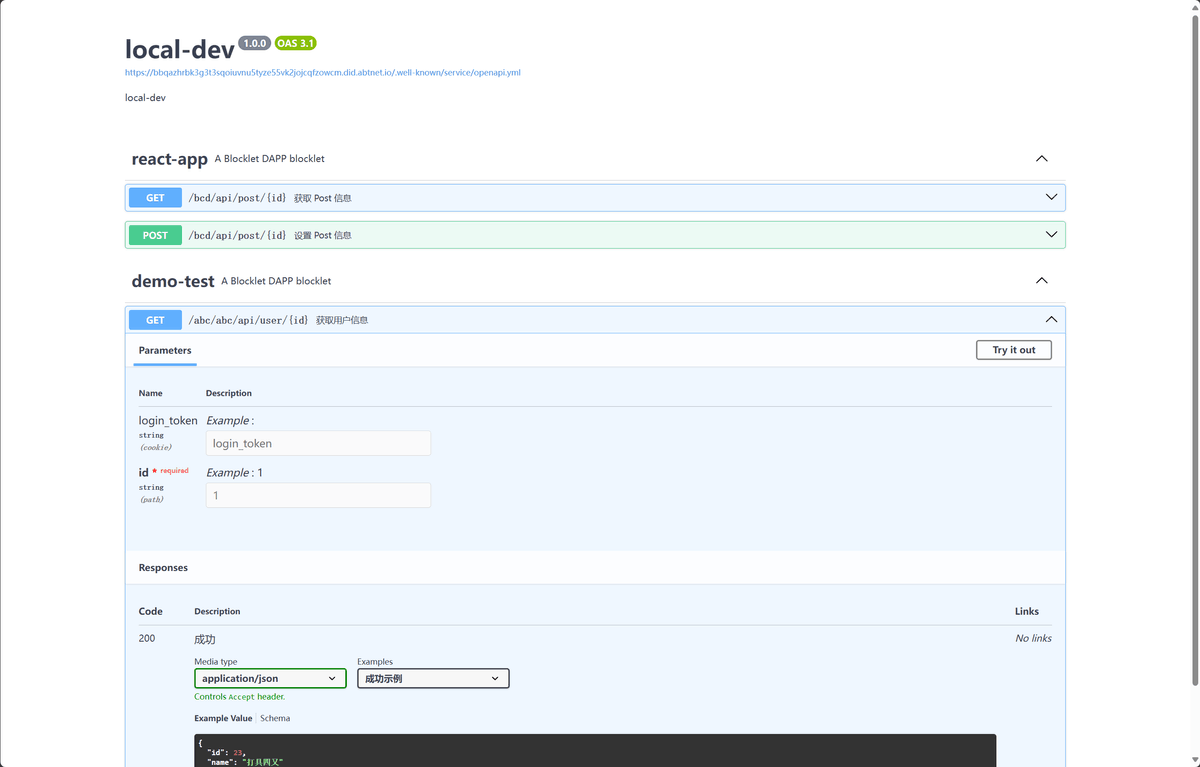
您还可以通过在当前 Blocklet 中安装以下组件,便可使用 Swagger UI 来直接查看和调试接口
预览的效果如下:
如何调用 OpenAPI
- 通过 Swagger UI 中展示的地址,通过
fetch或axios等请求库直接访问 - 通过
@blocklet/sdk中的 component-call 的方式来调用
这种方式常见用于在后端代码中使用(前端无法使用),相比与第一种方式,该方式响应会更快,也更安全
示例代码如下:
const component = require('@blocklet/sdk/lib/component');

const openapiData = {
    "openapi": "3.1.0",
    "info": {
        "title": "local-dev",
        "description": "local-dev",
        "version": "1.0.0"
    },
    "tags": [
        {
            "name": "openapi-app",
            "description": "A Blocklet DAPP blocklet"
        }
    ],
    "paths": {
        "/openapi-app/api/post/{id}": {
            "get": {
                "summary": "Fetch post data",
                "deprecated": false,
                "description": "",
                "tags": [
                    "openapi-app"
                ],
                "parameters": [
                    {
                        "name": "login_token",
                        "in": "cookie",
                        "description": "",
                        "required": false,
                        "example": "",
                        "schema": {
                            "type": "string"
                        }
                    },
                    {
                        "name": "id",
                        "in": "path",
                        "description": "",
                        "required": true,
                        "example": "1",
                        "schema": {
                            "type": "string"
                        }
                    }
                ],
                "responses": {
                    "200": {
                        "description": "succeed",
                        "content": {
                            "application/json": {
                                "schema": {
                                    "type": "object",
                                    "properties": {
                                        "id": {
                                            "type": "string"
                                        },
                                        "title": {
                                            "type": "string",
                                            "description": "title"
                                        }
                                    },
                                    "required": [
                                        "id",
                                        "title"
                                    ]
                                },
                                "examples": {
                                    "1": {
                                        "summary": "succeed example",
                                        "value": {
                                            "id": "69",
                                            "title": "Hello World"
                                        }
                                    }
                                }
                            }
                        }
                    }
                },
                "security": [],
                "x-id": "z1czx9Q9fH2KvX17C86gACLVFnrrWjucqNk",
                "x-did": "z2qaG1YXpcX99WvLfo5bmVCv1HiXq4NUGgnLd",
                "x-path": "/api/post/{id}",
                "x-method": "get"
            },
            "post": {
                "summary": "Save post data",
                "deprecated": false,
                "description": "",
                "tags": [
                    "openapi-app"
                ],
                "parameters": [
                    {
                        "name": "login_token",
                        "in": "cookie",
                        "description": "",
                        "required": false,
                        "example": "",
                        "schema": {
                            "type": "string"
                        }
                    },
                    {
                        "name": "id",
                        "in": "path",
                        "description": "",
                        "required": true,
                        "example": "1",
                        "schema": {
                            "type": "string"
                        }
                    }
                ],
                "requestBody": {
                    "content": {
                        "application/json": {
                            "schema": {
                                "type": "object",
                                "properties": {
                                    "title": {
                                        "type": "string"
                                    }
                                },
                                "required": [
                                    "title"
                                ]
                            },
                            "example": {
                                "title": "Hello Blocklet"
                            }
                        }
                    }
                },
                "responses": {
                    "200": {
                        "description": "succeed",
                        "content": {
                            "application/json": {
                                "schema": {
                                    "type": "object",
                                    "properties": {
                                        "id": {
                                            "type": "string"
                                        },
                                        "title": {
                                            "type": "string",
                                            "description": "title"
                                        }
                                    },
                                    "required": [
                                        "id",
                                        "title"
                                    ]
                                },
                                "examples": {
                                    "1": {
                                        "summary": "succeed example",
                                        "value": {
                                            "id": "69",
                                            "title": "Hello Blocklet"
                                        }
                                    }
                                }
                            }
                        }
                    }
                },
                "security": [],
                "x-id": "z1QryCeeXmWzz7TGPPSGtW8Wtdcn1omEkzm",
                "x-did": "z2qaG1YXpcX99WvLfo5bmVCv1HiXq4NUGgnLd",
                "x-path": "/api/post/{id}",
                "x-method": "post"
            }
        }
    }
}

const openapiItem = openapiData.paths['/api/post/{id}'].get;
const callResult = await component.call({

name: openapiItem['x-did'],

method: 'GET',
  path: openapiItem['x-path'].replace('{id}', '1')
})
更多 Component Call 相关用法,请看这里: