OverdueInvoicePayment 元件是一個專門用於處理特定客戶或訂閱的逾期發票付款的工具。它透過自動擷取逾期發票並向使用者呈現一個清晰的介面來結清其未付帳款,從而簡化了流程。
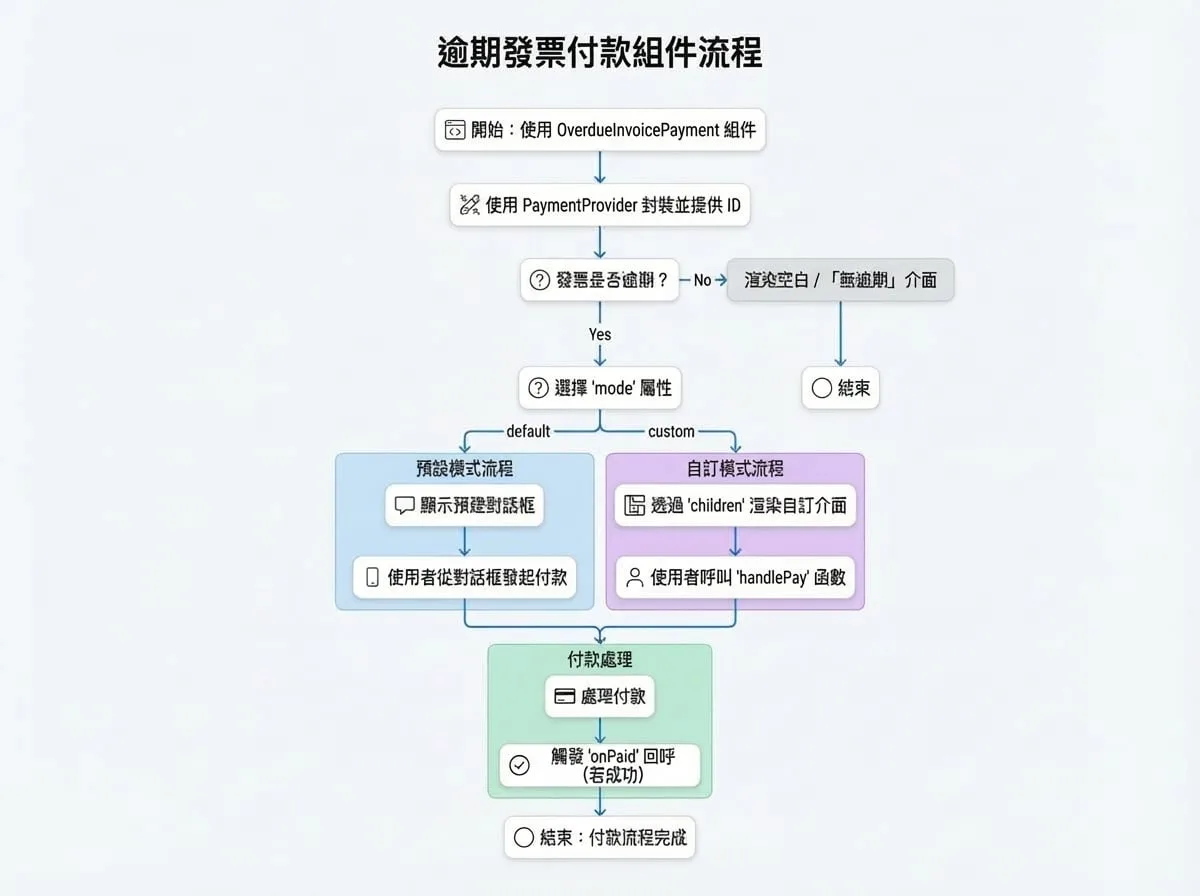
該元件可以在兩種模式下運作:一種是預設模式,會顯示一個預先建置的對話方塊以便快速整合;另一種是自訂模式,它提供了使用 render prop 建立獨特使用者介面的靈活性。
運作方式
該元件協調整個逾期付款流程,從擷取資料到處理最終的交易確認。
Props
OverdueInvoicePayment 元件接受以下 props 來自訂其行為:
| Prop | Type | Description |
|---|---|---|
subscriptionId | string | 要檢查逾期發票的訂閱 ID。必須提供 subscriptionId 或 customerId 其中之一。 |
customerId | string | 客戶的 ID 或 DID。使用此項來處理某位客戶的所有逾期發票。 |
mode | 'default' | 'custom' | 渲染模式。'default' 會顯示一個預先建置的對話方塊。'custom' 使用 children render prop 來建立自訂 UI。預設為 'default'。 |
onPaid | (id, currencyId, type) => void | 一個可選的回呼函式,在支付成功完成後觸發。id 將是 subscriptionId 或 customerId,type 將是 'subscription' 或 'customer'。 |
dialogProps | object | 在 default 模式下,傳遞給底層 Material-UI Dialog 元件的可選 props。例如:{ open: true, title: '自訂標題', onClose: handleClose }。 |
detailLinkOptions | object | 「查看詳情」連結的可選設定。可用於停用連結、變更其文字或提供自訂的 onClick 處理常式。格式:{ enabled?: boolean, onClick?: function, title?: string }。 |
successToast | boolean | 如果為 true,支付成功後會顯示一個成功的 toast 通知。預設為 true。 |
alertMessage | string | 在客戶模式下,附加到預設標題文字的可選訊息。 |
children | (handlePay, data) => React.ReactNode | 僅在 mode 為 'custom' 時使用的 render prop 函式。它會接收一個 handlePay 函式和一個 data 物件。 |
authToken | string | 用於 API 請求的可選身份驗證權杖,適用於伺服器對伺服器或跨來源的情境。 |
children Render Prop
當使用 mode="custom" 時,children 函式會接收兩個參數:
handlePay(item: SummaryItem):一個為特定貨幣群組啟動支付流程的函式。item物件來自data.summary物件。data:一個包含已擷取支付資訊的物件:
subscription?: Subscription:訂閱詳情,如果提供了subscriptionId。summary: { [key: string]: SummaryItem }:一個物件,其中每個鍵是貨幣 ID,值包含總金額、貨幣詳情和支付方式。invoices: Invoice[]:一個包含所有逾期發票物件的陣列。subscriptionCount?: number:有逾期發票的訂閱數量(適用於客戶模式)。detailUrl: string:查看詳細發票資訊的 URL。
使用範例
所有範例都假設您已在應用程式中設定好 PaymentProvider。
1. 訂閱的預設模式
這是處理特定訂閱逾期付款的最簡單方法。如果發現任何逾期發票,該元件將自動渲染一個對話方塊。
SubscriptionOverdue.tsx
import { OverdueInvoicePayment, PaymentProvider } from '@blocklet/payment-react';
import { useSessionContext } from './hooks/session'; // 您的自訂 session hook

function SubscriptionPage({ subscriptionId }) {
  const { session, connect } = useSessionContext();

  const handlePaymentSuccess = (id, currencyId, type) => {
    console.log(`為 ${type} ${id} 使用貨幣 ${currencyId} 成功付款`);
    // 您可以在此處重新擷取訂閱資料以更新其狀態
  };

  return (
    <PaymentProvider session={session} connect={connect}>
      {/* 如果沒有逾期發票,此元件將為 null */}
      <OverdueInvoicePayment
        subscriptionId={subscriptionId}
        onPaid={handlePaymentSuccess}
      />
      {/* 其他訂閱詳情可在此處渲染 */}
    </PaymentProvider>
  );
}
2. 客戶的預設模式
使用此模式為客戶建立一個集中的地方,以支付其所有跨多個訂閱的逾期發票。
CustomerDashboard.tsx
import { OverdueInvoicePayment, PaymentProvider } from '@blocklet/payment-react';
import { useSessionContext } from './hooks/session'; // 您的自訂 session hook

function CustomerDashboard() {
  const { session, connect } = useSessionContext();

  return (
    <PaymentProvider session={session} connect={connect}>
      <h2>Payment Center</h2>
      <p>Please settle any outstanding payments to ensure uninterrupted service.</p>
      <OverdueInvoicePayment
        customerId={session.user.did}
        onPaid={() => {
          console.log('客戶所有以某貨幣計價的逾期發票均已支付!');
          // 重新整理客戶帳戶狀態
        }}
      />
      {/* 客戶儀表板的其餘部分 */}
    </PaymentProvider>
  );
}
3. 自訂 UI 模式
為了完全控制使用者體驗,請使用 mode="custom"。這讓您可以將支付功能直接整合到您現有的 UI 中,而不是使用對話方塊。
CustomOverdueUI.tsx
import { OverdueInvoicePayment, PaymentProvider, Amount } from '@blocklet/payment-react';
import { useSessionContext } from './hooks/session'; // 您的自訂 session hook
import { Card, CardContent, Typography, Button, Stack } from '@mui/material';

function CustomOverdueUI({ subscriptionId }) {
  const { session, connect } = useSessionContext();

  return (
    <PaymentProvider session={session} connect={connect}>
      <OverdueInvoicePayment
        subscriptionId={subscriptionId}
        mode="custom"
        onPaid={() => console.log('自訂 UI 支付成功!')}
      >
        {(handlePay, { summary, invoices }) => {
          const summaryList = Object.values(summary);
          if (invoices.length === 0) {
            return <Typography>沒有逾期付款。一切正常!</Typography>;
          }

          return (
            <Card variant="outlined">
              <CardContent>
                <Typography variant="h6" color="error" gutterBottom>
                  您有 {invoices.length} 張逾期發票。
                </Typography>
                <Stack spacing={2} mt={2}>
                  {summaryList.map((item) => (
                    <Stack key={item.currency.id} direction="row" justifyContent="space-between" alignItems="center">
                      <Typography>
                        應付總額: <Amount amount={item.amount} decimal={item.currency.decimal} symbol={item.currency.symbol} />
                      </Typography>
                      <Button
                        variant="contained"
                        color="primary"
                        onClick={() => handlePay(item)}
                      >
                        使用 {item.currency.symbol} 支付
                      </Button>
                    </Stack>
                  ))}
                </Stack>
              </CardContent>
            </Card>
          );
        }}
      </OverdueInvoicePayment>
    </PaymentProvider>
  );
}