自動儲值功能透過在使用者點數餘額低於指定閾值時自動儲值,確保服務不中斷。此功能由兩個主要元件管理:AutoTopup,用於顯示目前的設定;以及 AutoTopupModal,提供設定介面。
自動儲值工作流程
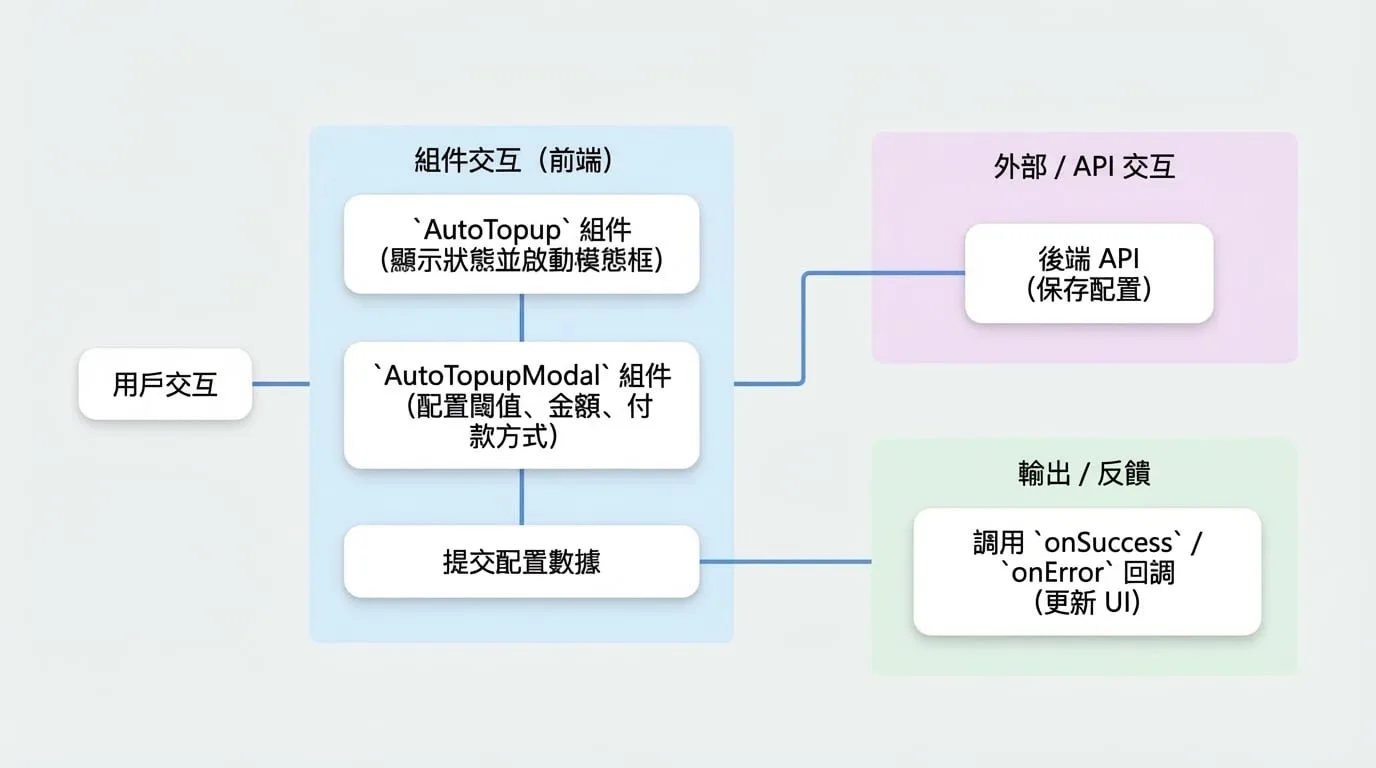
下圖說明了使用者設定自動儲值功能的典型流程。使用者與 AutoTopup 顯示元件互動,該元件會啟動 AutoTopupModal 以進行變更。然後,彈出視窗會與後端 API 通訊以儲存設定。
AutoTopup
AutoTopup 元件是一個顯示卡片,用於展示特定貨幣的自動儲值狀態,並提供設定入口。它支援多種渲染模式以提供靈活性。
Props
| Prop | Type | Description |
|---|---|---|
currencyId | string | 必需。 要管理的點數貨幣 ID。 |
onConfigChange | (config: AutoRechargeConfig) => void | 可選。設定成功更新時觸發的回呼函式。 |
mode | 'default' | 'simple' | 'custom' | 可選。渲染模式。預設為 'default'。 - default:一個完整展開的卡片,顯示所有詳細資訊。 - simple:一個緊湊、收合的視圖,帶有一個按鈕以展開詳細資訊。 - custom:使用 children render prop 渲染自訂 UI。 |
sx | SxProps | 可選。應用於元件的自訂 MUI 樣式。 |
children | (openModal, config, paymentData, loading) => React.ReactNode | 可選。僅在 mode 為 'custom' 時使用的 render prop 函式。它會接收建構自訂介面所需的工具。 |
使用方式
簡易模式
這是最常見的使用情境,提供一個緊湊的顯示方式,使用者可以展開以查看更多詳細資訊。
CreditManagement.tsx
import { PaymentProvider, AutoTopup } from '@blocklet/payment-react';

function CreditManagement({ session, currencyId }) {
  const handleConfigChange = (config) => {
    console.log('自動儲值設定已更新:', config);
    // 您可能想在這裡刷新使用者的餘額
  };

  return (
    <PaymentProvider session={session}>
      <AutoTopup
        currencyId={currencyId}
        mode="simple"
        onConfigChange={handleConfigChange}
        sx={{ mt: 2 }}
      />
    </PaymentProvider>
  );
}
自訂模式
若要完全控制 UI,請使用帶有 render prop 的 custom 模式。這讓您可以將自動儲值狀態和設定觸發器無縫整合到您現有的版面中。
CustomAutoTopupDisplay.tsx
import { PaymentProvider, AutoTopup } from '@blocklet/payment-react';
import { Button, Card, CardContent, Typography } from '@mui/material';

function CustomAutoTopupDisplay({ session, currencyId }) {
  return (
    <PaymentProvider session={session}>
      <AutoTopup currencyId={currencyId} mode="custom">
        {(openModal, config, paymentData, loading) => {
          if (loading) return <div>正在載入設定...</div>;

          return (
            <Card variant="outlined">
              <CardContent>
                <Typography variant="h6">智慧自動儲值</Typography>
                {config?.enabled ? (
                  <Typography color="success.main">
                    狀態:啟用中
                  </Typography>
                ) : (
                  <Typography color="text.secondary">
                    狀態:未啟用
                  </Typography>
                )}
                <Button onClick={openModal} variant="contained" sx={{ mt: 2 }}>
                  {config?.enabled ? '修改設定' : '立即設定'}
                </Button>
              </CardContent>
            </Card>
          );
        }}
      </AutoTopup>
    </PaymentProvider>
  );
}
AutoTopupModal
AutoTopupModal 是一個對話框元件,允許使用者啟用、停用和設定自動儲值功能的所有方面,包括觸發閾值、購買金額和支付方式。
Props
| Prop | Type | Description |
|---|---|---|
open | boolean | 必需。 控制彈出視窗是否可見。 |
onClose | () => void | 必需。 關閉彈出視窗的回呼函式。 |
currencyId | string | 必需。 正在設定的點數貨幣 ID。 |
customerId | string | 可選。客戶的 DID。預設為 PaymentProvider session 中的使用者。 |
onSuccess | (config: AutoRechargeConfig) => void | 可選。設定成功儲存後觸發的回呼。 |
onError | (error: any) => void | 可選。提交過程中發生錯誤時觸發的回呼。 |
defaultEnabled | boolean | 可選。若為 true,當為新設定開啟彈出視窗時,「啟用自動儲值」的開關將預設為開啟。 |
使用方式
這是一個完整的範例,說明如何管理 AutoTopupModal 的狀態並處理其回呼。
AutoRechargeSettings.tsx
import { PaymentProvider, AutoTopupModal } from '@blocklet/payment-react';
import { useState } from 'react';
import { Button } from '@mui/material';

function AutoRechargeSettings({ session, currencyId }) {
  const [isModalOpen, setModalOpen] = useState(false);

  const handleSuccess = (config) => {
    console.log('設定已成功儲存:', config);
    setModalOpen(false);
    // 可選,顯示成功提示或重新整理資料
  };

  const handleError = (error) => {
    console.error('儲存設定失敗:', error);
    // 可選,向使用者顯示錯誤訊息
  };

  return (
    <PaymentProvider session={session}>
      <Button variant="contained" onClick={() => setModalOpen(true)}>
        設定自動儲值
      </Button>

      <AutoTopupModal
        open={isModalOpen}
        onClose={() => setModalOpen(false)}
        currencyId={currencyId}
        onSuccess={handleSuccess}
        onError={handleError}
        defaultEnabled={true}
      />
    </PaymentProvider>
  );
}
此設定提供了一種強大的方式來管理自動儲值功能,讓使用者可以控制,同時確保維持其服務點數的流暢體驗。