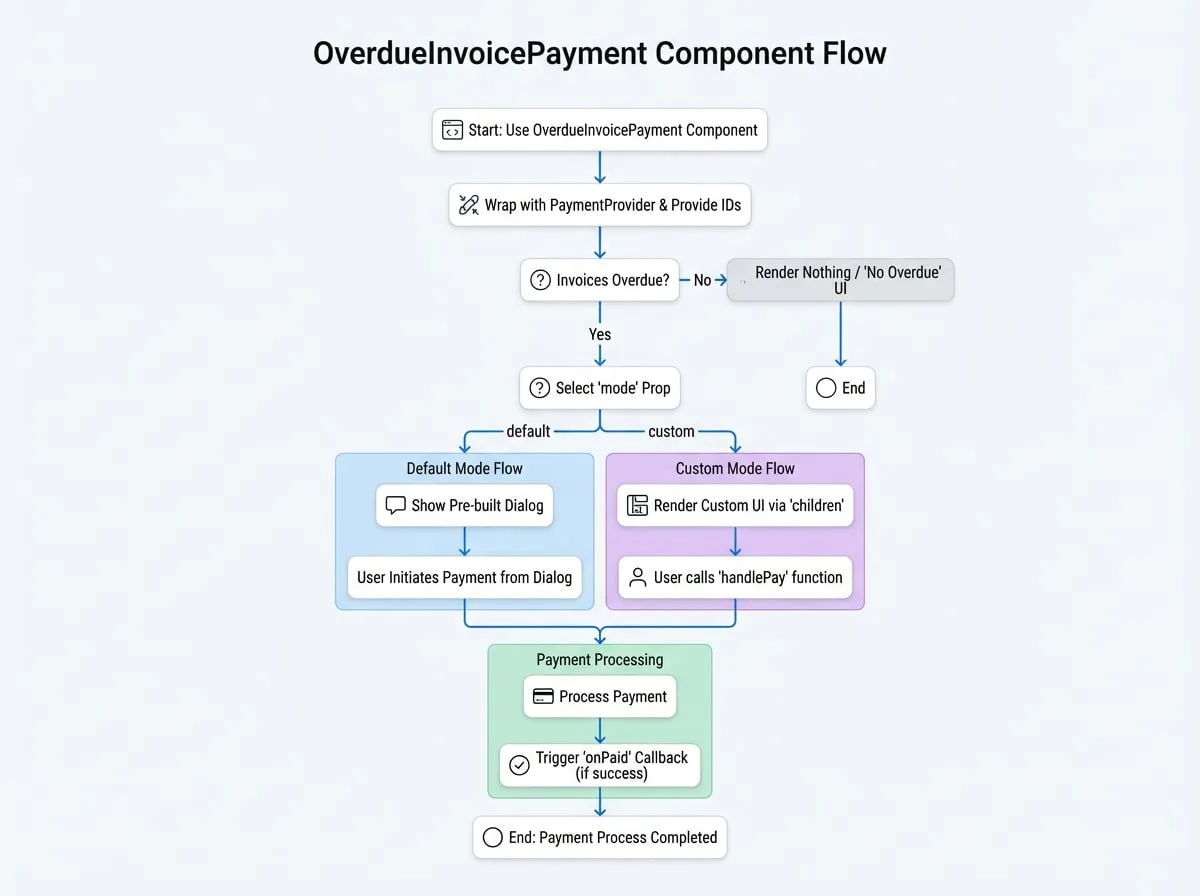
The OverdueInvoicePayment component is a specialized tool designed to handle the payment of overdue invoices for a specific customer or subscription. It simplifies the process by automatically fetching overdue invoices and presenting users with a clear interface to settle their outstanding payments.
This component can operate in two modes: a default mode that displays a pre-built dialog for quick integration, and a custom mode that provides the flexibility to build a unique user interface using a render prop. It must be wrapped within a PaymentProvider to function correctly.
Props
The OverdueInvoicePayment component accepts the following props to customize its behavior:
- subscriptionId
string— The ID of the subscription to check for overdue invoices. Either subscriptionId or customerId must be provided. - customerId
string— The ID or DID of the customer. Use this to handle all overdue invoices for a specific customer. - mode
'default' | 'custom'(default:default) — The rendering mode. 'default' shows a pre-built dialog. 'custom' uses the children render prop for a custom UI. - onPaid
function— An optional callback function that is triggered after payment for a specific currency is successfully completed. It receives (id, currencyId, type), where id is the subscriptionId or customerId, and type is 'subscription' or 'customer'.- parameters
object- id
string— The subscriptionId or customerId. - currencyId
string— The ID of the currency used for payment. - type
'subscription' | 'customer'— Indicates if the payment was for a subscription or a customer.
- id
- parameters
- dialogProps
object— Optional props to pass to the underlying Material-UI Dialog component in default mode. For example, { open: true, title: 'Custom Title', onClose: handleClose }. - detailLinkOptions
object— Optional settings for the "View Details" link. Can be used to disable the link, change its text, or provide a custom onClick handler.- enabled
boolean— Whether the link is enabled. - onClick
(e: React.MouseEvent) => void— Custom click handler. - title
string— Custom link text.
- enabled
- successToast
boolean(default:true) — If true, a success toast notification is shown upon successful payment. - alertMessage
string— An optional message to append to the default title text when in customer mode. - children
function— A render prop function used only when mode is 'custom'. It receives a handlePay function and a data object.- parameters
object- handlePay
(item: SummaryItem) => void— Function to initiate the payment process for a specific currency group. - data
object— An object containing the fetched payment information.
- handlePay
- parameters
- authToken
string— An optional authentication token for API requests, useful for server-to-server or cross-origin scenarios.
children Render Prop Data
When using mode="custom", the data object passed to the children function contains the following fields:
- subscription
Subscription— The subscription details, if subscriptionId was provided. - summary
{ [key: string]: SummaryItem }(required) — An object where each key is a currency ID. The value contains the total amount, currency details, and payment method for that currency. - invoices
Invoice[](required) — An array of all overdue invoice objects. - subscriptionCount
number— The number of subscriptions with overdue invoices (for customer mode). - detailUrl
string(required) — The URL to view detailed invoice information.
Usage Examples
All examples assume you have PaymentProvider set up in your application as detailed in the PaymentProvider documentation.
1. Default Mode for a Subscription
This is the simplest way to handle overdue payments for a specific subscription. The component will automatically render a dialog if any overdue invoices are found.
SubscriptionOverdue.jsx
import { OverdueInvoicePayment, PaymentProvider } from '@blocklet/payment-react';
import { useSessionContext } from '../hooks/session'; // Your custom session hook

function SubscriptionPage({ subscriptionId }) {
  const { session, connect } = useSessionContext();

  const handlePaymentSuccess = (id, currencyId, type) => {
    console.log(`Payment successful for ${type} ${id} with currency ${currencyId}`);
    // You can refetch subscription data here to update its status
  };

  return (
    <PaymentProvider session={session} connect={connect}>
      {/* This component will be null if there are no overdue invoices */}
      <OverdueInvoicePayment subscriptionId={subscriptionId} onPaid={handlePaymentSuccess} />
      {/* Other subscription details can be rendered here */}
    </PaymentProvider>
  );
}
2. Default Mode for a Customer
Use this to create a centralized place for a customer to pay all their overdue invoices across multiple subscriptions.
CustomerDashboard.jsx
import { OverdueInvoicePayment, PaymentProvider } from '@blocklet/payment-react';
import { useSessionContext } from '../hooks/session'; // Your custom session hook

function CustomerDashboard() {
  const { session, connect } = useSessionContext();

  return (
    <PaymentProvider session={session} connect={connect}>
      <h2>Payment Center</h2>
      <p>Please settle any outstanding payments to ensure uninterrupted service.</p>
      <OverdueInvoicePayment
        customerId={session.user.did}
        onPaid={() => {
          console.log('All customer overdue invoices paid for a currency!');
          // Refresh customer account status
        }}
      />
      {/* The rest of the customer dashboard */}
    </PaymentProvider>
  );
}
3. Custom UI Mode
For full control over the user experience, use mode="custom". This allows you to integrate the payment functionality directly into your existing UI instead of using a dialog.
CustomOverdueUI.jsx
import { OverdueInvoicePayment, PaymentProvider } from '@blocklet/payment-react';
import { useSessionContext } from '../hooks/session'; // Your custom session hook
import { Card, CardContent, Typography, Button, Stack } from '@mui/material';

function CustomOverdueUI({ subscriptionId }) {
  const { session, connect } = useSessionContext();

  // A simple Amount component for formatting
  const Amount = ({ amount, decimal, symbol }) => {
    const formattedAmount = (parseInt(amount, 10) / 10 ** (decimal || 0)).toFixed(2);
    return (
      <strong>
        {formattedAmount} {symbol}
      </strong>
    );
  };

  return (
    <PaymentProvider session={session} connect={connect}>
      <OverdueInvoicePayment
        subscriptionId={subscriptionId}
        mode="custom"
        onPaid={() => console.log('Custom UI payment successful!')}>
        {(handlePay, { summary, invoices }) => {
          const summaryList = Object.values(summary);
          if (invoices.length === 0) {
            return <Typography>No overdue payments. All clear!</Typography>;
          }

          return (
            <Card variant="outlined">
              <CardContent>
                <Typography variant="h6" color="error" gutterBottom>
                  You have {invoices.length} overdue invoice(s).
                </Typography>
                <Stack spacing={2} mt={2}>
                  {summaryList.map(item => (
                    <Stack key={item.currency.id} direction="row" justifyContent="space-between" alignItems="center">
                      <Typography>
                        Total Due:{' '}
                        <Amount
                          amount={item.amount}
                          decimal={item.currency.decimal}
                          symbol={item.currency.symbol}
                        />
                      </Typography>
                      <Button variant="contained" color="primary" onClick={() => handlePay(item)}>
                        Pay with {item.currency.symbol}
                      </Button>
                    </Stack>
                  ))}
                </Stack>
              </CardContent>
            </Card>
          );
        }}
      </OverdueInvoicePayment>
    </PaymentProvider>
  );
}