useSubscription
The useSubscription hook provides a simple way to subscribe to real-time events from the payment service using WebSockets. It handles the connection, subscription, and cleanup logic, allowing you to focus on how your application reacts to events like invoice.paid.
This is essential for creating dynamic user experiences where the UI needs to update instantly in response to backend events without requiring the user to refresh the page.
How It Works#
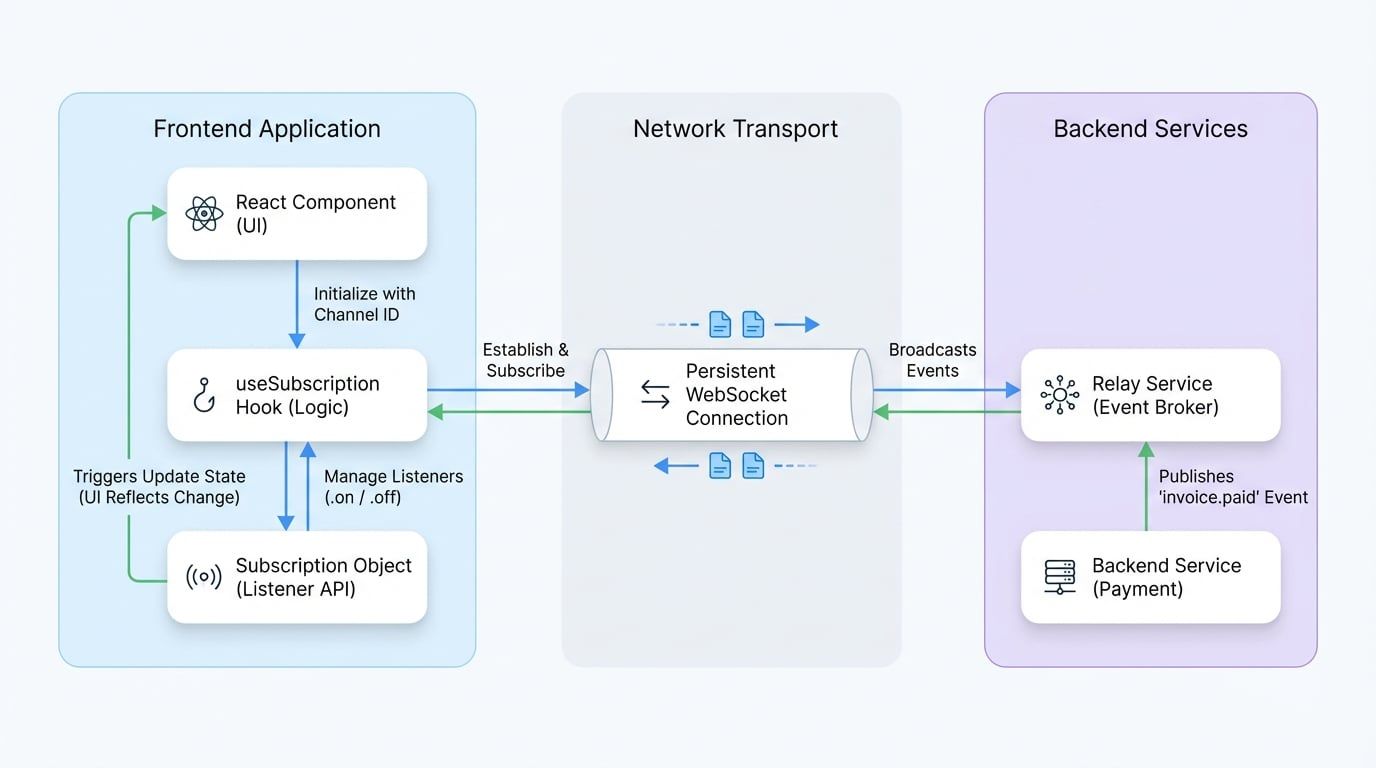
The hook abstracts the complexity of managing a WebSocket connection. When a component uses useSubscription, it establishes a persistent connection to a relay service. It then subscribes to a specific channel you provide. The hook automatically namespaces the channel for you, constructing a final channel name in the format relay:<app-id>:<your-channel>.
When the backend service publishes an event to that channel, the hook's subscription object emits the event, which your component can listen for.
The following diagram illustrates this data flow:
Parameters#
The hook takes a single string argument.
Parameter | Type | Description | Required |
|---|---|---|---|
|
| A unique identifier for the event stream you want to listen to. Important: This string must not contain separators like | Yes |
Return Value#
The hook returns a subscription object from the underlying @arcblock/ws client library. This object may initially be null while the connection is being established.
Once the connection is successful, the returned object provides methods to manage event listeners:
subscription.on(eventName, handler): Attaches an event listener.subscription.off(eventName, handler): Removes an event listener.
Example Usage#
Here's an example of a component that tracks the status of an invoice in real-time. When the backend broadcasts an invoice.paid event on the invoice's channel, the component's UI updates automatically.
Real-time Invoice Status Tracker
import { useSubscription } from '@blocklet/payment-react';
import React, { useState, useEffect } from 'react';

/**
 * A component that displays an invoice's status and updates it in real-time
 * when a 'invoice.paid' event is received.
 */
function InvoiceStatusTracker({ invoiceId }) {
  const [status, setStatus] = useState('pending');
  // Subscribe to a channel dedicated to this invoice
  const subscription = useSubscription(invoiceId);

  useEffect(() => {
    // The subscription object becomes available after the WebSocket connection is established.
    if (subscription) {
      const handlePaymentSuccess = (eventData) => {
        console.log(`Received 'invoice.paid' event for channel ${invoiceId}:`, eventData);
        // Update the component's state based on the event
        setStatus('paid');
      };

      // Attach the listener for the 'invoice.paid' event
      subscription.on('invoice.paid', handlePaymentSuccess);

      // It's crucial to clean up the event listener when the component unmounts
See all 20 lines