ResumeSubscription
The ResumeSubscription component provides a straightforward UI for users to resume a canceled subscription. It renders a dialog that guides the user through the confirmation process and automatically handles complex scenarios like re-staking if the subscription requires it.
This component must be used within a PaymentProvider to access the necessary context for handling wallet interactions.
Workflow#
The following diagram illustrates the process flow when a user resumes a subscription, including the conditional logic for re-staking.
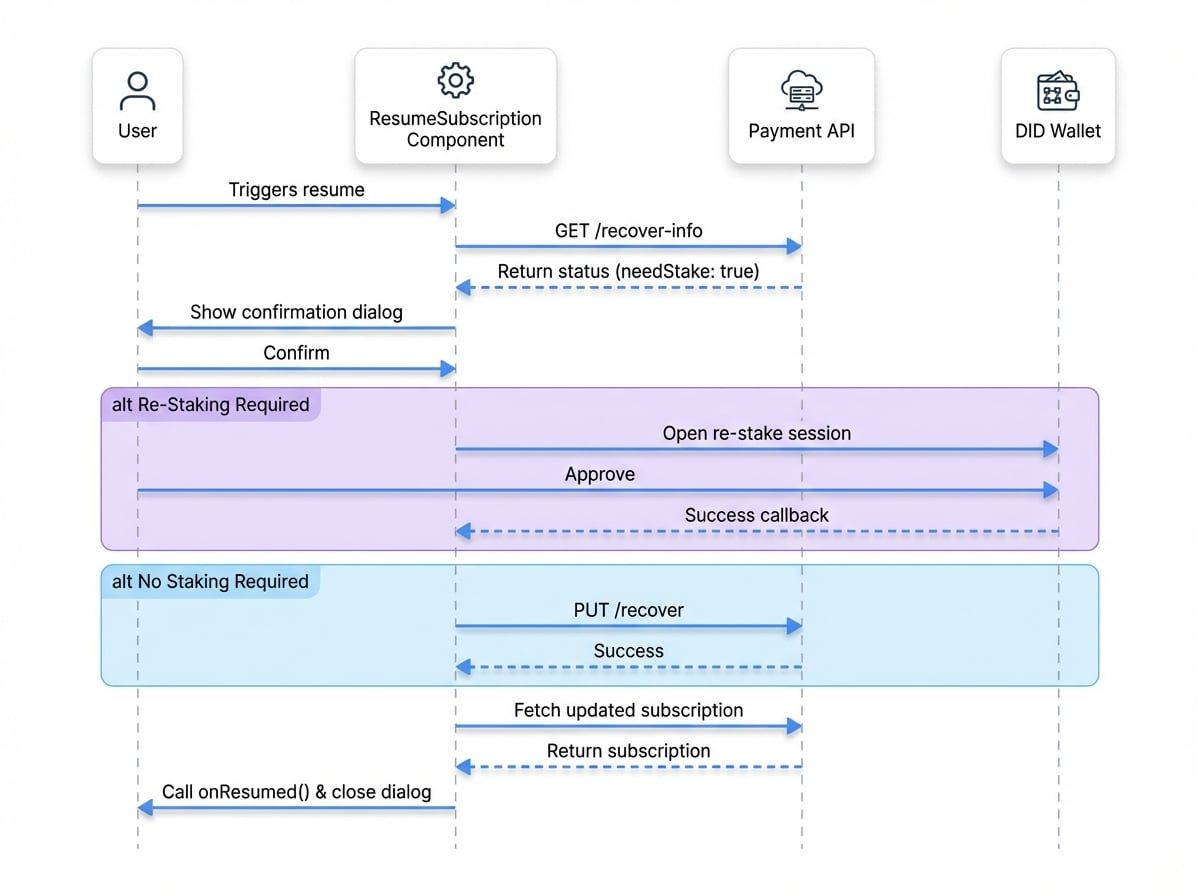
Props#
Prop | Type | Required | Description |
|---|---|---|---|
|
| Yes | The unique identifier of the subscription to be resumed. |
|
| No | A callback function that is triggered after the subscription is successfully resumed. It receives the updated subscription object as an argument. |
|
| No | Props to customize the underlying Material-UI Dialog. You can control its state ( |
|
| No | If |
|
| No | An optional authentication token for API requests. This is useful for cross-origin or server-to-server integration scenarios. |
Usage Examples#
Basic Usage#
This is the simplest way to use the component. It will render an open dialog by default.
Basic ResumeSubscription Example
import { ResumeSubscription } from '@blocklet/payment-react';

function ResumePage({ subscriptionId }) {
  // This component must be rendered within a PaymentProvider
  return <ResumeSubscription subscriptionId={subscriptionId} />;
}
Handling the Result#
Use the onResumed callback to receive the updated subscription data and refresh your application's state.
Handling the onResumed Callback
import { ResumeSubscription } from '@blocklet/payment-react';
import { useState } from 'react';

function SubscriptionDetails({ initialSubscription }) {
  const [subscription, setSubscription] = useState(initialSubscription);

  const handleSubscriptionResumed = (updatedSubscription) => {
    console.log('Subscription has been successfully resumed:', updatedSubscription);
    setSubscription(updatedSubscription);
    // You can also show a confirmation message or redirect the user.
  };

  return (
    <div>
      {/* Display subscription details based on the `subscription` state */}
      <ResumeSubscription
        subscriptionId={subscription.id}
        onResumed={handleSubscriptionResumed}
      />
    </div>
  );
}
Controlling the Dialog#
For a more practical integration, control the dialog's visibility from a parent component. This allows you to open it in response to a user action, like clicking a button.
Triggering ResumeSubscription with a Button
import { ResumeSubscription } from '@blocklet/payment-react';
import { useState } from 'react';
import { Button } from '@mui/material';

function SubscriptionActions({ subscriptionId }) {
  const [isModalOpen, setIsModalOpen] = useState(false);

  const handleResumed = () => {
    setIsModalOpen(false);
    // Refetch subscription data to update UI
    alert('Subscription resumed!');
  };

  return (
    <>
      <Button variant="contained" onClick={() => setIsModalOpen(true)}>
        Resume Subscription
      </Button>

      {isModalOpen && (
        <ResumeSubscription
          subscriptionId={subscriptionId}
          onResumed={handleResumed}
          dialogProps={{
            open: isModalOpen,
See all 8 lines
Full Integration Example#
Here is a complete example showing how to integrate ResumeSubscription within the required PaymentProvider.
Complete Integration Example
import { PaymentProvider, ResumeSubscription } from '@blocklet/payment-react';
import { useSessionContext } from 'path/to/your/session/context'; // Your app's session context
import { useState } from 'react';
import { Button, Card, CardContent, Typography } from '@mui/material';

function SubscriptionManagementPage({ subscription }) {
  const { session, connect } = useSessionContext();
  const [isResumeOpen, setIsResumeOpen] = useState(false);

  const handleResumed = (updatedSubscription) => {
    console.log('Subscription updated:', updatedSubscription);
    setIsResumeOpen(false);
    // Ideally, you would trigger a data refetch here to update the entire page.
  };

  return (
    <PaymentProvider session={session} connect={connect}>
      <Card>
        <CardContent>
          <Typography variant="h5">Manage Your Subscription</Typography>
          <Typography color="text.secondary">Status: {subscription.status}</Typography>

          {subscription.status === 'canceled' && (
            <Button
              variant="contained"
See all 22 lines