PhoneInput
The PhoneInput component provides a user-friendly, international phone number input field. It integrates seamlessly with react-hook-form and includes a searchable country selector with flags and dial codes, automatic number formatting, and powerful validation powered by google-libphonenumber.
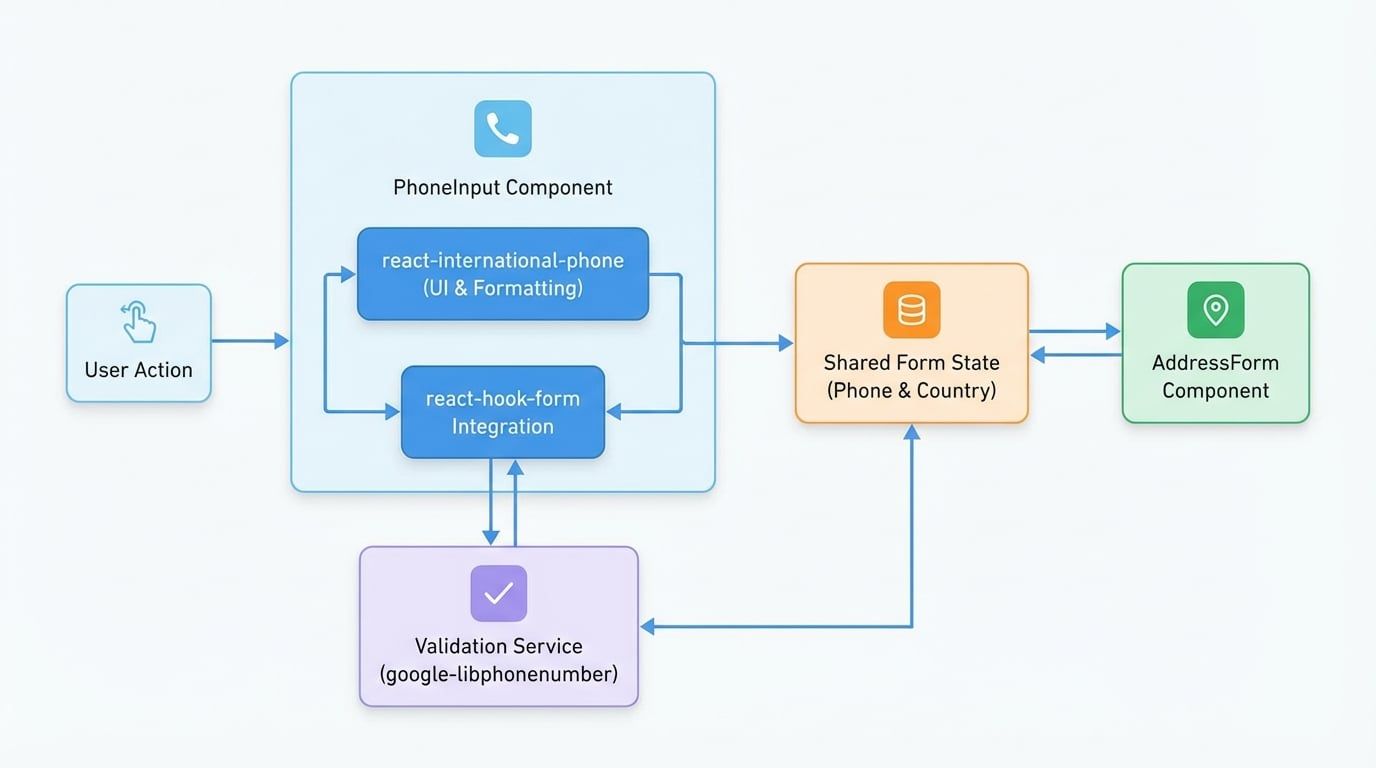
This component is designed to work in tandem with other form elements, such as the CountrySelect or AddressForm, by synchronizing its selected country with a shared form field.
How It Works#
The component leverages the react-international-phone library for its core functionality and wraps it to provide deep integration with react-hook-form and Material-UI. When a user selects a country or types a number, the component updates the corresponding fields in the form state. It also automatically updates its country selection when another component modifies the linked country field in the form.
Props#
The PhoneInput component accepts all standard Material-UI TextField props, in addition to the following specific props:
Prop | Type | Required | Default | Description |
|---|---|---|---|---|
|
| Yes | - | The name of the field to register with |
|
| No |
| The name of the form field that stores the selected country's ISO2 code. This allows the phone input's country to be synchronized with other parts of your form, such as an address component. |
Usage#
To use the PhoneInput component, you must wrap it in a FormProvider from react-hook-form. The following example demonstrates a basic implementation with validation.
First, you need the asynchronous validation function provided by the library.
phone-validator.js
// src/libs/phone-validator.js
import { getPhoneUtil } from '@blocklet/payment-react/libs/phone-validator';

export const validatePhoneNumber = async (phoneNumber) => {
  if (!phoneNumber) return true;
  try {
    const util = await getPhoneUtil();
    const parsed = util.parseAndKeepRawInput(phoneNumber);
    return util.isValidNumber(parsed);
  } catch (err) {
    console.error('Phone validation error:', err);
    // Fallback to a simple regex if lib fails to load
    const pattern = /^[+]?[(]?[0-9]{3}[)]?[-\s.]?[0-9]{3}[-\s.]?[0-9]{4,6}$/im;
    return pattern.test(phoneNumber) || 'Invalid phone number';
  }
};
Now, you can use this validator in your form component.
MyPaymentForm.tsx
import { FormProvider, useForm } from 'react-hook-form';
import { Button, Box } from '@mui/material';
import { PhoneInput } from '@blocklet/payment-react';
import { validatePhoneNumber } from '../libs/phone-validator'; // Adjust path as needed

export default function MyPaymentForm() {
  const methods = useForm({
    mode: 'onBlur',
    defaultValues: {
      phone: '',
      'billing_address.country': 'us', // Default country
    },
  });

  const onSubmit = (data) => {
    alert(JSON.stringify(data, null, 2));
  };

  return (
    <FormProvider {...methods}>
      <form onSubmit={methods.handleSubmit(onSubmit)}>
        <Box display="flex" flexDirection="column" gap={2}>
          <PhoneInput
            label="Phone Number"
            name="phone"
See all 19 lines
Explanation#
FormProvider: The entire form, including thePhoneInput, is wrapped in aFormProviderto provide the necessary form context.name="phone": This registers the input field under the namephonein the form data.countryFieldName="billing_address.country": This tellsPhoneInputto both read from and write to thebilling_address.countryfield in the form's state. This is how it stays synchronized. The default value for this field is set to'us'inuseForm.rules: We pass an asynchronousvalidatefunction to therulesprop.react-hook-formwill await this function to resolve during validation. ThevalidatePhoneNumberutility is called to perform the check.
Integration with AddressForm#
The true power of PhoneInput is revealed when used alongside an AddressForm. Since both components can be linked to the same country field (billing_address.country by default), changing the country in the AddressForm will automatically update the flag and dial code in the PhoneInput.
For a complete example of this integration, please see the documentation for AddressForm.